
Email CTR measures the percentage of recipients who clicked at least one link in your email. Low CTR can be a content, design,...

Key Takeaways
Email works through a set of technical rules that determine how messages move between devices and servers. These rules are called email protocols: standardized communication methods that allow email clients, mail servers, and networks to exchange messages reliably.
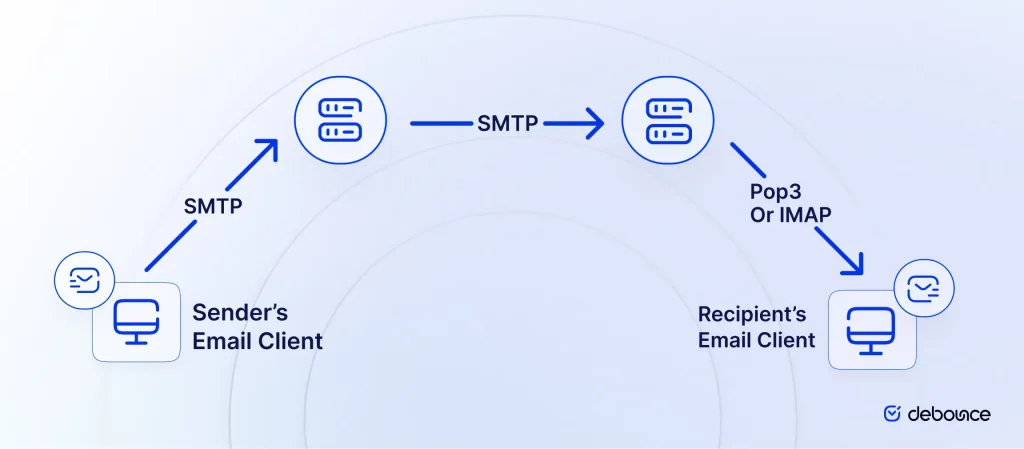
When discussing IMAP, POP3, and SMTP, it’s important to understand that each protocol plays a different role in the email system. SMTP handles sending messages from a client to a mail server and between mail servers, while POP3 and IMAP are used to retrieve messages from the server to the recipient’s email client. Because of this division of responsibilities, email protocols work together to move emails through the system. One protocol manages message submission and transmission, while others manage how emails are accessed, stored, and synchronized across devices.
Understanding the differences between IMAP vs. POP3 vs. SMTP helps explain how email systems function and why different configurations are used depending on how you send, receive, and manage messages.
IMAP, or Internet Message Access Protocol, is an email protocol used to access and retrieve messages stored on a mail server. Instead of downloading emails permanently to one device, IMAP keeps messages stored on the server and allows users to access them from their email client.
Because emails remain on the server, IMAP supports synchronization across multiple devices. Actions such as reading a message, moving it to a folder, or deleting it are reflected everywhere the account is connected, including phones, laptops, and webmail interfaces. This approach makes IMAP well-suited for business environments and users who access email from several devices, as it keeps mailboxes consistent and updated across all platforms.
POP3, or Post Office Protocol version 3, is a protocol that retrieves messages from a mail server by downloading them directly to a device. Once the messages are downloaded, they are typically stored locally in the user’s email client.
By default, POP3 removes messages from the server after downloading them, although some email clients allow users to change this setting and keep copies on the server. Because of this behavior, POP3 usually works best when email is accessed from a single device.
POP3 is commonly used in situations where server storage is limited or users prefer to keep emails stored locally rather than synchronized
SMTP (Simple Mail Transfer Protocol) is a standard protocol used to send emails across the internet. It manages the process of transmitting messages from an email client to a mail server and then between mail servers until the message reaches the recipient’s mail server.
Unlike IMAP or POP3, SMTP does not retrieve or store email messages. Its role is limited to sending and relaying messages between servers.
In a typical email system, SMTP handles the outgoing message transmission, while IMAP or POP3 is used to access and retrieve messages from the mailbox.
The POP3 is the email protocol that ensures retrieving or transferring the upcoming emails from the mail server to the receiver’s mail client. The main algorithm behind this email protocol is that it is concerned with connecting to the server, downloading the email messages, deleting the copies from the server, and disconnecting from it.
Notably, the fact that the copies of the messages are deleted before the disconnection, even though you can opt to save them by modifying the default settings, makes POP3 different from the IMAP.
Also, it is known for solid authentication instruments used to establish greater privacy for the user.
The IMAP protocol is another protocol used for the receiving of messages. Its distinctive feature is that you can access your email box from different devices. Such an event is possible due to the idea that the server does not eliminate emails after their delivery to the email client. That way, the IMAP email server becomes the storage of the files while the user can access it with the email client if there is an Internet connection. The downloading of the message starts when the recipient decides to open a specific email.
As a result, you can see that SMTP has a sending function, while IMAP and POP allow people to receive emails.
However, on the technical level, the SMTP, IMAP, and POP have different configurations that produce these functions.
For instance, the significant distinction of SMTP protocol from the other two refers to their email port configuration.
What is a secure email port? Before all, a port allows communication between the servers, connecting one server to the more extensive network. In particular, the port appears to be an identifier of what service or application is running on the server. By setting the secure email port, the sender can convey its message to the correct server.
Picking the SMTP protocol port number can determine whether your message will be encrypted or not, relayed or submitted. Here are the number of ports that are used by the SMTP protocols:
Notably, the POP3 and IMAP use different ports, which will be covered in another section.
In the end, the SMTP ports define how one SMTP server would send the message further to others. If you use the wrong configuration, it can result in bad consequences for your campaign.
Even if you have all your leads organized with some software and have the correct email address, selecting the wrong ports configuration for submitting and transmitting data can give you some trouble. The most acceptable option is port 587, as it is a recognized and widely-used solution for SMTP servers.
You already know that POP3 and IMAP have a similar function allowing receiving emails. Nevertheless, they have distinctions that can give an email system certain benefits regarding usage, storage, organization, access, and other things. They come from the idea that one stores the email on the server while another downloads it to the computer.
First, if a person gets many messages, they will likely choose the POP3 protocol. Why? The IMAP email servers store the email messages on the server and leave copies of the messages affecting the storage space of the email server.
At the same time, the POP3 contemplates downloading the messages from the POP3 incoming mail server to the computer and deleting the copies. As a result, picking the POP3 seems to be a more favorable option as the IMAP server storage may have limited capacity; unless you want to save space on your computer. However, considering the weight of the messages, they should not be crucial to your operation.
Regarding deliverability, you can suggest that the significant business actors likely have POP3 email servers due to the number of incoming messages. Therefore, you should consider the specifics of the POP3 protocol to create outreach campaigns targeted at them.
Importantly, access to the files plays a crucial role as well. If you have a good Internet connection, then IMAP can be a better choice in terms of access. Why? The IMAP email server stores the message copies on the server. It means you can access them anywhere, irrespective of the client or device you possess.
The same applies to the retrieval of messages. For instance, if you use the Gmail email system, you will utilize the IMAP system. If you have an app installed on your phone, you will get a notification on the incoming messages both on the computer and the app. In this regard, the IMAP email servers seem to be more functional.
Simultaneously, the IMAP email server offers excellent synchronization and organization opportunities. The explanation is that it focuses on storing the messages on the server. Thus, the latest IMAP versions allow a person to synchronize actions performed with the email on different devices.
For instance, if you read certain emails or decide to move them in the trash by using your phone, you will not need to repeat this action when utilizing the PC. This action will be synchronized automatically. Besides, this type provides greater organization by hierarchically sorting the messages into folders.
However, there is a condition when the incoming POP3 server can be a better option. For instance, when you have a bad Internet connection and still need to access your messages all the time, POP3 will allow you to access, read and work with the old or received emails without the Internet connection.
The installation of each system requires specific resources from the computer. In this regard, the POP3 email server requires less CPU and memory of the computer for the operation and running of the necessary actions. Compared to the IMAP, which allows synchronization and better organization, the user will need more computational capacity to perform actions between the server and the client.
If you don’t have enough resources, POP3 will be the best option. Yet, you will sacrifice the functionality and better access to the emails.
One can ask which of the types of email protocol configuration is quicker. Well, the answer to this question is not definite. In most cases, when downloading new emails, using the IMAP server would be faster, as it downloads the parts of the email, like headers for the display.
Then, only if you choose to proceed with the specific email will it start downloading the rest of it. Simultaneously, when a person utilizes the POP3, then a user downloads all of the new emails at once.
Besides, considering the different mechanics at the center of the protocols’ operation, they use various ports. For instance, the POP3 protocols would use port 110 to establish the connection with the SMTP server, while the IMAP would utilize port 143.
Interestingly, they as well have distinctive ports in case of message encryption. If the messages are encrypted under SSL/TLS layers, the IMAP will resort to alternative port 993, while the POP3 port 995, respectively.
As a result, both of these secure email protocols can be beneficial. The decision to apply one of them should derive from the user’s preferences. Yet, remember that prominent corporate actors usually have their own servers working on POP3 due to its higher security.
Some may believe that hackers can get to it if the message is in transit from one server to another. It is true; that’s why people have tried to find a more secure protocol option. However, there is no other secure alternative. Instead, one can use Transport Layer Security (TLS). A layer of protection contributes to the SMTP protocol and encodes the message.
The main principles that protect data transmission refer to the TLS handshake and TLS record layer concepts. The first one contemplates the process in which two servers exchange messages and authenticate, verify one another and create keys for further exchange of information.
The second is concerned with transporting the data or messages securely with the help of the keys. The records, managed by the compressions and decryption algorithms, contain information about the message, referring to the content, protocols, length, and message authentication codes.
The TLS protocols have been developed, and the experts today recognize different types of them, particularly Opportunistic TLS, Forced TLS, and STARTTLS.
Moreover, another method to encrypt the message is to apply Secure/Multipurpose Internet Mail Extensions (S/MIME). The basis of their operation lies in applying key cryptography or digital signatures. It is a way to improve security, yet, some may find weak spots referring to metadata.
In the end, they are only the ways to improve the SMTP protocols as the latter remains the back-end solution for relaying data and, thus, messages.
Email systems rely on several protocols that work together to send and receive messages. SMTP manages the sending process, transferring messages from a user’s email client to a mail server and between mail servers. POP3 and IMAP, in contrast, allow recipients to retrieve messages from the server and access them through their email clients.
Each protocol operates differently. POP3 typically downloads messages to a device and, by default, removes them from the server, though many clients allow users to keep copies on the server if configured. IMAP stores messages on the mail server and synchronizes mailbox activity across devices, allowing users to access the same inbox from multiple locations while keeping messages organized on the server. These protocols also rely on specific email ports and encryption mechanisms such as TLS to secure data during transmission.
Even with proper protocol configuration and secure connections, successful email delivery also depends on list quality. Sending to invalid, disposable, or inactive email addresses can lead to high bounce rates and harm your sender reputation, making it harder for legitimate messages to reach inboxes.
This is where DeBounce’s email validation tools can help. By verifying email addresses before sending campaigns, DeBounce allows businesses to remove invalid or risky contacts, reduce bounce rates, and improve overall deliverability. If you want to protect your sender reputation and ensure your emails reach real recipients, validate your email lists with DeBounce before every campaign.
Yes, but it depends on where your emails are stored. If messages were downloaded locally using POP3 and removed from the server, you may need to upload them back to the server before switching to IMAP to keep them accessible across devices.
If SMTP authentication fails, the email server will reject the sending request. This usually occurs because of incorrect credentials, unsupported authentication methods, or missing encryption settings.
Yes. Many email servers allow both protocols to be enabled simultaneously, letting users choose how they want to access their messages depending on their device or workflow.

Find quick answers to your questions about our pricing and plans.

Email CTR measures the percentage of recipients who clicked at least one link in your email. Low CTR can be a content, design,...

Want to write cold emails that get read? Here are some of the best-known strategies for writing a perfect cold email that always gets a...

During your email lead generation, you will collect different types of email accounts including role-based email accounts. While it is advisable to send emails to...

Email marketing might not sound like the most glamorous way to promote your dropshipping business. However, any expert marketer knows just how effective this tactic...


Email lead generation usually works through inbound lead capture and outbound prospecting. Inbound brings in people who show interest through your own channels,...

A dedicated IP starts with zero sender reputation. Without a 30–60-day warm-up beginning at low volume, deliverability gets worse before it gets better....
