If you’re seeing far too many bounces for outbound emails, you may first blame your email copy, the whole target list of emails, or the...

Key Takeaways
You cleaned your email list six months ago. Your bounce rate looks acceptable. Your unsubscribe rate is low. Then, your inbox placement drops by 40% overnight, and your email service provider (ESP) tells you that you’ve hit spam traps.
Spam traps are among the most misunderstood threats to email deliverability. Unlike bounces or spam complaints (problems you can see and measure directly), spam trap hits often happen silently. You won’t get a bounce notification, and the trap won’t unsubscribe. It just sits on your list, quietly signaling to inbox providers that your data quality is poor.
A spam trap is an email address that exists solely to identify senders who don’t follow best practices around permission, list hygiene, and data quality. These addresses never sign up for anything and never engage with emails. If you’re sending to one, it means something went wrong in how you built or maintained your list.
This guide explains what spam traps are, how they work, why they exist, and how to keep them off your lists so they don’t tank your deliverability.
Spam traps serve a specific purpose: they help inbox providers and anti-spam organizations identify senders who acquire addresses through poor practices. They can be considered as quality control mechanisms. Inbox providers like Gmail, Yahoo, and Outlook want to protect their users from unwanted email. But they can’t manually review every sender. Instead, they use spam traps as automated signals that indicate risky behavior.
Spam traps don’t exist to punish legitimate marketers. They exist because spam and low-quality email still make up a significant portion of global email traffic. According to email spam statistics, billions of spam messages are sent daily, and spam traps help internet service providers (ISPs) filter out the worst offenders before their users ever see the messages.
When a sender hits a spam trap, it usually points to a specific weakness in how email addresses were collected or maintained:
Not all spam traps work the same way, and different types signal different problems with your email program. Understanding the distinctions helps you identify where your list-building or maintenance process broke down.
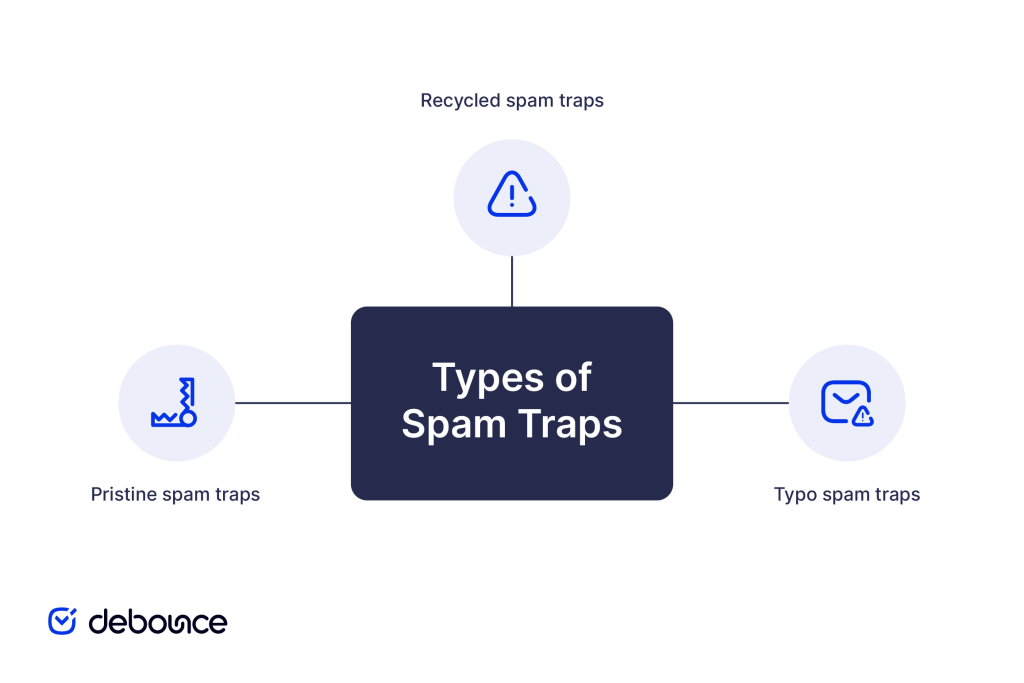
Pristine spam traps are email addresses that were never used by real people. They exist solely as traps from the moment they’re created.
Anti-spam organizations and ISPs register domains, publish email addresses on public websites where bots can scrape them, or embed them in places where only automated list collectors would find them. These addresses never sign up for anything, never interact with websites, and never request information.
If you hit a pristine spam trap, it’s a clear signal that you acquired addresses without permission. There’s no legitimate way for a pristine trap to end up on your list except through purchasing, scraping, or using a contaminated third-party source.
ISPs treat pristine trap hits seriously. They indicate intentional or reckless disregard for permission-based marketing, and the consequences often include immediate throttling, blocklisting, or complete filtering of your messages.
Recycled spam traps start as legitimate email addresses used by real people. Over time, the person abandons the address (stops logging in and stops responding to emails), and eventually the ISP deactivates it.
When an email address goes inactive, ISPs don’t immediately delete it. First, they return hard bounces to any sender who tries to use it. This hard bounce period can last 6-12 months or longer. If you’re cleaning your list properly and removing bounced email addresses, you’ll stop sending to the address during this phase.
After the hard bounce period, the ISP may reactivate the address, not for a real user, but as a spam trap. Any sender still mailing to that address clearly hasn’t been paying attention to bounces or engagement signals for at least a year, which indicates poor list hygiene.
Recycled traps are less severe than pristine traps because they don’t necessarily indicate malicious intent. They do, however, signal that you’re not maintaining your list properly. You’re holding onto addresses that haven’t engaged in a very long time, which tells ISPs you care more about list size than list quality.
Typo spam traps catch senders who don’t validate email addresses at the point of collection. These are addresses with common misspellings in the domain portion, such as gmial.com, yaho.com, hotmial.com, that anti-spam organizations have registered and turned into traps.
Users make typos when filling out forms. If your signup form doesn’t check for common domain misspellings in real-time, you’ll collect these bad addresses. Some anti-spam organizations deliberately register hundreds of these misspelled domains specifically to catch senders with weak form validation.
Typo traps indicate two problems: you’re not using real-time validation on your forms, and you’re not verifying addresses before sending. While less severe than pristine traps, they still hurt your sender reputation because they show you’re not taking basic steps to ensure data quality.
The fix is straightforward: add form validation that catches common typos and flags them before submission, or use real-time email verification at signup to block invalid and misspelled addresses immediately.
Spam traps stay hidden by design. There’s no public database to check, no API that flags an address as a trap, and no manual way to remove them, because you can’t tell which email addresses on your list are spam traps in the first place.
Inbox providers and anti-spam organizations monitor spam traps constantly. When your email arrives at a trap, they log your IP address, sending domain, and other reputation signals. They don’t immediately blocklist you, as one trap hit might be an accident, but patterns matter.
If you hit multiple spam traps across several sends, or if you consistently mail to traps over weeks or months, ISPs interpret this as systematic poor list quality. Your sender reputation score drops, and your emails start getting filtered.
You won’t see a bounce. Spam traps accept mail at the Simple Mail Transfer Protocol (SMTP) level to avoid revealing themselves. From your perspective, the message was “delivered successfully.” But behind the scenes:
The worst part is that you can’t easily tell which address caused the problem. Spam trap operators don’t publish their addresses, and ESPs usually can’t tell you exactly which contact triggered a filter. You have to infer the problem from reputation drops and delivery metrics.
Spam trap hits hurt campaigns and create compounding problems that affect your email program for weeks or months.
When ISPs see spam trap hits, they reduce your inbox placement rate. Instead of landing in the primary inbox, your messages get filtered to the spam or promotions tabs. Subscribers who want your emails might never see them.
Hit enough spam traps, and you’ll end up on public or private blocklists. Public blocklists like Spamhaus are visible to anyone and affect email delivery globally. Private blocklists maintained by individual ISPs are invisible to you but just as damaging, since your emails simply stop reaching users on that ISP.
ISPs track sender reputation as a score that rises and falls based on your practices over time. Spam trap hits push your score down, and rebuilding takes consistent good behavior: removing bad addresses, improving engagement, and sending only to people who want your emails.
A single spam trap hit won’t destroy your program, but consistent hits signal to ISPs that you’re not a sender they should trust. Once your reputation drops below certain thresholds, recovery becomes exponentially harder.
Avoiding spam traps is about building and maintaining your list in ways that make spam traps impossible to collect. Remember to:
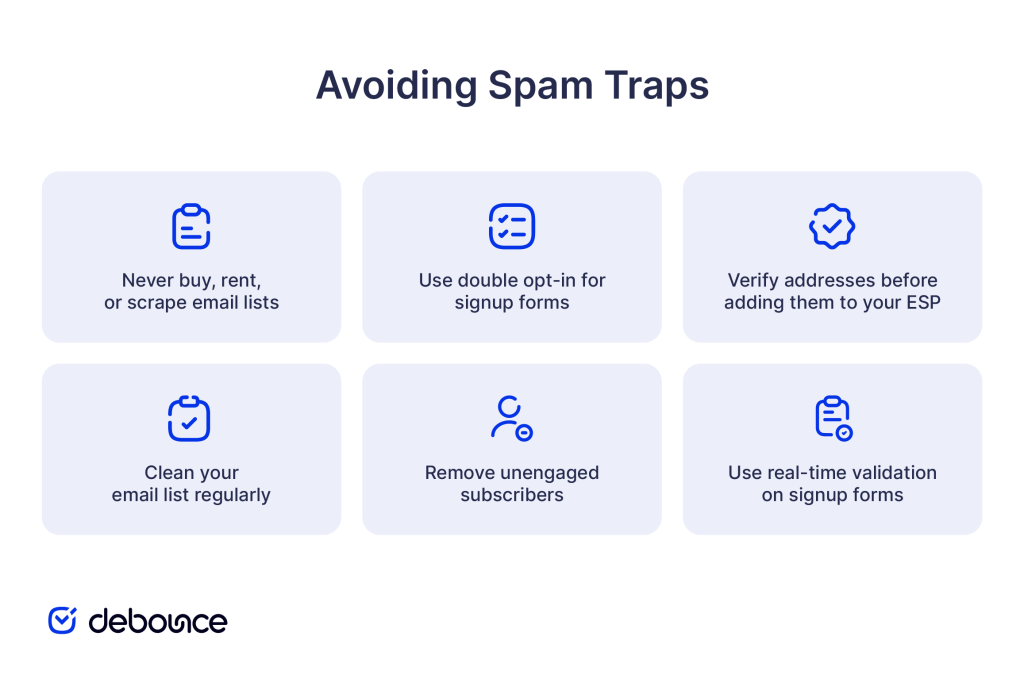
Avoiding spam traps is an ongoing process built into how you grow and maintain your email program.
Spam traps exist to identify senders with poor email practices, and hitting them damages your reputation, inbox placement, and long-term deliverability. But spam traps are entirely avoidable: build your list through permission-based signups, verify addresses before sending, clean regularly to remove inactive contacts, and monitor engagement signals to catch problems early.
Every shortcut (including buying a list, scraping addresses, or skipping verification) increases spam trap risk and undermines the entire email program you’ve worked to build.
Verify your current email list to identify invalid, risky, and inactive addresses before your next campaign. DeBounce checks for syntax errors, domain issues, and high-risk patterns that often indicate spam traps, helping you send only to addresses that will protect your sender reputation. Run your list through DeBounce today and remove the addresses, putting your deliverability at risk.
How long does a spam trap stay active once it's created?
Spam traps remain active indefinitely; anti-spam organizations and ISPs maintain them continuously to monitor sender practices and identify ongoing list quality issues.
Can a spam trap ever be removed from an email list?
You can’t identify and manually remove specific spam traps, but you can eliminate them by verifying your list, removing unengaged contacts, and stopping acquisition practices that introduce traps in the first place.
Do spam traps exist on corporate or custom email domains?
Yes, organizations can create internal spam traps on their own domains to monitor external senders or catch employees sharing corporate addresses with unauthorized third parties.
Find quick answers to your questions about our pricing and plans.
If you’re seeing far too many bounces for outbound emails, you may first blame your email copy, the whole target list of emails, or the...
Basic demographic information was once the key to driving demand generation. But now that this data is widely accessible, it is no longer sufficient to...


As an email marketer, you may often encounter a formidable obstacle in your campaigns — ambiguous email bounce codes. These codes can be perplexing and...

Email needs no introduction since, for ages, it has served as one of the main communication channels for individuals and organizations worldwide, facilitating everything from...

Fake emails rely on urgency, impersonation, and visual tricks. Learning the signs lets you slow down and evaluate before acting. Sender domain mismatches,...

Email lists are the foundation for an effective email marketing campaign. Building an email list is ongoing for as long as you need it to....