
You can create a Gmail filter from the search bar or from Settings, and both let you combine several actions in one rule....

Key Takeaways
So you’ve been sending out emails the past couple of days, verifying them with your email validator, but then you find your emails bouncing back like crazy. Well, you’re not alone. 10%-30% of businesses worldwide rely on catch-all emails, with more and more making the switch daily.
In this article, I’ll let you know the intricacies of what exactly a catch-all email (also known as accept-all email) entails, how they work, their benefits, potential drawbacks, and how to effectively manage them (depending upon your organization’s needs). Let’s dive in.
As the name suggests, a catch-all email receives all incoming emails through the target domain regardless of whether the email was previously set up to receive incoming mail.
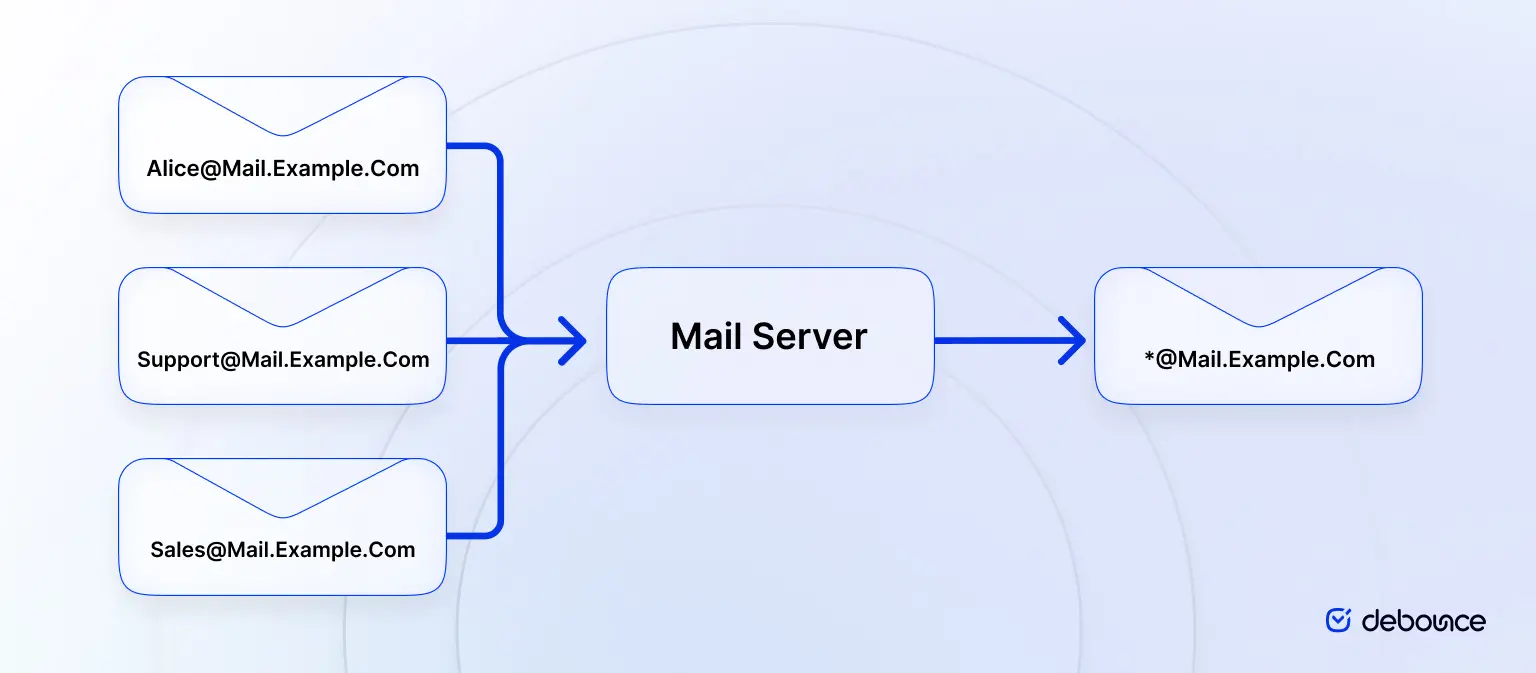
In essence, a domain-wide setting mail server is configured to accept all emails sent to the domain, whether the specified mailbox exists or not.
For instance, let’s say you have three email addresses set up for your domain. One points to “Alice,” one point to “Support,” and one to “Sales.” As a catch-all email account, you can set up “Contact” so that any email messages sent to “Help” or any other currently non-existent email address then the email will still be forwarded but to the “Contact” catch-all email we have set up.
A simple representation is provided below:
Now that you understand what a catch-all email means let’s take a step forward and understand how this may come in handy.
Let’s imagine a situation where you work for an agency with new incoming leads arriving daily via email. Your chief sales officer (CSO) is providing a decent bonus to motivate the new sales team, but he forgot one key thing. The previous SDR who got fired also had his email deleted (which was widely publicized), and many emails that turned out to be potential leads were lost. The new sales team, as a consequence, did not manage to come up to par with the prior team’s sales.
If this were to happen, the CSO, upon hearing this, should immediately call for a catch-all email to be made so that if ever an employee happens to leave the company, any emails going through to their account will still be received and acknowledged.
As a result of the utility of catch-all emails, many large organizations love to use them. It’s no secret that humans are prone to habitual mistakes & according to Tessian, over half (58%) of employees say they’ve sent an email to the wrong person at some point in time.
Just think for a second—if an important email were to bounce back or not be delivered, you would likely feel devastated, wouldn’t you? Catch-all emails serve as a means to prevent this by intercepting misdirected emails and stopping them from bouncing back or getting lost.
Sticking around with catch-all emails may feel like a good idea for many different use cases, especially if your emails were earned from a very rigorous trek. But it’s key to understand the advantages and disadvantages which we’ll outline in this section in regards to the benefits and drawbacks of using them.
There are several alternative strategies that organizations can consider based on their specific needs. You may want to go test each in order and then figure out the best for your (or your organization’s) use case:
1. Individual Email Addresses: Assigning unique, individual email addresses to each recipient or function within the organization, ensuring precise email routing and reducing the risk of spam. This is the normal email strategy that most people and companies use.
2. Aliases and Forwarding: Utilizing aliases and email forwarding to direct emails to a central inbox or a designated individual, streamlining communication while maintaining organization. For instance if your employee named “John” goes on a vacation then his emails will automatically be forwarded to “Marketing”.
3. Email Filtering and Rules: Implementing email filtering rules to automatically sort and prioritize emails based on criteria such as sender, subject, or content, aiding in efficient email management. Though this strategy is more advanced, this allows you to prioritize any emails (which you’d usually mark as important) to come up first in the email list.
When to Use Catch-all Emails:
When Not to Use Catch-all Emails:
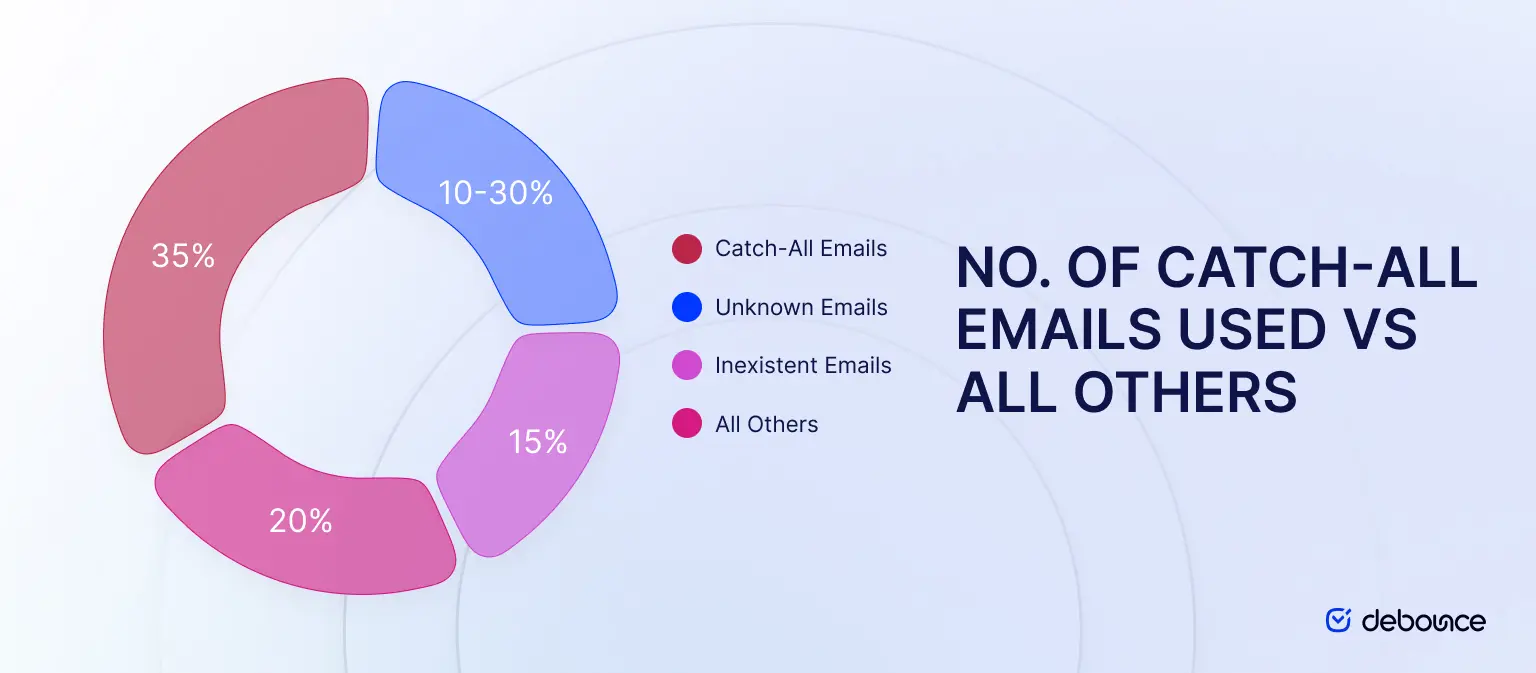
Catch-all emails are quite common, with 10-30% of all emails being catch-all emails, according to DeBounce. This means that for every 100 emails sent, 10 to 30 of them will be sent to a catch-all email address.
Nowadays, email providers like GoDaddy provide the option to configure a catch-all domain right off the bat directly through their customer dashboard. Companies with complex email solutions may not prefer using this, though, as some do prefer a more structured approach where they avoid catch-all addresses altogether due to security concerns, the potential for increased spam, and the risk of receiving unwanted or malicious emails to undefined addresses.
For companies with low-security email providers (where emails rarely ever go to the spam folder), the likelihood that spammers find their way to make somehow you click on a dangerous link increases manifold – which is why large organizations with a decent security system only generally use this technique.
The true risk remains that catch-all addresses can become a lethal target for spam & possible dangerous actors if not properly managed.
One of the main problems catch-all emails cause for marketing is that you wouldn’t know whether or not the email specified belongs to an actual person or not.
This causes two main issues; the first is that if the email gets delivered, meaning it did not bounce back then it will still likely not be opened. This causes the second issue of a negative impact on your engagement rates, consequently impacting your email marketing campaigns.
Another likely issue astounding from catch-all emails is that emailing catch-all emails tends to drive up bounce rates marginally. This leads to email service providers becoming wary – leading to future deliverability likely becoming tarnished.
Managing catch-all addresses requires a cautious approach. Because these domains accept messages even when the mailbox may not exist, they introduce uncertainty that can affect deliverability and sender reputation if not handled carefully.
Regularly clean and update your email lists. Remove invalid addresses, hard bounces, inactive contacts, and risky entries before launching campaigns. Using an email verification tool can help identify catch-all domains so you can handle them separately instead of treating them like fully verified contacts.
Do not send campaigns to catch-all emails together with your main list. Create a separate segment for them. This allows you to control sending frequency, test performance safely, and protect the engagement metrics of your primary audience.
Instead of sending large campaigns to catch-all addresses at once, start with smaller batches. Gradual sending allows you to observe open rates, click activity, and bounce patterns before increasing volume. This reduces the risk of sudden deliverability problems.
Catch-all domains can sometimes accept messages during verification but still produce delivery failures later. Monitor bounce rates, spam complaints, and sender reputation signals through your ESP or deliverability monitoring tools. If bounce levels rise or engagement drops significantly, pause sending to that segment and reassess your list quality.
With all the boring details out of the way, let’s quickly get to the fun part! Verifying catch-all emails remains to be clearly important especially for ensuring your emails go through to the right hands, but how do you exactly do this?
Unfortunately, there is no true way to verify a catch-all email—though your email verification provider can let you in on the secret that the sending address is likely a catch-all email that you’ve entered in. One of the best ways to do this is via an email validator like DeBounce, which lets you know whether an email is accept-all or not.
You should start creating a plan when you have decided to send marketing campaigns to accept all emails. You can start extracting invalid emails from your list by sending in small batches (at your discretion) and monitoring which ones bounce back (these will be emails you want to take out of your data).
Some ESPs will actually enable a higher amount of accept-alls to be sent at once, but we would recommend that you contact your preferred sending platform to gather any additional information.
We also recommend that you use another email account to do some catch-all sending to see which ones bounce back (these will be invalid, and the emails that don’t bounce most likely made it to their intended destination) so you won’t hurt your sending status with your primary email account or sending platform.
Catch-all domains introduce a level of uncertainty that marketers need to manage carefully. Since the mail server accepts messages for any address under the domain, it becomes difficult to determine whether the intended recipient actually exists or if the email will ever be read.
With catch-all domains, an email may appear valid during verification because the server accepts incoming messages. However, this does not confirm that the mailbox belongs to a real person. In many cases, the message may land in a general inbox, remain unread, or be filtered by internal rules before reaching anyone.
Even when a catch-all server initially accepts a message, delivery failures can still occur later in the process. Some servers temporarily accept emails during the connection stage and reject them afterward if the mailbox is invalid or inactive. This behavior can lead to higher bounce rates than expected.
Catch-all domains sometimes collect addresses that are rarely monitored or no longer used. In certain cases, these addresses may function as spam traps set up by mailbox providers to detect poor sending practices. Sending to these addresses increases the risk of filtering and deliverability penalties.
Low engagement and unexpected bounces from catch-all addresses can weaken sender reputation over time. Internet service providers track signals such as bounce rates, open rates, spam complaints, and inactivity. If a large portion of your campaigns reaches catch-all domains that generate little engagement, future emails may struggle to reach the inbox.
Catch-all email domains play a complicated role in email communication. On one hand, they help organizations avoid losing messages caused by typos, outdated addresses, or unexpected changes in team structure. On the other hand, they introduce uncertainty for marketers because it becomes difficult to confirm whether a specific mailbox actually exists or whether the message will ever be read.
For businesses running email campaigns, the key is understanding how catch-all domains influence deliverability. Higher bounce risks, inactive inboxes, and potential spam traps can affect sender reputation and engagement metrics if they are not managed carefully. This is why list hygiene, segmentation, and gradual sending strategies are essential when working with catch-all addresses.
Before sending campaigns, it is also important to identify which addresses belong to catch-all domains so you can treat them differently from fully verified contacts. Tools like DeBounce’s Catch-All Email Validator help detect accept-all domains during the verification process, allowing you to segment these addresses and protect your sender reputation.
By recognizing the risks and managing them strategically, you can continue running effective email campaigns while keeping your deliverability and domain reputation strong.
You can send emails to catch-all domains, but it should be done cautiously. Since these addresses cannot be fully verified, they should be segmented from your main list, sent to in smaller batches, and closely monitored for bounce rates and engagement.
Remove catch-all addresses if they consistently produce bounces, show no engagement over multiple campaigns, trigger spam complaints, or negatively affect your sender reputation and overall deliverability metrics.

Find quick answers to your questions about our pricing and plans.
You can create a Gmail filter from the search bar or from Settings, and both let you combine several actions in one rule....
A/B testing is one of the core methodologies in more than most marketing tactics. And with good reason, as it allows marketers to make educated...

Spam trigger words raise filter scores when stacked together, written in all caps, or placed in subject lines that don't match the email...
Email needs no introduction since, for ages, it has served as one of the main communication channels for individuals and organizations worldwide, facilitating everything from...
Automated email marketing is incredibly convenient and powerful. Like anything, it takes some work to get right and maintain momentum. Unfortunately, email lists can become...

Raw XML is intentionally machine-formatted. The fastest path to value is parsing reports into a table of sending sources and outcomes; manually for...
