Email analytics is important. It lets you in on a lot of information about your subscribers and their behavior towards your emails. In this post,...

Key Takeaways
Your email campaigns start landing in spam. Customers report that emails from your domain are being blocked entirely by their mail provider. Your website suddenly throws security warnings in people’s browsers. Ad platforms reject your domain without explanation.
On the surface, those feel like separate problems, but they’re not. They usually point back to the same thing: poor domain reputation. And unlike a bounced email or a spam complaint, which you can actually see and react to, domain reputation works quietly in the background. Inbox providers, security tools, and ad platforms all keep their own score of how trustworthy your domain looks to them. That score is what decides if your emails land in inboxes, whether your site looks safe to people who visit it, and if your ads get approved.
Running regular domain reputation checks helps you catch problems before they escalate into deliverability crises, security incidents, or blocked campaigns.
This guide explains what domain reputation is, why it matters beyond just email, how different types of reputation checks work, and how to interpret results so you can maintain strong trust signals across all the platforms that evaluate your domain.
Domain reputation is a trust score that email providers, security tools, browsers, and platforms assign to your domain based on observed behavior and historical patterns. It reflects whether systems should trust content, emails, and links associated with your domain.
Domain reputation acts as your domain’s credit score. Just as financial institutions check your credit before approving a loan, inbox providers check your domain’s reputation before delivering your emails, browsers check it before displaying your site, and ad platforms check it before running your campaigns.
Domain reputation is calculated from multiple signals, such as:
Domain reputation differs from brand reputation. You can have strong brand recognition but poor technical domain reputation if your email practices are weak or your site was compromised.
Domain reputation directly impacts every channel where your domain appears: email campaigns, website traffic, advertising, and even API integrations that check domain trust before allowing connections.
Inbox providers like Gmail, Outlook, and Yahoo use domain reputation as a primary filter when deciding whether to deliver your emails to the inbox, promotions tab, or spam folder. A strong domain reputation means your messages reach subscribers. A poor reputation means even opted-in subscribers might never see your campaigns.
If your domain reputation drops below certain thresholds, internet service providers (ISPs) can start slowing your sends down or shut them off entirely until you fix the underlying issues. This can happen gradually through accumulated small problems or suddenly if you hit spam traps or generate complaint spikes.
Browsers check domain reputation against security databases before loading your site. If your domain appears in malware or phishing lists, visitors see interstitial warnings that drive them away before they ever reach your content.
Even if browsers don’t block you, poor domain reputation can affect search rankings, reduce click-through rates when security badges are missing, and undermine user confidence if your domain appears in public blocklists that researchers and journalists monitor.
Ad platforms, payment processors, and B2B SaaS tools often check domain reputation before approving accounts or processing transactions. A domain with poor reputation may be rejected from Google Ads, flagged by Stripe or PayPal, or blocked from integrating with enterprise tools. These checks prevent risky domains from accessing essential services.
Domain reputation affects customer acquisition costs (when emails don’t deliver), conversion rates (when sites trigger security warnings), and partnership opportunities (when platforms reject your domain). Poor reputation becomes a tax on every marketing and sales activity you run. These effects build on each other, creating long-term consequences for the business.
Domain reputation is calculated from measurable behaviors and signals that systems monitor continuously:
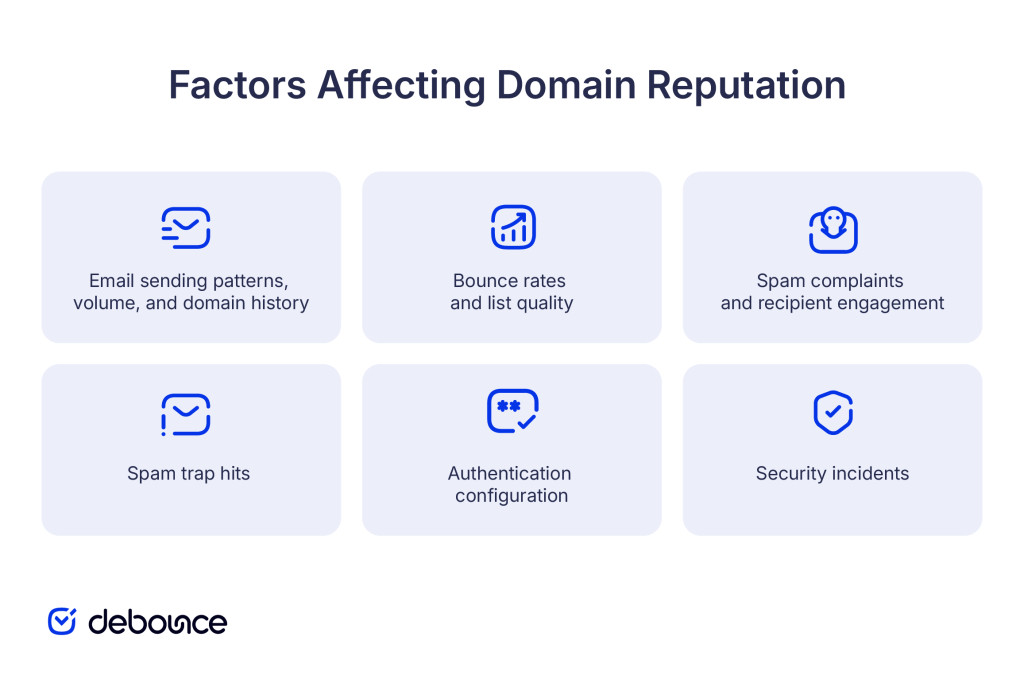
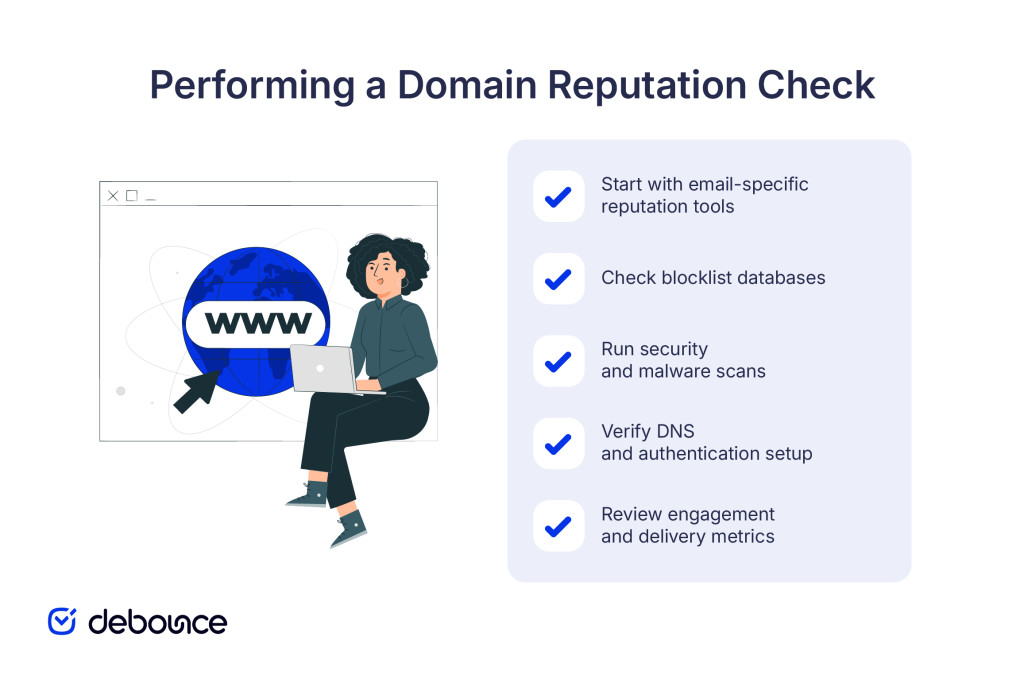
Email reputation tools provided by mailbox operators and third-party services offer insight into how your sending domain is being evaluated based on sending behavior, complaints, and engagement patterns.
These tools typically require domain verification and then surface metrics such as complaint rates, inbox placement signals, authentication status, and, in some cases, indicators related to spam trap activity. Reviewing these metrics over time makes it easier to spot trends and connect deliverability changes to specific campaigns.
Your domain may appear on public or private blocklists maintained by anti-spam organizations. These lists track domains and IPs associated with abusive or risky sending behavior, and you can check them individually or through aggregated tools that scan multiple lists at once.
Being listed on a major blocklist means many ISPs and corporate email systems will reject or filter your emails automatically.
Services that monitor web security scan domains for malware, phishing activity, and other threats. If a domain is flagged in these systems, browsers may display warnings or block access before visitors ever reach the site. Even temporary flags can reduce traffic, undermine user trust, and take time to resolve once triggered.
Use DNS lookup tools to confirm that your SPF, DKIM, and DMARC records are correctly configured. These tools show whether authentication records are present, properly formatted, and aligned with your sending domain. Misconfigured or missing records can cause authentication failures that reduce inbox placement even when your list quality is strong.
If you send email through an email service provider (ESP), check your campaign metrics: bounce rates, complaint rates, unsubscribe rates, and engagement. While not a direct reputation check, these metrics reveal the behaviors that drive reputation scores. Sustained increases in bounces or complaints often appear before broader deliverability problems become visible.
Different reputation checks serve different purposes. Run all three types regularly to get complete visibility into how external systems perceive your domain. Pairing these checks with list validation by DeBounce helps prevent the behaviors that lead to reputation damage in the first place.
Email reputation checks focus specifically on how inbox providers view your domain as an email sender. These checks evaluate sending volume, bounce rates, complaint rates, spam trap hits, and authentication to produce scores or risk ratings.
Common email reputation tools:
Email reputation is the most dynamic type. It can improve or degrade within days based on your recent sending behavior.
Security checks identify whether your domain has been flagged for hosting malicious content, participating in phishing, or being compromised by attackers.
Key security reputation sources:
Security reputation problems are serious and often indicate your site was compromised. They require immediate investigation and cleanup, not just removal requests.
Blocklist checks show whether anti-spam organizations or ISPs have added your domain to lists that trigger filtering or rejection.
Major blocklists to monitor:
Blocklists typically provide delist processes, but removal requires fixing the root cause, like cleaning your list, stopping spam trap hits, or securing compromised systems, before lists will remove you.
Reputation tools use different scoring systems and labels. Understanding what they mean helps you prioritize fixes.
Some tools use 0-100 scales where higher is better:
Scores in the 80+ range are ideal for consistent inbox placement. Scores below 70 indicate you need to investigate and address list quality or sending practice issues.
Some tools categorize domains as low-risk, medium-risk, or high-risk:
Medium-risk ratings are early warnings. Fix issues before they escalate to high-risk status.
Being listed on any major blocklist is serious. The impact depends on which list:
Even one Tier 1 listing can block 30-50% of your intended recipients.
Tools show whether your SPF, DKIM, and DMARC records are valid and aligned:
Failed authentication hurts your reputation and can cause message rejection at receiving servers.
When you check your domain reputation, you’ll typically find one or more of these issues:

Identifying which specific issues affect your domain helps you prioritize fixes: authentication and blocklist removals are urgent; engagement and pattern improvements are important medium-term projects.
Check frequency depends on your sending volume and how critical email is to your business:
Always check reputation after changing ESPs, migrating domains, updating authentication records, recovering from security incidents, or acquiring email lists through partnerships or company acquisitions.
If you notice sudden inbox placement declines, increased spam folder delivery, or rising bounce rates, run an immediate comprehensive reputation check across all tools to identify the cause. Regular monitoring catches problems while they’re still fixable. Waiting until deliverability collapses means you’re already losing revenue and subscriber trust.
Domain reputation determines whether your emails reach inboxes, your website appears safe to visitors, and platforms approve your domain for advertising and integrations. Running regular domain reputation checks across email tools, blocklist databases, and security scanners reveals problems before they escalate into deliverability crises or security incidents.
Domain reputation reflects your actual practices over time. Consistent good behavior, such as permission-based list building, regular list cleaning, proper authentication, and strong security, builds a reputation that protects your domain when minor issues occur.
Start with a baseline domain reputation check. Document your current scores and any issues flagged, then address the most critical problems first, including blocklist removals, authentication fixes, and list cleaning.
Maintaining strong email deliverability starts with a clean list. Use DeBounce to verify your email addresses before sending, removing invalid, risky, and low-quality contacts that generate the bounces and complaints that damage domain reputation. Check your list now and protect the reputation you’ve worked to build.
How long does it take for a domain's reputation to recover after being flagged?
Recovery typically takes 2-6 weeks of consistently good sending behavior (low bounces, no complaints, no trap hits) after fixing the root cause, though severe issues like major blocklist presence can take 3+ months.
Can a new domain have a bad reputation from day one?
Yes, if the domain was previously owned and used for spam, or if it’s closely associated with other domains that have poor reputation, it can inherit negative signals before you send your first email.
Does domain reputation affect paid ads or PPC approvals?
Yes, ad platforms like Google Ads and Facebook check domain reputation during review; domains with security flags, blocklist presence, or poor trust signals may be rejected or require additional verification before ads are approved.
Find quick answers to your questions about our pricing and plans.

Email analytics is important. It lets you in on a lot of information about your subscribers and their behavior towards your emails. In this post,...
Key Takeaways Spam traps help inbox providers and anti-spam organizations identify senders who acquire addresses through poor practices. There are three main spam trap types:...

Who doesn’t have an email? Almost everyone has. It’s one of the most popular communication channels across the globe. Not only does it let you...


If you’re seeing far too many bounces for outbound emails, you may first blame your email copy, the whole target list of emails, or the...

What email throttling entails is the regulation of the number of email messages sent to a specific ISP or remote server at a go. If...
Automated email marketing is incredibly convenient and powerful. Like anything, it takes some work to get right and maintain momentum. Unfortunately, email lists can become...