MX records tell sending servers which mail servers accept email for your domain and the order in which they should be tried. There...

Key Takeaways
You send a contract to a client. The email travels through multiple servers, internet infrastructure, and potentially dozens of intermediate systems before it arrives. At any point along that path, an unencrypted message can be intercepted, read, and copied by anyone with the right access or tools.
Email wasn’t originally built with privacy in mind. The core protocols that move messages across the internet were created decades ago, when security wasn’t the primary concern. Today, those same systems carry medical records, legal agreements, financial data, and sensitive business plans. That’s why email encryption isn’t just a technical upgrade, but a necessary layer of protection.
Email encryption protects message content by making it unreadable to anyone except the intended recipient. Whether you’re a healthcare provider protecting patient information, a lawyer sending confidential documents, or a marketer handling customer data, understanding how encryption works helps you choose the right safeguards and stay aligned with the compliance requirements your industry demands.
Email encryption is the process of converting email message content from readable text (plaintext) into scrambled, unreadable code (ciphertext) that can only be decoded by someone with the correct decryption key.
When you send an unencrypted email, the message travels as readable text through every server it passes through. Anyone who intercepts the transmission, be it a compromised network, a malicious server operator, or a government surveillance system, can read the content directly.
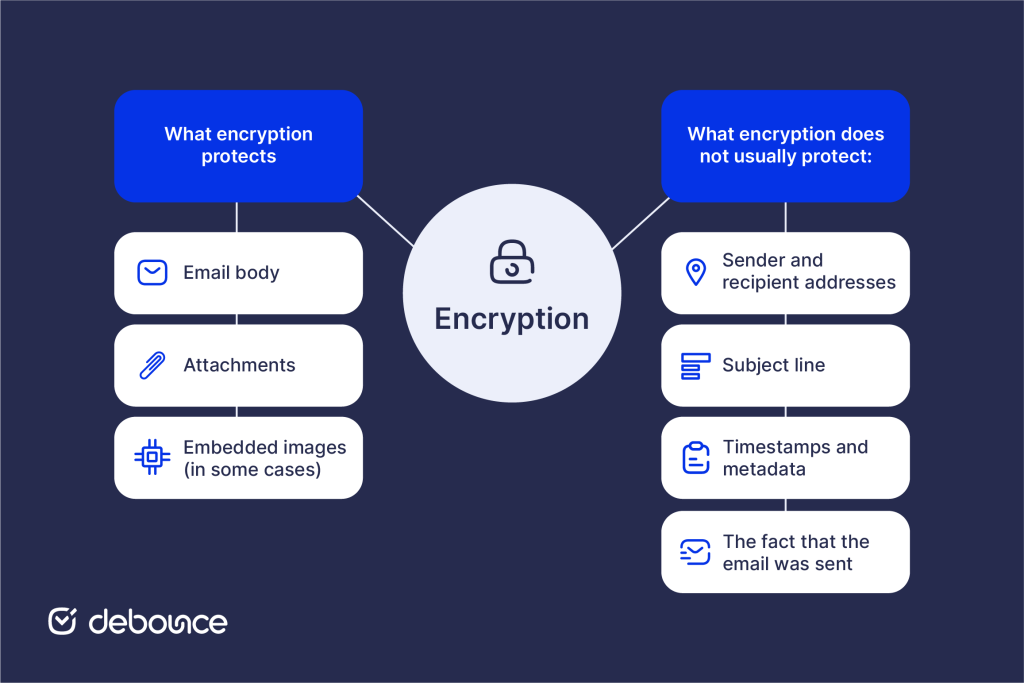
Encrypted email converts that readable content into mathematical ciphertext before it leaves your device or server. Without the corresponding decryption key, the intercepted data appears as meaningless characters. Only the recipient holding the correct key can reverse the process and read the original message.
For example, an unencrypted message reading “Please find attached the client contract for $250,000” becomes a ciphertext that looks something like: aGVsbG8gd29ybGQ… (a string of seemingly random characters).
Email encryption protects the body of the message, file attachments, and, in some cases, embedded images. However, it usually does not protect sender and recipient addresses, the subject line, transmission timestamps or other metadata, or the fact that the email was sent at all.
The case for email encryption extends beyond individual privacy to organizational risk management, regulatory compliance, and professional responsibility.
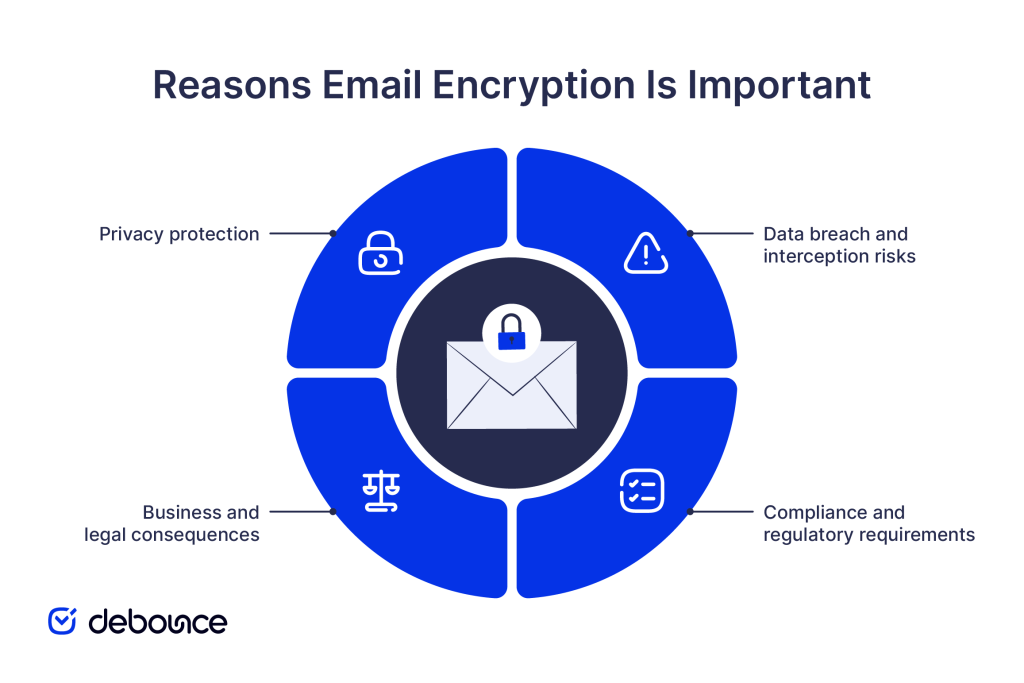
Every unencrypted email you send passes through multiple servers, internet service providers, and network infrastructure points before reaching its destination. At each point, the message is potentially readable by system administrators, security researchers, law enforcement with legal authority, or attackers who have compromised the infrastructure.
For personal communications containing financial information, health details, or sensitive personal data, this exposure creates a real privacy risk that encryption directly addresses.
Email spam and phishing attacks represent only part of the overall risks associated with email. Man-in-the-middle attacks intercept email during transmission between servers. Compromised email accounts expose stored messages. Insecure networks allow traffic capture. Encryption reduces the damage from each of these scenarios by ensuring intercepted content remains unreadable.
If email archives are left unencrypted, a single data breach can expose years of sensitive conversations at once. When emails are encrypted, the impact of a breach is significantly reduced. Attackers may still see metadata, such as who communicated and when, but they cannot read the actual content of the messages.
Organizations that do not secure sensitive communications face serious legal and financial risk. Attorney–client privilege may be weakened if legal discussions are sent without encryption. Trade secrets can lose protection when shared without reasonable safeguards. In addition, contractual obligations to protect customer data can be violated if email practices fail to meet accepted security standards.
Multiple regulatory frameworks mandate encryption for specific types of sensitive data:
Non-compliance carries substantial fines, reputational damage, and in serious cases, criminal liability for responsible individuals. For organizations in regulated industries, encryption is a compliance obligation.
Email encryption uses mathematical algorithms and cryptographic keys to protect message content through a send-encrypt-transmit-decrypt cycle. The encryption and decryption process includes:
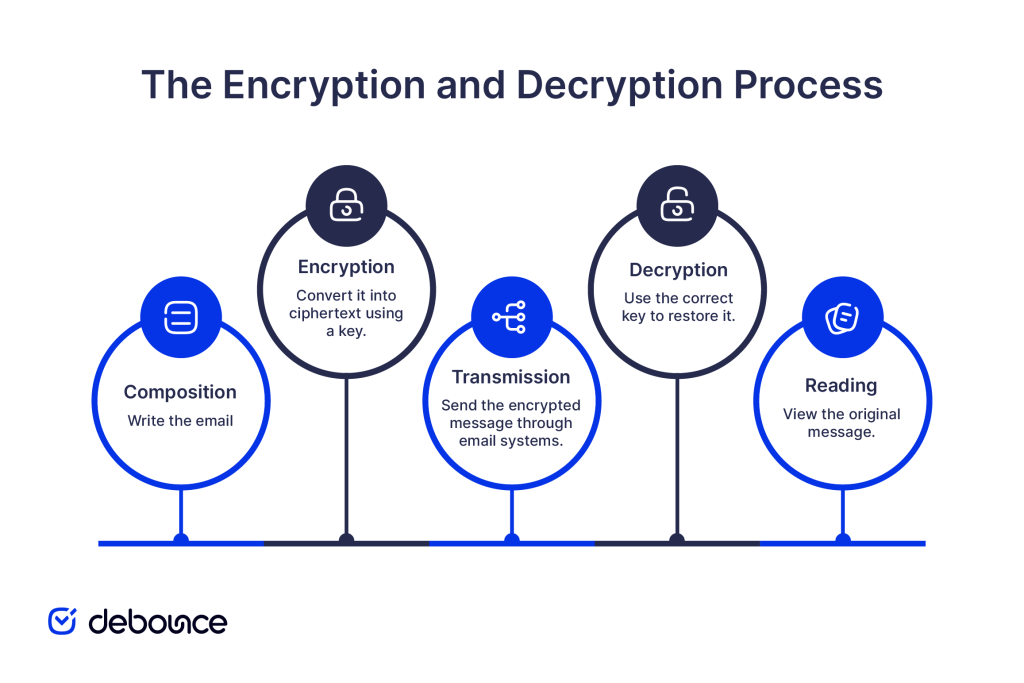
Cryptographic keys are strings of data used by encryption algorithms to perform and reverse encryption. The security of encrypted email depends almost entirely on key security: who holds them, how they’re stored, and how they’re exchanged.
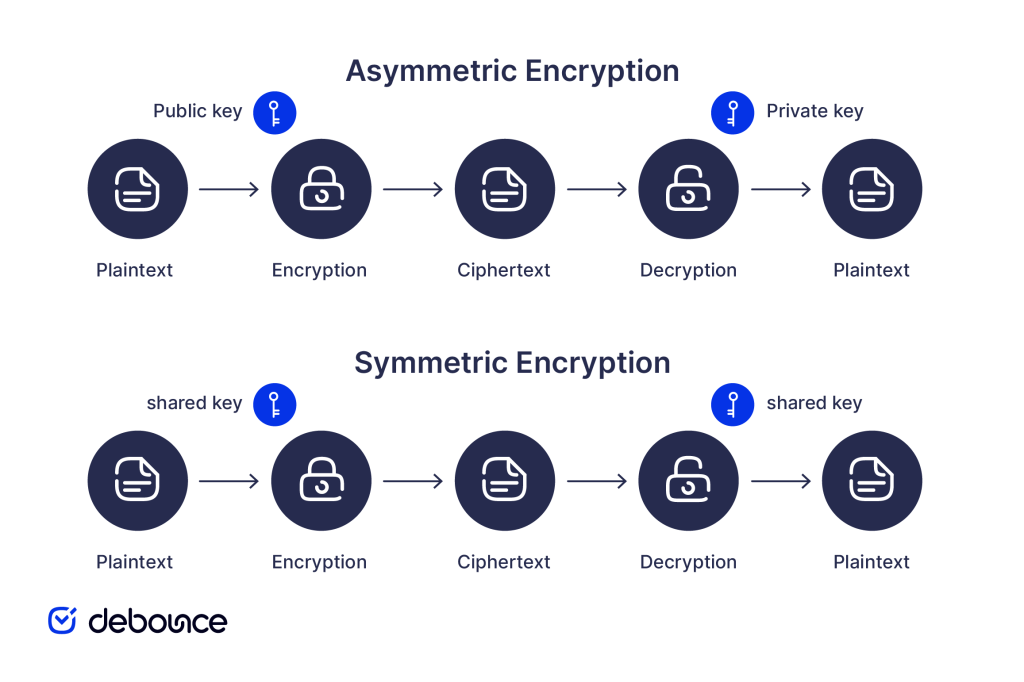
Symmetric encryption uses the same key to encrypt and decrypt. It’s fast but requires securely sharing the key with recipients, which creates a chicken-and-egg problem: how do you securely share the key without already having secure communication?
Asymmetric encryption solves this with key pairs: a public key that anyone can use to encrypt messages for you, and a private key that only you hold to decrypt them. You share your public key openly; your private key never leaves your control.
Encryption in transit protects messages while they travel between servers (the most common form of email encryption). Messages are encrypted for transmission but may be stored unencrypted on the destination server.
Encryption at rest, on the other hand, protects messages stored on servers or devices, ensuring that even if a server is compromised, stored email content remains inaccessible without keys.
End-to-end encryption protects messages throughout their entire lifecycle: from the moment you write them to when the recipient reads them. It makes sure that even the email service provider can’t access content.
Three primary email encryption methods serve different use cases, security levels, and technical requirements.
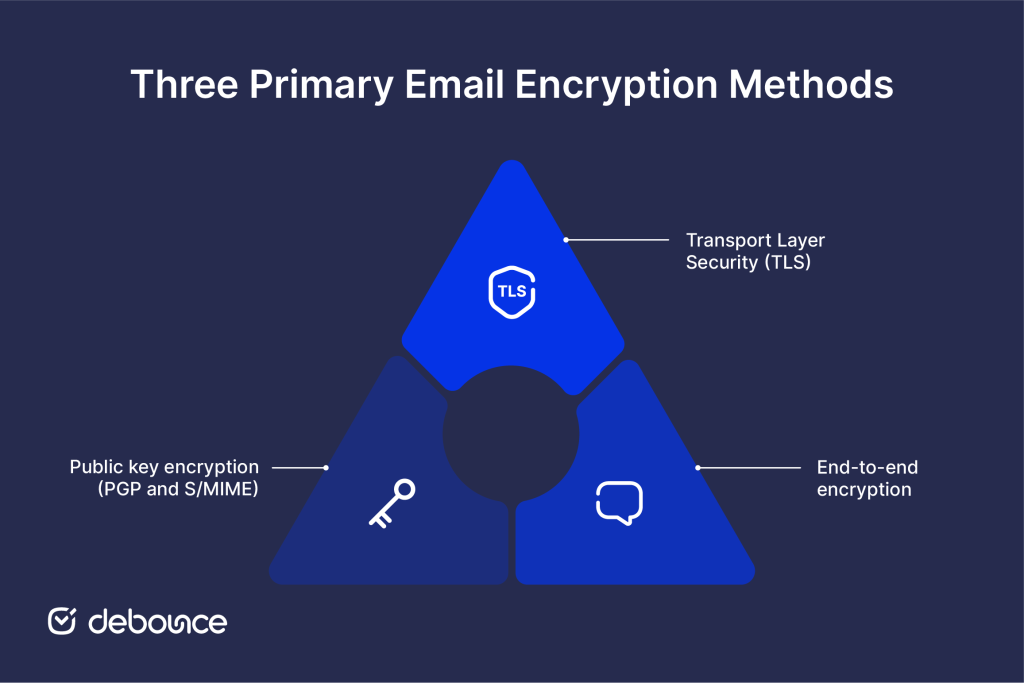
TLS is the most widely used email encryption method, protecting messages during transmission between mail servers. When both the sending and receiving mail servers support TLS, the connection between them is encrypted, preventing interception of messages in transit.
Your email provider’s server connects to the recipient’s server and negotiates a TLS-encrypted connection before transferring the message. This happens automatically when both servers support TLS. No action required from senders or recipients.
TLS protects the transmission channel but not the message content itself. Messages may be stored unencrypted at either end. If one server doesn’t support TLS, transmission may fall back to unencrypted delivery. TLS doesn’t protect against server-level access; email providers can technically read messages stored on their servers.
Most email systems use opportunistic TLS, encrypting when supported but falling back to unencrypted delivery when not. Enforced TLS requires encryption and fails delivery if TLS isn’t available, providing stronger guarantees but occasionally blocking legitimate messages.
End-to-end encryption (E2EE) protects messages from the moment they leave the sender’s device to when they’re decrypted on the recipient’s device. No intermediate party, including email providers, internet service providers, or server operators, can access the content.
With TLS, your email provider encrypts the connection, but can access your stored messages. With E2EE, messages are encrypted before leaving your device using keys your provider doesn’t hold. Even if the email provider’s servers are compromised, encrypted messages remain unreadable.
E2EE places key management responsibility on users. Your private key must be securely stored. If lost or compromised, encrypted messages may become permanently inaccessible or exposed. This increased security comes with increased user responsibility.
Some providers build E2EE into their infrastructure by design, handling key management automatically while maintaining end-to-end protection. This approach makes E2EE accessible without requiring technical expertise.
PGP (Pretty Good Privacy) and S/MIME (Secure/Multipurpose Internet Mail Extensions) implement public key cryptography for email, providing the strongest and most flexible encryption options available.
Both systems use asymmetric key pairs. You generate a key pair: share your public key with anyone who might send you encrypted email, and protect your private key exclusively. Senders encrypt messages using your public key; only your private key can decrypt them.
PGP uses a “web of trust” model where users vouch for each other’s key authenticity. Keys are distributed through public key servers or shared directly. PGP is highly flexible and widely used in technical communities, but setup requires manual key management and is more complex for non-technical users.
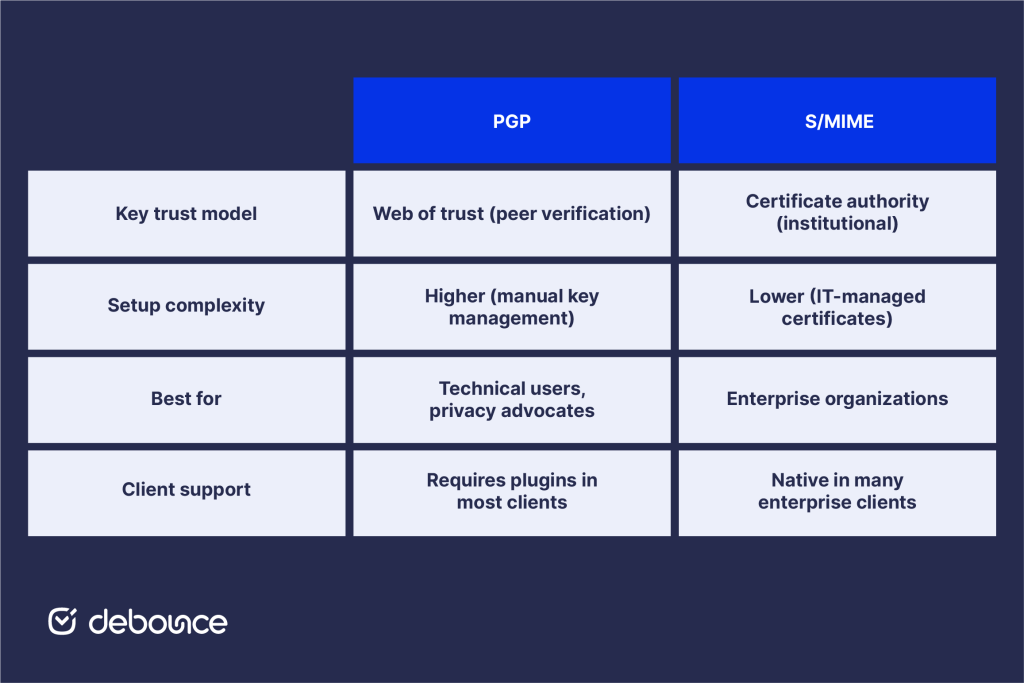
S/MIME uses certificate authorities (CAs) to verify key authenticity, the same infrastructure that secures websites (HTTPS). Organizations can issue S/MIME certificates to employees through their IT infrastructure, making deployment more manageable at enterprise scale. Outlook, Apple Mail, and most enterprise email clients support S/MIME natively.
Encryption is only as effective as the practices surrounding its implementation and use.
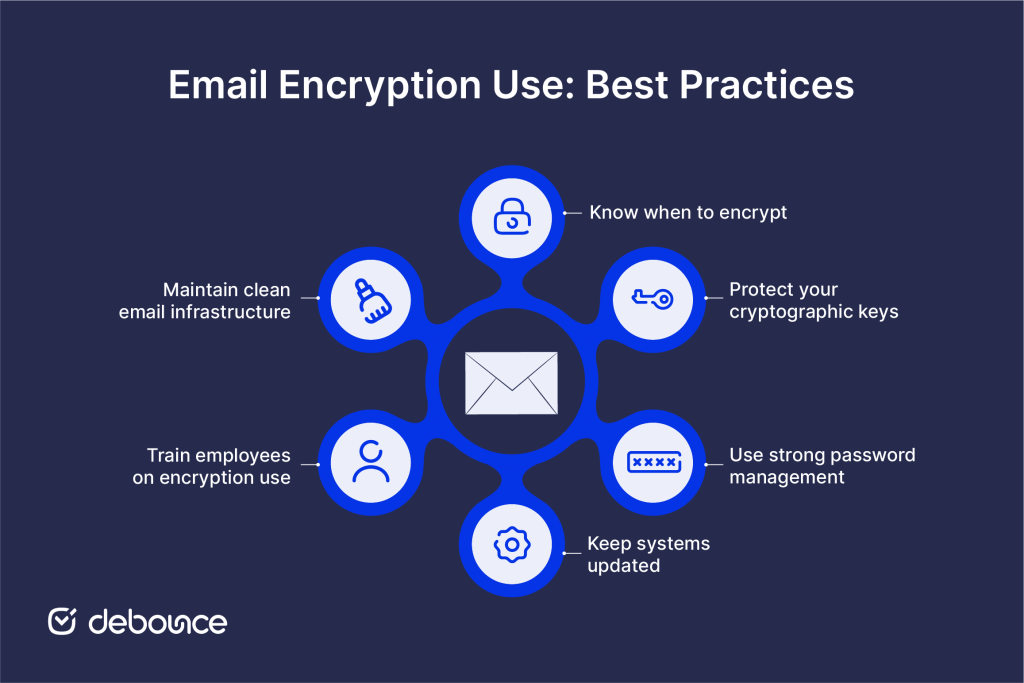
Not every email requires encryption, but certain content types always should be encrypted:
Configuring SPF, DKIM, and DMARC alongside encryption creates defense in depth: authentication prevents your domain from being impersonated while encryption protects message content. Both are necessary, as neither alone provides complete protection.
Your encryption is only as strong as your key security. Key management best practices include:
Many encryption implementations protect private keys with passphrases. Use long, unique passphrases that aren’t reused across other accounts. Store passphrases in a dedicated password manager rather than writing them down or using memorable phrases.
Encryption algorithms and implementations receive security updates that address discovered vulnerabilities. Running outdated encryption software can expose you to attacks against known weaknesses even when encryption is technically in use. Apply security patches to email clients, encryption plugins, and operating systems promptly.
Technical encryption controls fail when users bypass them; sending sensitive content through personal email, disabling encryption to avoid setup friction, or sharing private keys for convenience. Regular security awareness training that explains why encryption matters and how to use it correctly reduces these human-factor risks.
Using AI for email marketing alongside proper encryption controls helps marketing teams maintain both deliverability and security, ensuring campaigns reach intended recipients through properly secured channels.
Encryption protects message content, but weak email hygiene introduces separate risks. Poor account management, outdated contact lists, and disorganized communication channels create openings that encryption does not fix. Strengthening everyday clean-up email practices reduces the overall attack surface in ways encryption alone cannot address.
Email encryption transforms message content into unreadable ciphertext that only authorized recipients can decrypt, protecting sensitive information both in transit and at rest. TLS encrypts email automatically as it moves between servers, helping prevent interception during delivery. E2EE protects content from the sender’s device to the recipient’s device, while PGP and S/MIME use public and private key pairs to provide the strongest message-level protection.
Encryption solves one critical problem: protecting content from unauthorized access, but it works best as part of broader email security. Authentication protocols prevent sender impersonation, validated contact lists maintain list quality and reduce exposure, and user awareness training ensures encryption controls are actually used rather than bypassed.
Check whether your organization enforces TLS for all email transmission and whether your email platform offers end-to-end encryption for sensitive communications. If you handle regulated data (health, financial, legal), verify that your encryption practices meet applicable compliance requirements before assuming standard email protection is sufficient.
Protect not just your email content but your entire email infrastructure. Use DeBounce to validate contact lists, remove invalid and risky addresses, and maintain the clean sending environment that supports strong deliverability alongside your encryption and authentication controls. Secure email starts with knowing your messages reach real, verified recipients, and that the content those recipients receive is protected every step of the way.
Does email encryption slow down email delivery?
Modern email encryption adds negligible delay to delivery. TLS encryption happens in milliseconds during server connections, and end-to-end encryption processing is similarly fast on current hardware, making delivery speed a non-issue for practical purposes.
Can encrypted emails be recovered if I lose my key?
In most end-to-end and PGP/S/MIME implementations, losing your private key means permanently losing access to messages encrypted with the corresponding public key, which is why secure key backup is essential before encrypting important communications.
Find quick answers to your questions about our pricing and plans.

MX records tell sending servers which mail servers accept email for your domain and the order in which they should be tried. There...
What email throttling entails is the regulation of the number of email messages sent to a specific ISP or remote server at a go. If...

Email logos appear primarily in signatures (professional emails) and headers (marketing emails), each with different sizes and optimization requirements. Logos should be under...
SPAM words can really hurt your email marketing. Therefore, it’s obvious we need to avoid them in order to succeed in email marketing. In this...
In a time when everybody’s talking about hyper-segmentation and personalized promo messages, cold emailing may seem a bit outdated and obsolete. But it really isn’t....

Imagine sending an important email to a client only for it to end up in their spam folder or not reach them at all. Even...