Spoofing fakes trusted identities to bypass filters and build credibility; phishing uses that credibility to manipulate victims into harmful actions. Most sophisticated phishing...

Key Takeaways
Smishing has become a major source of fraud in the US as scammers target mobile phones, where security controls are often weaker, and messages tend to receive immediate attention. According to the FTC’s latest report on text scams, consumers reported losing $470 million to scams that began with a text message in 2024, more than five times the amount reported in 2020. Email has decades of spam-filtering infrastructure behind it, while SMS still feels direct and trustworthy to many users, making it an attractive channel for attackers.
Smishing is a phishing attack delivered through SMS text messages, where the attacker impersonates a trusted source to trick the recipient into clicking a link, sharing personal data, or transferring money. The word combines “SMS” (short message service) and “phishing” (the name for deceptive attacks that use fake communications to steal information or money).
Like all phishing attacks, smishing is a form of social engineering. The attack doesn’t exploit a software vulnerability, but human trust, urgency, and the instinct to respond quickly when something seems important. The message creates a scenario that feels real and time-sensitive, then presents a link or a request that the attacker controls.
The mechanism follows a consistent pattern regardless of which brand or institution the attacker impersonates:
Smishing succeeds because text messages still feel more immediate and personal than email. Most people read SMS messages within minutes of receiving them, while mobile messaging has fewer filtering and warning mechanisms than email, which benefits from decades of spam detection and sender authentication.
Attackers also rely on shortened links that conceal the destination, making it harder for recipients to judge whether a website is legitimate before tapping. Once the link is opened, victims are far more likely to interact with a convincing fake login page, payment portal, or delivery website.
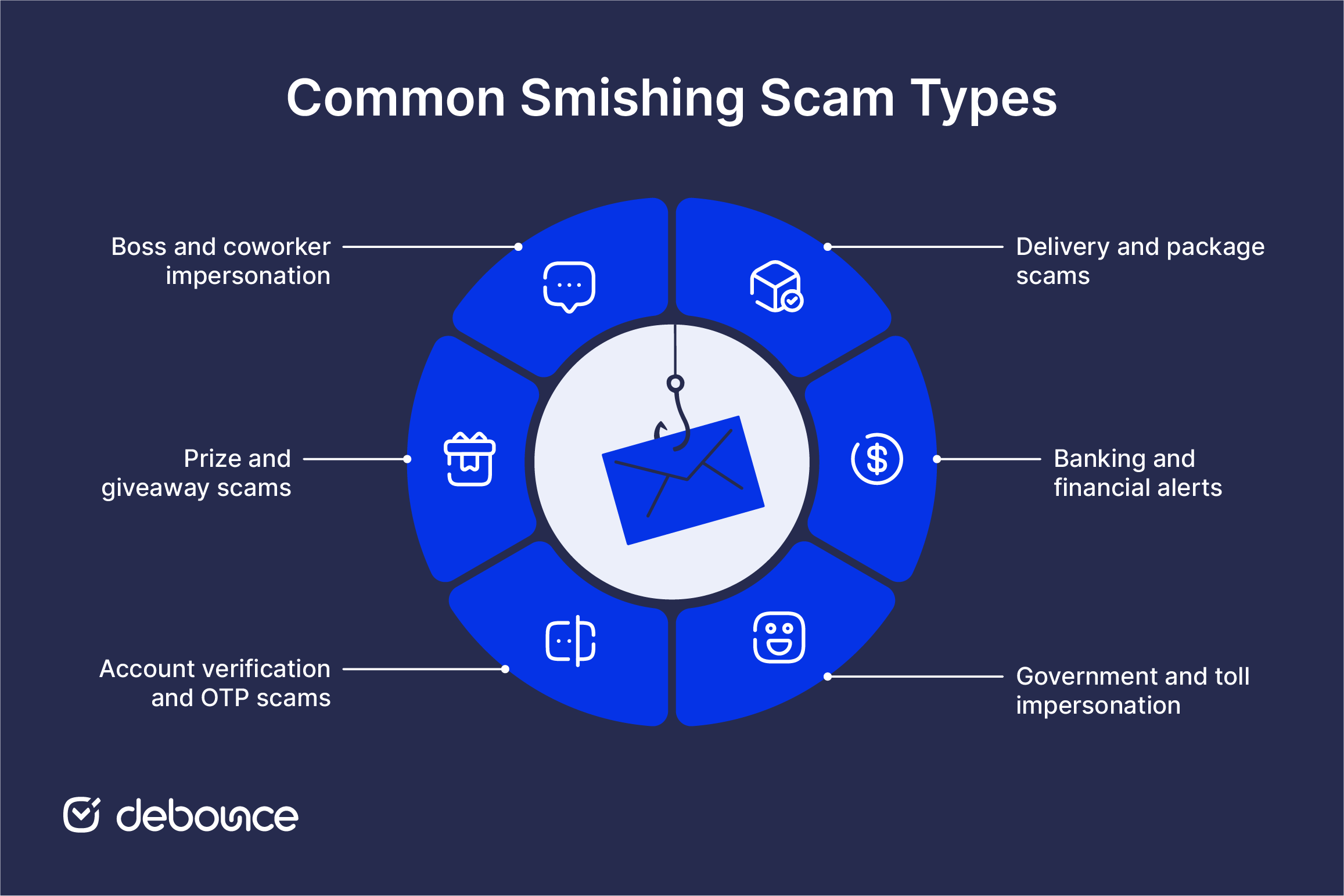
Smishing messages take many forms, but the following are among the most common:
Most smishing messages contain warning signs. Check any unexpected text carefully before responding or opening a link:
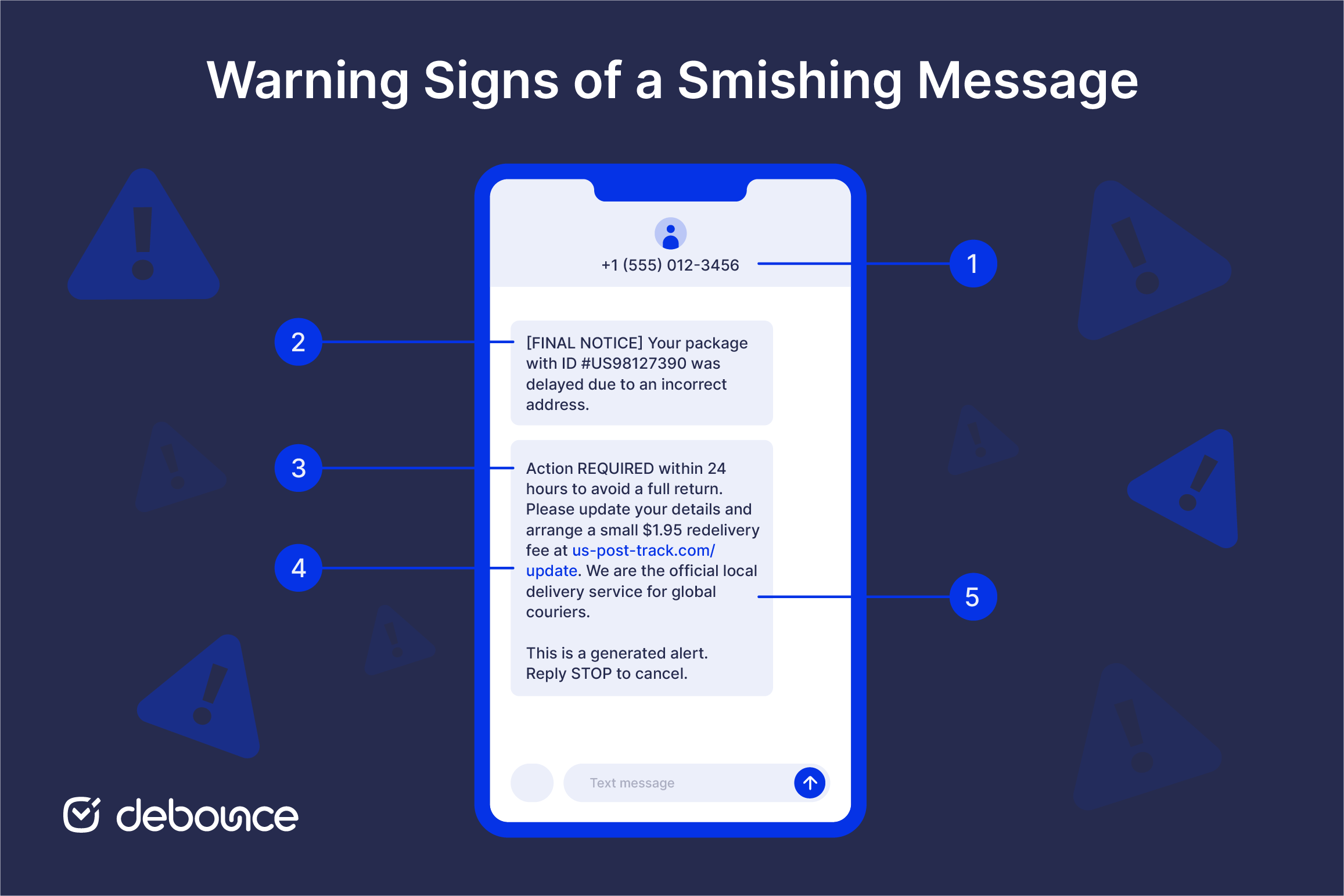
When in doubt, contact the organization independently through its official website or a phone number you already trust. Never use the contact details provided inside the suspicious message.
Phishing, smishing, and vishing are related social engineering attacks delivered through different communication channels. Attackers use all three to impersonate trusted organizations, create urgency, and persuade people to disclose information or send money.
| Phishing | Smishing | Vishing | |
| Channel | SMS / text | Voice call or voicemail | |
| Common impersonations | Banks, employers, online services, IT teams | Couriers, banks, government agencies, personal contacts | Banks, government agencies, technical support, employers |
| Primary ask | Open a link, download a file, or enter login details | Open a link, reply with information, or call a number | Share a passcode, transfer money, disclose information, or install software |
| Why it works | Volume and familiarity | High open rates, weak mobile filtering | Real-time pressure, harder to hang up |
| Primary defenses | Spam filtering, SPF, DKIM, DMARC, and independent verification | Message filtering, blocking and reporting suspicious texts, and independent verification | Call screening, refusing to disclose passcodes, and calling back through an official number |
Phishing is the original and still most common form by total volume. Email-based attacks target login credentials for banking, work accounts, or personal platforms. Primary defenses include sender authentication, spam filtering, and user awareness. Email spam statistics show phishing remains the dominant threat channel globally.
Smishing succeeds more often per attempt than email phishing because mobile filtering is weaker and SMS click-through rates are higher. The attacks tend to be shorter and simpler than phishing emails: a single link is all most smishing texts contain.
Vishing uses voice calls, often combined with smishing in cross-channel attacks, where a text prompts the recipient to call a number, where a live attacker continues the scam. Real-time voice pressure is harder to pause and evaluate than a text or email, which makes vishing particularly effective against targets who are already anxious about the scenario the attacker has constructed.
No single measure stops every smishing attempt, but combining several layers of protection makes you much less likely to become a victim.
Act as soon as you realize what happened. Work through these steps in order:
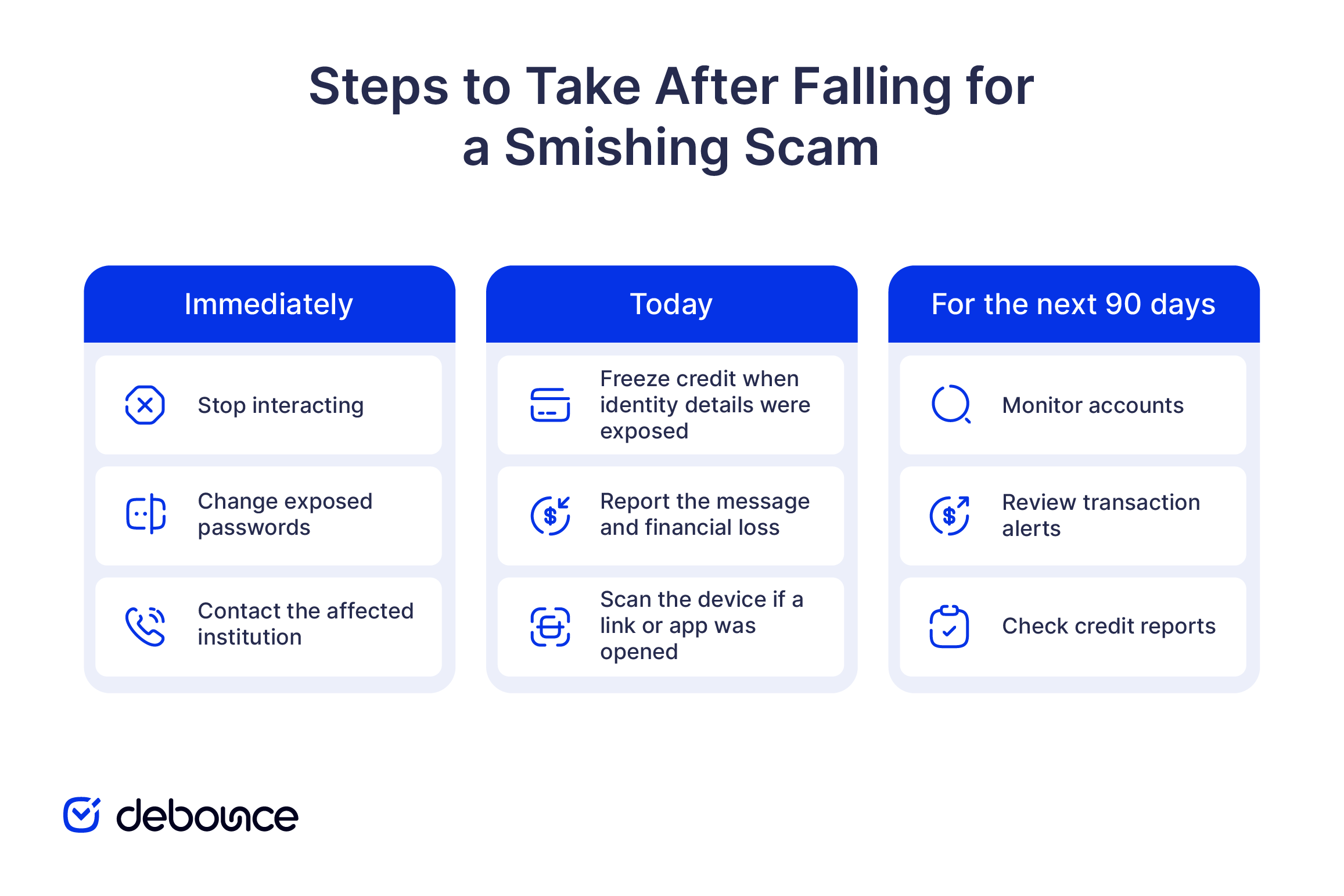
If you tapped a link and suspect malware, run a mobile security scan immediately, remove any unfamiliar apps that appeared after the incident, and consider a factory reset if your device is behaving strangely. This can include unexpected battery drain, new apps you didn’t install, or data usage spikes, which can all indicate something was installed.
Smishing works because it uses familiar situations, trusted names, and pressure to act before checking the message. The texts may be simple, but they can still be convincing. Recognizing an unexpected request and pausing to verify it can prevent most attempts from going any further.
The most effective precautions are straightforward: do not open links in unexpected texts, enable message filtering, report suspicious messages to 7726, and verify any claim through the organization’s official contact.
SMS security is only one part of protecting customers and business communications. Organizations must also secure email with SPF, DKIM, and DMARC while maintaining a clean contact list. DeBounce email validation identifies invalid, disposable, and risky addresses before sending, helping reduce bounces and protect sender reputation. Start with 100 free verifications to check the quality of your list before your next campaign.
Yes. Email phishing remains the dominant attack channel by total volume, as billions of phishing emails are sent daily. Smishing is growing faster as a share of attacks, but email is still where most phishing attempts originate.
Forward suspicious texts to 7726, which spells SPAM on a standard phone keypad. All major US carriers use this code to receive smishing reports and identify senders to block. The same code works in the UK.
In almost all cases, no. Simply receiving a smishing text is safe. The risk comes from tapping the link, opening an attachment, or installing an app that the link leads to. There are rare, highly targeted “zero-click” exploits that can compromise devices without user interaction, but these are sophisticated attacks typically used against specific high-value targets, not mass smishing campaigns.
Phone numbers circulate through data breaches from services you’ve used, purchased lists from data brokers, public records, and social media profiles. Attackers also use automated number-generation tools that send texts to sequential or randomly generated numbers without needing a specific list.
Find quick answers to your questions about our pricing and plans.
Spoofing fakes trusted identities to bypass filters and build credibility; phishing uses that credibility to manipulate victims into harmful actions. Most sophisticated phishing...
Are you using influencers for brand awareness? If not, here are some statistics that may interest you. You fall in the 7% who are not...

If your email campaigns suddenly start bouncing, open rates plummet overnight, or clients report that they never receive your messages, there’s a strong chance your...
Now, more than ever, more business owners are beginning to see and use email marketing as a veritable tool to foster productive business relationships with...
Contacting inactive or invalid email addresses is a waste of your email marketing budget and can have other negative repercussions for your business’s email marketing....

Having a custom domain for your business emails adds a level of professionalism and credibility that generic email addresses like gmail.com or outlook.com cannot match....