Back to Integrations

SendGrid Email Verification Integration

Connect DeBounce to SendGrid with one API key, import and validate your contact list, then unsubscribe the invalid, disposable, and spam-trap addresses you select.

No Credit Card is Required. From $0.00045 per Check.

What the SendGrid Integration Does

The integration imports contact lists from SendGrid into DeBounce for validation, then updates the list in SendGrid by unsubscribing the result categories you select, eliminating the need to export, upload, and re-import files manually.

  • Pulls any SendGrid contact list into DeBounce with a single click. No CSV export is needed.
  • Runs every address through multiple validation layers, including catch-all testing and spam-trap detection that SendGrid’s own checks don’t cover.
  • Writes the outcome back to SendGrid by unsubscribing the result categories you select from that list.
  • Leaves your original contact records intact. Selected addresses are unsubscribed from the list, not deleted from your SendGrid account.
  • Disconnects cleanly when the job is done if you set it up for a one-off clean instead of ongoing use.

Before You Start

Three things need to be in place. The integration does not require SendGrid’s Pro or Premier tiers, which is the main practical difference between this route and SendGrid’s own validation product.

Requirement Detail
A DeBounce account New accounts include 100 free credits, and no credit card is required. One credit covers one email validation.
A SendGrid API key Created under Restricted Access, with email list access, User Account read access, and Marketing Campaigns full access.
A list under 200,000 emails The maximum is 200,000 emails per list. Split larger SendGrid audiences before importing.

How to Validate Your SendGrid List

Five steps, from creating the key to suppressing bad addresses. Steps 1 and 2 are one-time setup. Steps 3 to 5 are what you repeat each time you clean a list.


  • 01

    Creating SendGrid API key

    DeBounce needs a SendGrid API key with the right permissions to read your lists and update them. Marketing Campaigns access is the one people most often miss, and without it the import fails.

    1. Log in to SendGrid and open Account Details, then API Keys.
    2. Click Create API Key in the top right corner and give the key a name.
    3. Select the Restricted Access tile so the Access Details table appears, then add email list access.
    4. Scroll to User Account and set Read Access. Give Marketing Campaigns full access. Leave all other options at their defaults.
    5. Click Create & View, then click the key to copy it. SendGrid shows the full key only once.
  • 02

    Connect SendGrid to DeBounce

    In DeBounce, click Integrations in the left menu, then click Connect in front of the SendGrid icon. Paste the API key from step 1 and press Connect. When the connection succeeds, your full set of SendGrid lists appears on the next page.

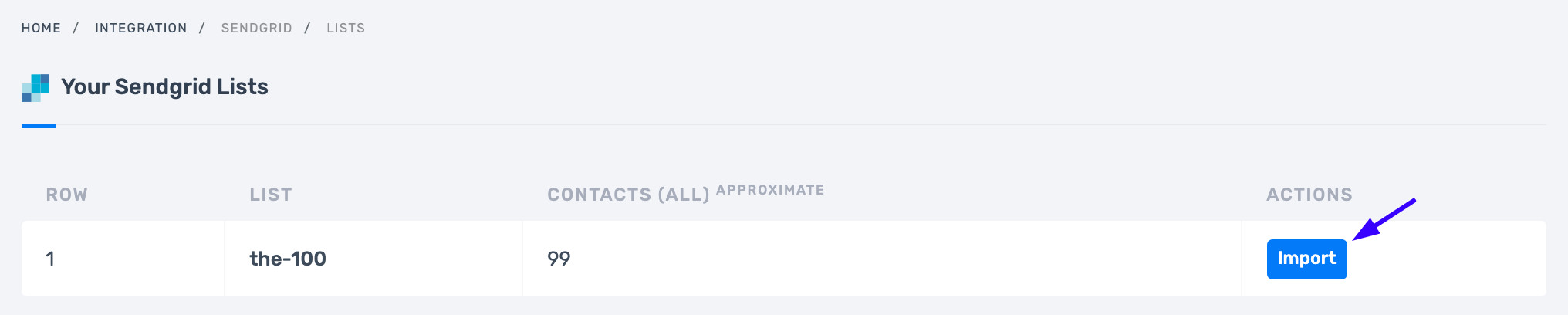
    Importing a list from SendGrid (screenshot 1)

  • 03

    Import the list you want to clean

    Click Import in front of the list you plan to validate and wait for the transfer to finish. Duplicate rows are identified before validation begins and are highlighted rather than charged, so repeated addresses do not consume credits. Once the transfer completes, the list is ready to validate.

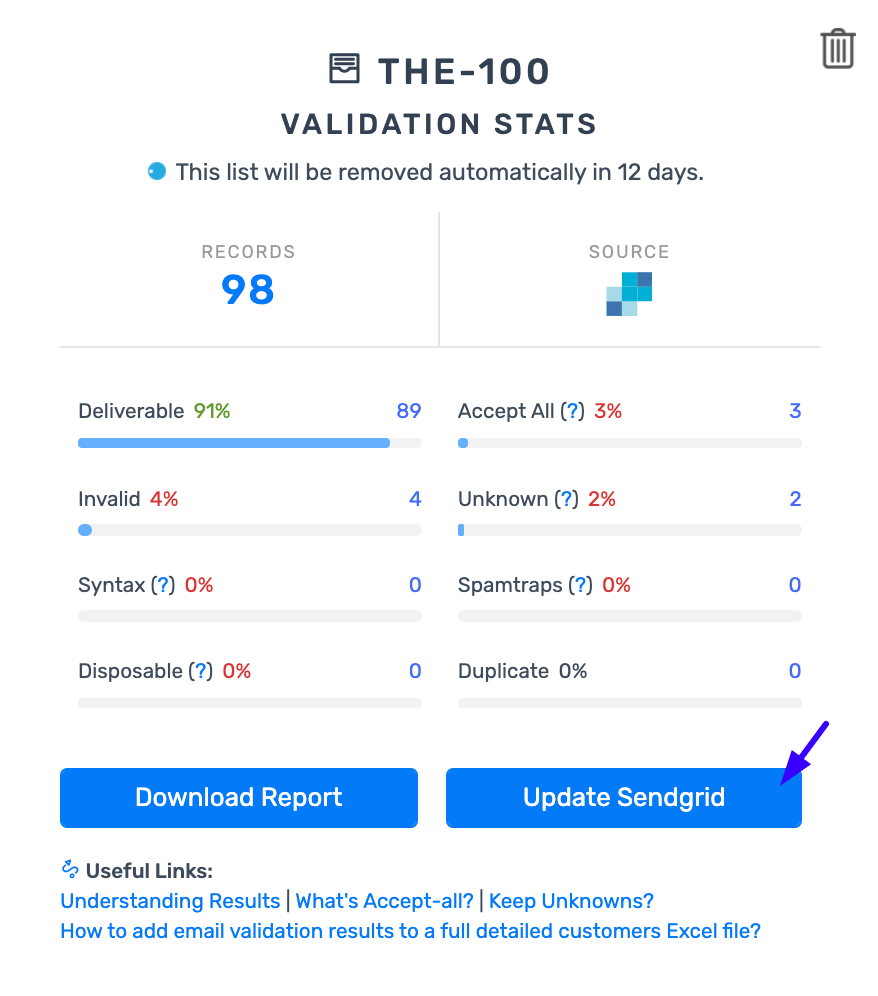
    Importing a list from SendGrid (screenshot 2)

  • 04

    Validate and review the results

    Start validation on the imported list. Every address is checked for syntax, MX records, mailbox existence, disposable domains, catch-all behavior, greylisting, and misspelled domains. No messages are sent to your contacts, because email list validation uses DNS and SMTP protocol functions only. Processing time depends on factors such as list size, list quality and server response speeds. DeBounce sends a notification email when validation is complete.

  • 05

    Suppress the bad addresses inside SendGrid

    Once validation is complete, click Update SendGrid’s List. Choose which result categories to suppress, for example invalid, spam-trap, and disposable, then click the Update SendGrid’s List button. After a few seconds, the selected categories are unsubscribed from that list in SendGrid.

    What this does and does not do:

    The addresses are unsubscribed from the list, not deleted from your SendGrid account. They stop receiving campaigns sent to that list, and the contact records remain in place. This is worth knowing before you go looking for contacts that appear to still be there.

    Unsubscribing bad emails from your SendGrid account

  • 06

    Optional: Disconnect when you are finished

    Navigate to the Integrations page in DeBounce and press Disconnect in front of the SendGrid logo. This is worth doing if the API key was created for a single cleaning job. Leave the connection in place if you plan to re-import the list on a regular schedule.

    Download before you lose it:

    Uploaded lists are removed automatically 10 days after upload or validation, whichever is later. Export the results before then if you want to keep a copy of the cleaned file.

    Disconnecting SendGrid

What Your Validation Results Mean

Each address comes back with a numeric code and a text reason, in both the exported file and the API response. The codes tell you which categories are safe to keep in SendGrid and which to suppress before your next send.

Text code Code Description Safe to send?
Deliverable 5 Verified as a real address currently accepting mail Yes
Accept-All 4 Domain-wide setting, the server accepts everything sent to it Depends on your setup
Unknown 7 The server could not be reached, after up to three attempts Depends on your setup
Role 8 Group inbox such as info@, support@ or admin@ Maybe, not recommended
Invalid 6 Verified as non-existent or not accepting mail, will bounce No
Disposable 3 Temporary address from services such as Mailinator or 10 Minute Mail No
Spam Trap 2 A honeypot address used to catch poor sending practices No
Syntax 1 Not a valid email address in structure No


Deciding what to do with accept-all and unknown results

Neither is automatically bad. If you send through a provider that expects a bounce rate below 4%, leave both out of the send. If you send from a dedicated server with your own IPs, they may be safe, depending on list health and on whether those contacts opted in themselves.

Accept-all domains are common in small businesses and in government, medical and educational organizations, where the addresses behind them are often genuine. Catch-all validation resolves them into valid or invalid at a stated 95% accuracy, for 10 credits per address rather than the standard 1.

Role accounts depend on source rather than the technical result. They are usually fine where you know the owners, and a poor idea where the address arrived through a registration form.

What Happens in SendGrid After Suppression

SendGrid applies its own suppression rules on top of anything you push across, which explains most cases of a message not sending after a clean.

  • An address that bounces twice is logged to SendGrid’s bounce suppression list, and later sends to it are suppressed automatically.
  • Unsubscribed recipients are tracked separately from bounces in SendGrid’s suppression system.
  • Removing a recipient from the bounce list allows sending to it again, which matters after a temporary domain outage.

On thresholds, SendGrid recommends generating hard bounces from fewer than 5% of attempted messages. Most mailbox providers expect under 2%, so treat 2% as the working target.

How This Differs From SendGrid's Built-In Validation

SendGrid ships its own Email Address Validation, available to Email API Pro and Premier level accounts only. Below those tiers, the option to create a validation key does not appear at all, and it is API-only, with no interface for uploading a list.

On coverage, SendGrid returns Valid, Risky, or Invalid plus a score, backed by six checks: syntax, MX or A record, suspected disposable, suspected role, known bounces, and suspected bounces.

SendGrid Email Address Validation DeBounce SendGrid integration
Plan requirement Email API Pro or Premier accounts only Any SendGrid plan that can issue an API key
How you use it API only, real-time or bulk Connect in the app, import a list, click validate
Batch limit 1,000,000 addresses or 50 MB per job 200,000 emails per list
Spam traps Not reported as a distinct result Reported as its own category, code 2
Catch-all domains Not reported as a distinct check Detected, and separately resolvable at 95% stated accuracy
Unknown results Not reported as a distinct category Reported, and not charged
Pricing model Pay as you go with volume discounts applied automatically 1 credit per validation, credits never expire

The two are not mutually exclusive. Pro and Premier teams often use SendGrid’s real-time endpoint at signup and run periodic list cleans through the integration.

Keep New Signups From Reaching SendGrid Dirty

Cleaning a list fixes the addresses already in it, not the ones arriving tomorrow. Around 30% of emails go bad within a single year, so validation at the point of capture does more long-term work than any single cleaning pass.

  • The real-time validation widget adds validation to any web form with a single JavaScript snippet and no backend work. It checks formatting, disposable domains, mailbox existence, and typo domains as the visitor types.
  • The email validation API suits backend integration, returning Safe to Send, Risky, Invalid, or Unknown with the numeric code, the reason, and a did_you_mean suggestion on typos.

Use a looser rule on signup forms than on campaigns:

Treat Deliverable, Accept-all, and Unknown as valid on registration forms, or accept the address when send_transactional returns 1. The threshold that protects a campaign will lock real customers out of a signup flow.

Troubleshooting the Integration

Problem Cause and fix
The connection fails after pasting the API key The key is missing a required permission. It needs email list access, User Account read access, and Marketing Campaigns full access. Recreate the key rather than editing the existing one if you are unsure.
Your SendGrid lists do not appear after connecting Same cause in most cases. Marketing Campaigns access is what exposes the contact lists to the integration.
The list is too large to import Lists are capped at 200,000 emails. Split the audience inside SendGrid and import it in batches.
Suppressed contacts still appear in SendGrid Expected behavior. The selected categories are unsubscribed from the list, not deleted from the account, so the records remain visible.
Results are gone when you come back to download them Lists are removed automatically 10 days after upload or validation, whichever is later. Re-import and re-run, or download promptly next time.
A campaign still bounces after cleaning Check which categories you suppressed. Leaving accept-all and unknown in a send is the usual cause when you send through a provider that expects a bounce rate below 4%.

Frequently Asked Questions (FAQs)

01

Do I need SendGrid Pro or Premier to use this integration?

No. The DeBounce integration does not require SendGrid’s Pro or Premier tiers. You need a SendGrid account that can issue an API key with the required permissions.

02

Does the integration delete contacts from SendGrid?

No. The categories you select are unsubscribed from the list you validated. The contact records stay in your account.

03

How many emails can I import from SendGrid at once?

The maximum is 200,000 emails per list. If a SendGrid audience is larger, split it into segments inside SendGrid and import them in batches.

04

Does validation send test emails to my contacts?

No. DeBounce uses DNS and SMTP protocol functions and avoids sending any message to external mail exchangers for delivery, so your contacts receive nothing.

05

Which SendGrid API key permissions are required?

Create the key under Restricted Access, add email list access in the Access Details table, set User Account to Read Access, and give Marketing Campaigns full access. Everything else can stay at its default.

06

What does it cost to validate a SendGrid list?

One credit per email validation, 10 credits for catch-all validation, and 20 for data enrichment. Duplicates and unknown results are not charged, credits never expire, and new accounts start with 100 free credits.

07

Are my original CSV columns preserved?

Yes. Exports keep your original columns and add validation columns, so a cleaned file goes back into SendGrid without rebuilding your segmentation.

08

How often should I re-validate my SendGrid lists?

Quarterly suits most active senders, with an extra pass before any large campaign. Lists from lead generation or older databases need it more often, and a rising bounce rate is the clearest signal one is due.

09

Can I validate a SendGrid list without connecting the integration?

Yes. Export your contacts as a CSV, upload the file directly, validate and download the result. You would then apply the suppressions in SendGrid yourself.