
The highest-impact subdomain decision is separating marketing, transactional, and outbound traffic. Transactional emails should always have the strongest deliverability protection because they trigger...

Key Takeaways
Every day, more than 370 billion emails move across the internet, yet few people think about the infrastructure that makes this constant flow of communication possible. At the center of it all is Simple Mail Transfer Protocol (SMTP), the standard protocol responsible for sending emails from a sender’s client or application to a mail server, and then onward to the recipient’s server.
An SMTP port is the network endpoint that enables this connection. In email transmission, the port determines how a client or application communicates with the mail server and which security mechanisms, such as encryption and authentication, are applied during the process. This is why the SMTP port you use matters for both deliverability and security. The wrong port can cause connection failures, blocked messages, or weaker protection during transmission, while the correct configuration supports reliable and secure email delivery.
The most commonly used SMTP ports today are 25, 465, 587, and 2525. In this guide, we explain how each of them works and how to choose the right one for secure, reliable email delivery.
Let’s dive in.
Here’s a concise SMTP port reference guide:
✔ Port 25: Standard SMTP port for server-to-server email relay (commonly blocked due to spam issues).
✔ Port 587: Default secure port for email submission (recommended).
✔ Port 465: Legacy SMTPS port (to be used only if necessary).
✔ Port 2525: Alternative port when other ports are blocked.
Simple Mail Transfer Protocol (SMTP) is the Internet standard for electronic mail transmission.
Developed in the early 1980s, SMTP serves as the foundation for how emails move across networks from sender to recipient.
Think of the functions of SMTP a bit like a relay race:
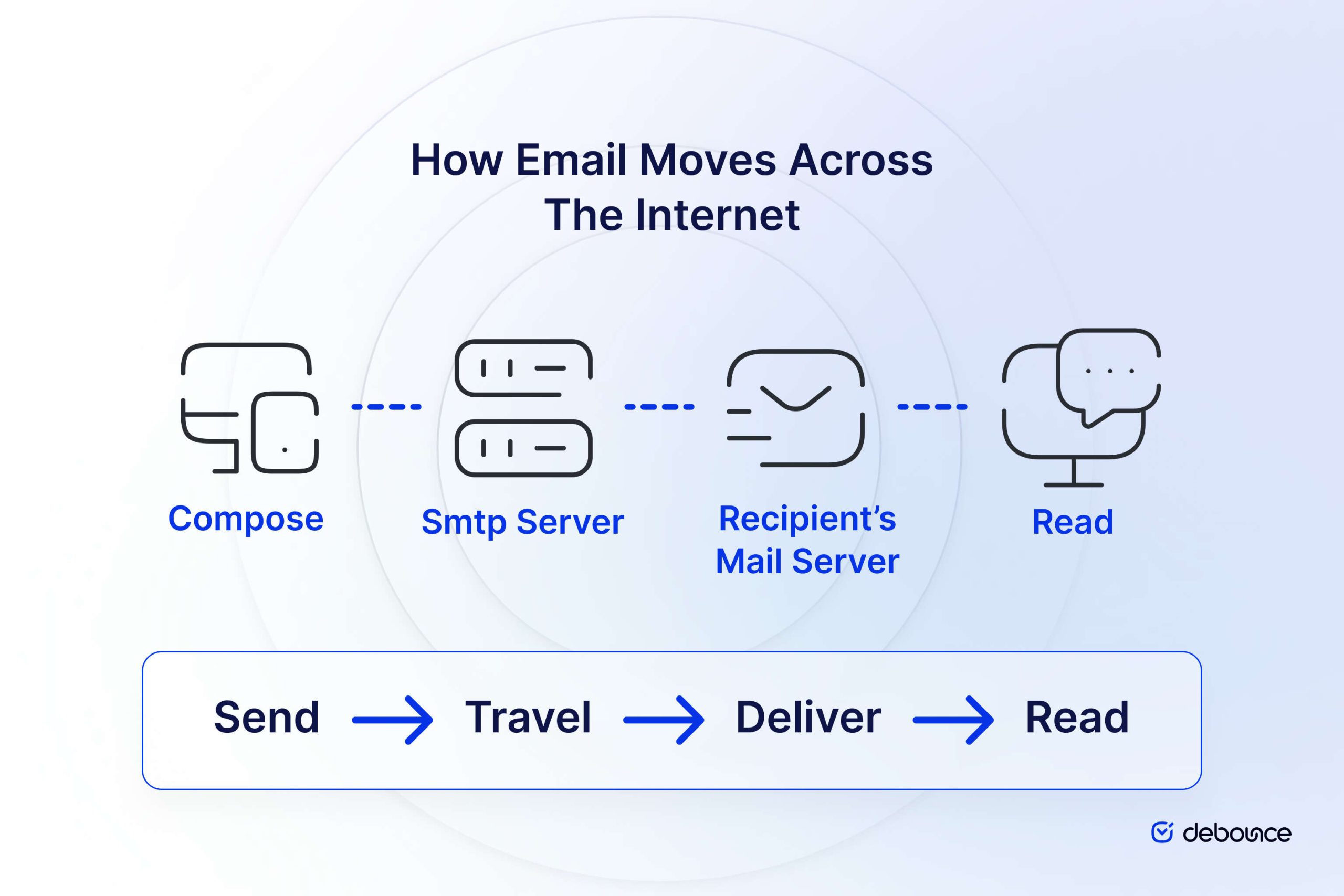
An illustration that shows the simple process of how an email is sent across the internet (Compose > SMTP Server > Deliver to Recipient’s Mail Server, and then Read)
To visualize this process, imagine sending a physical letter:
When SMTP was first standardized in 1982, email security wasn’t a primary concern.
The internet was a much smaller, more trusted network primarily used by academic and research institutions.
Therefore, the original SMTP specification had no built-in security mechanisms – emails were transmitted as plain text, with no encryption or robust authentication.
However, this lack of security became problematic as the internet grew and email became a critical communication tool for businesses and individuals.
Some key security issues with traditional SMTP include:
Over time, extensions and enhancements to SMTP were developed to address these shortcomings:
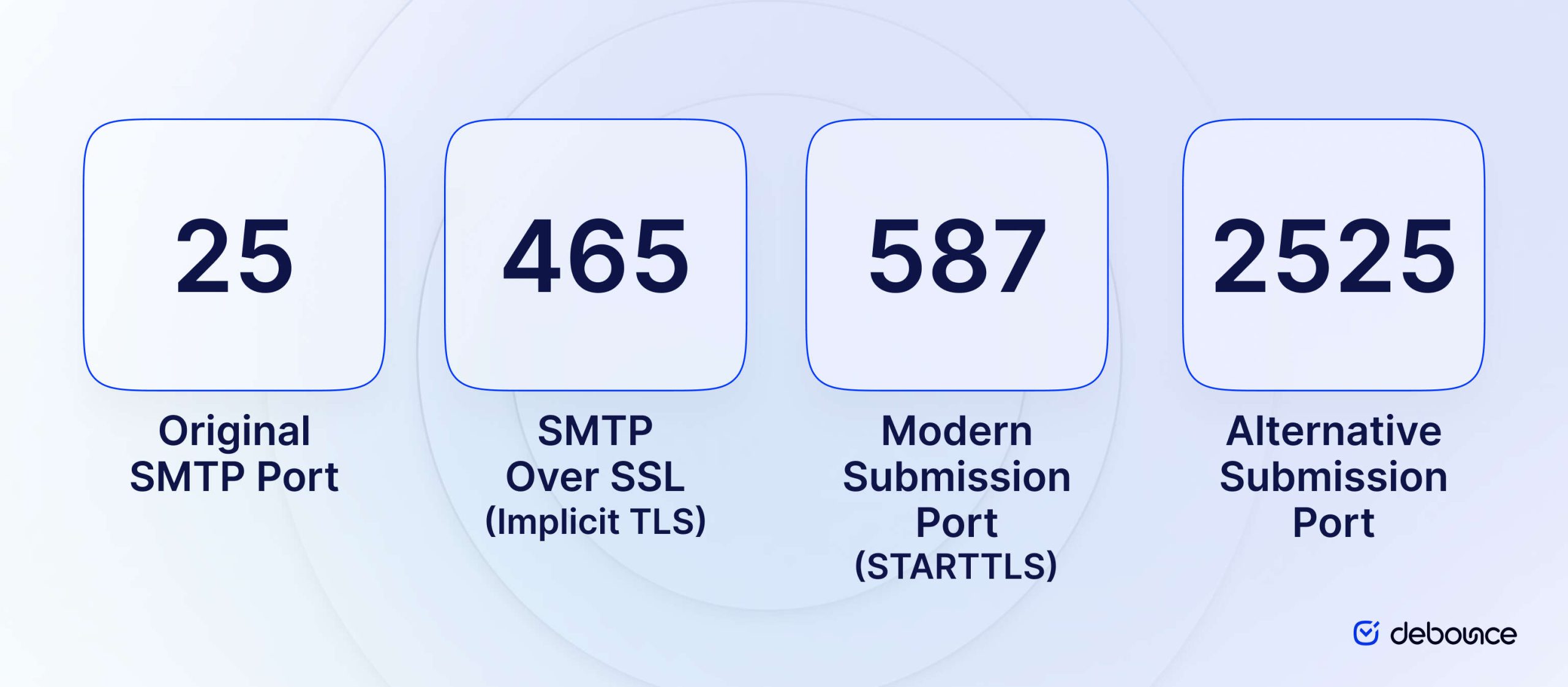
An illustration of icons representing the different email ports and why you’d use them
In networking, a port is a logical endpoint for communication.
Think of ports as specialized doorways into a computer system – each serving a specific type of traffic. Ports are identified by numbers ranging from 0 to 65535.
For SMTP communication, specific ports have been designated:
The choice of port affects:
Understanding these distinctions is crucial for setting up reliable, secure email systems.
So, why these ports and why are there differences? Why not just have one secure port specifically for email that everyone uses? Let’s break that down.
Port 25 was established as the standard SMTP port in 1982 when the protocol was first defined by the Internet Engineering Task Force (IETF).
For many years, it served as the default port for all SMTP traffic, both for submitting emails from clients to servers and for server-to-server relay.
The implementation of Port 25 originated from a 1982 request by the University of Southern California to the Internet Engineering Task Force (IETF).
At that time, the focus was on establishing a standardized communication channel for email transmission with basic protection against attacks, such as man-in-the-middle interception.
Today, the role of Port 25 has narrowed significantly. Its primary function is now limited to:
A simple telnet connection to an SMTP server on Port 25 might look like this:
> telnet smtp.example.com 25Trying 192.0.2.1…
Connected to smtp.example.com.
Escape character is ‘^]’.
220 smtp.example.com ESMTP Postfix
> EHLO client.example.com
250-smtp.example.com
250-PIPELINING
250-SIZE 10240000
250-VRFY
250-ETRN
250-STARTTLS
250-ENHANCEDSTATUSCODES
250-8BITMIME
250 DSN
Notice the 250-STARTTLS line, indicating that this server supports encryption via the STARTTLS command, but it’s not mandatory.
However, with this in mind, Port 25 has several significant security limitations:
Because of these issues, particularly its exploitation by spammers, many Internet Service Providers (ISPs) and cloud hosting providers now block outbound traffic on Port 25 from their customers.
This blocking helps prevent compromised systems from being used to distribute spam.
If you’re experiencing connection issues on Port 25, it’s likely because your ISP is blocking it. In a simple test, you might see:
> telnet smtp.example.com 25Trying 192.0.2.1…
telnet: Unable to connect to remote host: Connection timed out
This blocking is so widespread that Port 25 should no longer be used for email client submissions. Instead, it should be reserved solely for server-to-server communication.
Port 465 has perhaps the most convoluted history of the SMTP ports.
In the mid-1990s, as the need for email encryption became apparent, the Internet Assigned Numbers Authority (IANA) briefly assigned Port 465 for “SMTPS” – SMTP over SSL.
However, this assignment was short-lived.
Around 1997, the IETF decided on a different approach to secure SMTP: adding the STARTTLS command to the SMTP protocol itself, which would allow encryption to be negotiated over existing ports.
As a result, Port 465’s official assignment for SMTPS was revoked after only about a year.
Despite this official deprecation, many email services had already implemented support for Port 465, and it continued to be widely used. This created a situation where Port 465 was being used in practice even though it was no longer officially designated for SMTP.
Port 465 uses what’s known as “Implicit TLS” or “Implicit SSL”:
This approach is similar to how HTTPS works on the web – the secure connection is established before any application data is transmitted.
Here’s a simplified communication flow for Port 465:
Today, Port 465 exists in a curious state:
Port 465 is appropriate for:
The Internet Assigned Numbers Authority has now reassigned Port 465 to a different service (“URL Rendezvous Directory for SSM”), though in practice it continues to be primarily used for secure SMTP.
In 1998, RFC 2476 (later replaced by RFC 6409) introduced the concept of a dedicated “message submission” port separate from the SMTP relay port. This separation addressed the growing need to distinguish between two different types of SMTP traffic:
Port 587 was designated for this message submission role, creating a clear distinction from Port 25’s relay function. This separation allowed for different policies and security requirements to be applied to each type of traffic.
Port 587 uses “Explicit TLS” through the STARTTLS command. Here’s how it works:
A typical SMTP session using Port 587 with STARTTLS might look like this:
> telnet smtp.example.com 587Trying 192.0.2.1…
Connected to smtp.example.com.
Escape character is ‘^]’.
220 smtp.example.com ESMTP Postfix
> EHLO client.example.com
250-smtp.example.com
250-PIPELINING
250-SIZE 10240000
250-VRFY
250-ETRN
250-STARTTLS
250-AUTH PLAIN LOGIN
250-ENHANCEDSTATUSCODES
250-8BITMIME
250 DSN
> STARTTLS
220 2.0.0 Ready to start TLS
… (TLS negotiation occurs) …
> EHLO client.example.com
250-smtp.example.com
250-PIPELINING
250-SIZE 10240000
250-VRFY
250-ETRN
250-AUTH PLAIN LOGIN
250-ENHANCEDSTATUSCODES
250-8BITMIME
250 DSN
> AUTH LOGIN
334 VXNlcm5hbWU6
dXNlcm5hbWU=
334 UGFzc3dvcmQ6
cGFzc3dvcmQ=
235 2.7.0 Authentication successful
Notice how SMTP communication begins in plain text but switches to TLS encryption after the STARTTLS command is issued.
In most cases, Port 587 will be your port of choice.
It’s emerged as the recommended standard for email submission for several compelling reasons:
For the vast majority of users and organizations setting up new email systems, Port 587 should be the default choice for message submission.
Port 2525 is not an officially designated SMTP port by either IANA or the IETF. Instead, it emerged as a practical alternative when the standard ports (25, 465, and 587) are blocked by ISPs or corporate networks.
Functionally, Port 2525 typically works identically to Port 587:
The primary difference is simply the port number itself, which helps bypass network restrictions.
Port 2525 should be considered in these scenarios:
Many email service providers, including Mailgun, SendGrid, and others, support Port 2525 specifically to provide this fallback option for their customers.

An illustration of a developer thinking about which email port they should use in their project
Let’s talk security because, from a developer perspective, this is one of your most important considerations. There are several options.
STARTTLS, used primarily on Ports 25 and 587, provides “opportunistic encryption” through these steps:
Advantages:
Disadvantages:
Implicit TLS, used on Port 465, takes a different approach:
Advantages:
Disadvantages:
Authentication is a critical security component that verifies the identity of the sending client. The authentication requirements vary by port:
Port 25:
Port 465:
Port 587:
Port 2525:
It’s worth noting that modern email servers should always require authentication for message submission, regardless of port, to prevent abuse.
| Feature | Port 25 | Port 465 | Port 587 | Port 2525 |
| Primary Use | Server-to-server relay | Secure message submission | Message submission | Alternative submission |
| Encryption Type | Optional STARTTLS | Implicit TLS | STARTTLS | STARTTLS |
| Initial Connection | Unencrypted | Encrypted | Unencrypted | Unencrypted |
| Downgrade Attack Risk | High | Low | Medium | Medium |
| Authentication | Optional | Required | Required | Required |
| ISP Blocking Likelihood | High | Medium | Low | Low |
| IETF Standard | Yes (for relay) | No | Yes (for submission) | No |
| Recommended For | Server-to-server only | Legacy systems | Modern clients | When others are blocked |
To ensure the highest level of email security when configuring SMTP:

An illustration of a developer thinking about the best way to set up their email sending SMTP ports.
Now, choosing the ports that are best for your project. We can break down this down by use case so you can find the best fit.
If you’re configuring an email client like Outlook, Apple Mail, or Thunderbird:
For applications sending transactional or marketing emails:
const nodemailer = require(‘nodemailer’);let transporter = nodemailer.createTransport({
host: ‘smtp.example.com’,
port: 587,
secure: false, // true for 465, false for other ports
auth: {
user: ‘username’,
pass: ‘password’
},
tls: {
// do not fail on invalid certs
rejectUnauthorized: false
}
});
<?php
use PHPMailerPHPMailerPHPMailer;
require ‘vendor/autoload.php’;
$mail = new PHPMailer;
$mail->isSMTP();
$mail->Host = ‘smtp.example.com’;
$mail->SMTPAuth = true;
$mail->Username = ‘username’;
$mail->Password = ‘password’;
$mail->SMTPSecure = PHPMailer::ENCRYPTION_SMTPS; // SSL encryption
$mail->Port = 465;
?>
import smtplibimport ssl
from email.message import EmailMessage
msg = EmailMessage()
msg.set_content(“This is a test email.”)
msg[‘Subject’] = ‘Test Email’
msg[‘From’] = ‘[email protected]’
msg[‘To’] = ‘[email protected]’
context = ssl.create_default_context()
with smtplib.SMTP(‘smtp.example.com’, 2525) as server:
server.starttls(context=context)
server.login(‘username’, ‘password’)
server.send_message(msg)
For mail server configuration handling relay traffic:
# Outgoing relay settingsrelayhost = [mail.example.com]:25
smtp_tls_security_level = may
smtp_tls_note_starttls_offer = yes
# Using alternative port for relayrelayhost = [mail.example.com]:587
smtp_tls_security_level = encrypt
smtp_sasl_auth_enable = yes
smtp_sasl_password_maps = hash:/etc/postfix/sasl_passwd
smtp_sasl_security_options = noanonymous
To configure Postfix to secure SMTP submission on Port 587:
# SMTP submission on port 587submission inet n – y – – smtpd
-o syslog_name=postfix/submission
-o smtpd_tls_security_level=encrypt
-o smtpd_sasl_auth_enable=yes
-o smtpd_tls_auth_only=yes
-o smtpd_client_restrictions=permit_sasl_authenticated,reject
-o milter_macro_daemon_name=ORIGINATING
# TLS parameterssmtpd_tls_cert_file=/etc/ssl/certs/ssl-cert-snakeoil.pem
smtpd_tls_key_file=/etc/ssl/private/ssl-cert-snakeoil.key
smtpd_tls_security_level=may
smtpd_tls_protocols = !SSLv2, !SSLv3
smtpd_tls_mandatory_protocols = !SSLv2, !SSLv3
To configure Exchange Server for secure SMTP submission:
To test connectivity to an SMTP server on a specific port, you can use simple command-line tools:
Using Telnet:# Testing port 587
telnet smtp.example.com 587
# You should see something like:
Trying 192.0.2.1…
Connected to smtp.example.com.
Escape character is ‘^]’.
220 smtp.example.com ESMTP ready
Using OpenSSL for TLS testing:
# Testing STARTTLS on port 587
openssl s_client -starttls smtp -crlf -connect smtp.example.com:587
# Testing implicit TLS on port 465
openssl s_client -connect smtp.example.com:465
Using a dedicated SMTP testing tool like swaks:
# Basic SMTP test with authentication
swaks –server smtp.example.com –port 587 –tls –auth-user username –auth-password password –to [email protected] –from [email protected]
Symptoms:
Possible causes:
Solutions:
Symptoms:
Possible causes:
Solutions:
Port blocking is increasingly common, especially for Port 25:
Signs you’re experiencing port blocking:
Testing for port blocking:
# Use telnet to test connectivitytelnet smtp.example.com 25
# If blocked, you’ll see no response or a timeout
# If open, you’ll see the server’s greeting banner
TLS problems can be subtle and difficult to troubleshoot:
Use OpenSSL to inspect the TLS handshake:
# For port 587 with STARTTLSopenssl s_client -starttls smtp -connect smtp.example.com:587 -tls1_2
# For port 465 with implicit TLS
openssl s_client -connect smtp.example.com:465 -tls1_2
# Look for these in the output:
# – Certificate information and expiration
# – Certificate chain validation
# – TLS version and cipher used

Someone sits at a computer with arrows pointing to icons of SMTP, IMAP, and POP3
SMTP is not the only system related to email, and it’s important to understand the rest of the system so you can build systems that work effectively, sustainably, and efficiently. Here’s a quick guide to some of the other factors you need to know.
While SMTP handles sending email, receiving email requires different protocols:
POP3 is one of the oldest email retrieval protocols:
A simple POP3 session might look like:
> telnet mail.example.com 110+OK POP3 server ready
> USER username
+OK
> PASS password
+OK Logged in
> LIST
+OK 2 messages
1 1425
2 32360
> RETR 1
+OK 1425 octets
(… message content …)
> QUIT
+OK Logging out
IMAP is a more sophisticated protocol for accessing mailboxes:
An IMAP session might begin:
> telnet mail.example.com 143* OK IMAP4rev1 Server Ready
> A001 LOGIN username password
* OK Logged in
> A002 SELECT INBOX
* 18 EXISTS
* 2 RECENT
* OK [UNSEEN 17] Message 17 is first unseen
* OK [UIDVALIDITY 1428913542] UIDs valid
* FLAGS (Answered Flagged Deleted Seen Draft)
* OK [PERMANENTFLAGS (Answered Flagged Deleted Seen Draft *)] Limited
A002 OK [READ-WRITE] SELECT completed
Email’s end-to-end journey involves multiple protocols working together:
A comprehensive email server setup requires multiple ports:
| Service | Protocol | Unencrypted Port | Encrypted Port | Encryption Method |
| Sending Mail | SMTP (relay) | 25 | 25 | STARTTLS |
| Mail Submission | SMTP | 587 | 587 | STARTTLS |
| Secure Submission | SMTPS | N/A | 465 | Implicit TLS |
| Mail Retrieval | POP3 | 110 | 995 | Implicit TLS |
| Mail Access | IMAP | 143 | 993 | Implicit TLS |
Setting up a complete email server requires configuring all these ports appropriately for both sending and receiving functionality.
After exploring the complexities of SMTP ports, several clear guidelines emerge:
For different email users, our port recommendations are:
For individual users:
For business email administrators:
For developers integrating email functionality:
For email service providers:
By following these best practices and staying informed, you can ensure that your email infrastructure remains both secure and reliable, delivering messages successfully while protecting sensitive information from interception or compromise.
Email remains one of our most critical communication tools, and understanding the nuances of SMTP ports is essential for anyone managing email systems.
The protocols and ports we’ve explored represent decades of evolution in internet standards, adapting to growing security threats while maintaining the interoperability that makes email so universal.
Yes. Some antivirus and security tools include firewall or email scanning features that can block or restrict SMTP ports, especially ports 25, 465, or 587. If email sending fails, check your antivirus firewall rules or temporarily disable email scanning to see if it resolves the issue.
The port numbers themselves are standard, but providers may recommend different configurations. Most services, including Gmail and Outlook, support Port 587 for secure email submission, while Port 465 may also be available for SSL/TLS connections. Always check the provider’s SMTP settings to confirm the correct server address and security method.
Find quick answers to your questions about our pricing and plans.

The highest-impact subdomain decision is separating marketing, transactional, and outbound traffic. Transactional emails should always have the strongest deliverability protection because they trigger...

Mass emailing is a powerful way to communicate a message to a large audience. The goal could be anything from boosting conversions, a quick follow-up...

A couple of factors determine whether your recipients will click on your email or not. However, the most important of these is your email sender...

Struggling to make sales through email marketing? Learn the tricks to getting your emails opened, read, and clicked on so you can make money with...

Are you looking for a Mailchimp alternative? Mailchimp is a popular email marketing platform, but its lengthy customer service response times and arbitrary rules have...


E-mail lists play a important function in any on-line advertising and marketing strategy. Whether for your weblog, business, or corporation, you can depend on e-mail...
