Do you run professional or business email campaigns? Are you wondering how to implement DMARC records for email validation and security? Did you know? You...

Key Takeaways
Your sending platform says “Delivered,” but that doesn’t necessarily mean anyone actually saw the message. It might be sitting in a spam folder or buried in Promotions, where no one looks. You can test email deliverability in minutes with free tools that show exactly where your emails land, whether they pass authentication, and what’s hurting your sender reputation.
Google’s sender guidelines and the 2024 bulk-sender rules made this kind of testing hard to skip if you send in any real volume. However, deliverability depends on sender reputation, and that reputation changes with every campaign you send.
The fastest way to check deliverability is a spam-score test. The most reliable way is an inbox-placement test. A spam-score tool checks your content and setup, while an inbox-placement tool shows where real mailboxes route your message.
Between those two sit four more checks that show why an email may fail and where it landed: authentication, blocklist status, sender reputation, and a quick manual test.
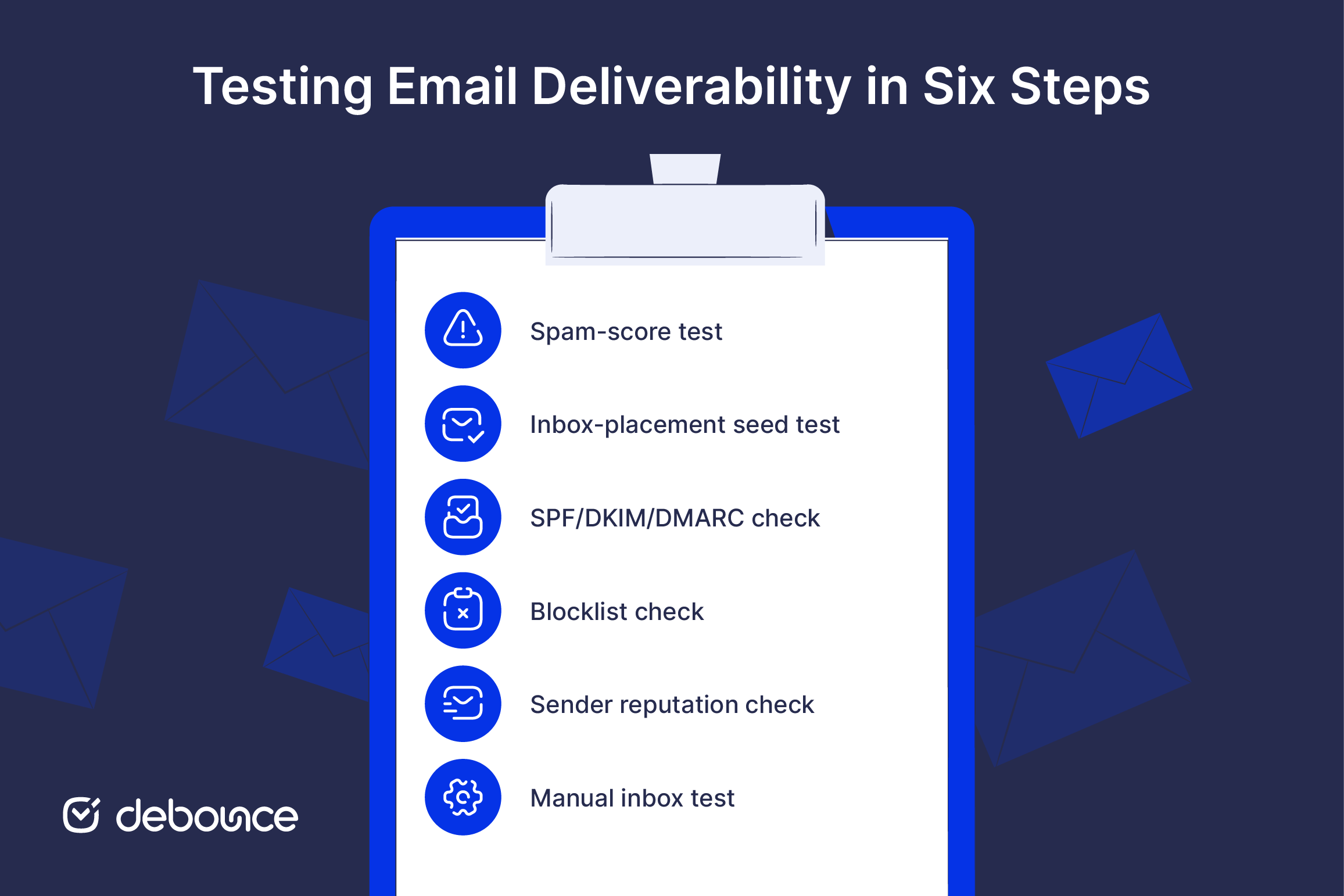
A spam-score test is the quickest check you can run before sending anything. Tools like Mail-tester generate a score, commonly out of 10, along with a breakdown of what helped or hurt it. It evaluates your content, authentication, and configuration, not your live reputation at each inbox provider.
Here’s how to run one:
An inbox-placement test, sometimes called a seed test, sends your email to real mailboxes across providers and reports whether it landed in the inbox, spam, or promotions for each one. This is the test that reveals a message hitting the inbox in Gmail while landing in spam in Outlook, which a spam-score test alone won’t show you.
Steps to run one:
Confirm your sending domain passes SPF, DKIM, and DMARC. Failing any one of these is one of the most common reasons mail ends up in spam.
Most spam-score and placement tools report your authentication results directly. You can also inspect the raw headers of a received email or run a dedicated record checker. As Gmail and Yahoo require authentication for bulk senders, a pass on all three protocols is the baseline, but alignment between them matters just as much as the individual checks.
Check whether your sending domain or IP appears on major blocklists such as Spamhaus or Barracuda. A listing can block delivery outright, regardless of how clean your content is.
If you find yourself listed, find the root cause first. Common culprits include spam complaints, weak engagement, authentication gaps, or sending to bad addresses. Fix the underlying issue, then request delisting from the blocklist operator.
Review your domain and IP reputation in Google Postmaster Tools and a Sender Score lookup. Reputation is the single biggest driver of where your email lands, more than content or even authentication in many cases.
A strong sender reputation usually reflects steady send volume, low complaint rates, and consistent engagement. A weak reputation often shows up as sudden spikes in bounces or complaints, uneven sending patterns, or declining inbox placement.
Reputation builds slowly but can drop quickly, so check it regularly, not only when deliverability starts to fail.
Send your email to your own Gmail, Outlook, and Yahoo accounts and see where it lands in each one. It takes two minutes and catches obvious problems fast.
The limitation is that your own inboxes are a small, biased sample, so use this check to spot major issues, not to replace a proper seed test.
Before you send an important campaign, use the Email Deliverability Pre-Send Checklist to catch common deliverability issues before they hurt inbox placement. It walks you through the key checks: spam score, inbox placement, SPF/DKIM/DMARC authentication, blocklists, sender reputation, content issues, and list hygiene.
Every method above checks one or more of the same core dimensions. Knowing what each one means helps you read a report.
| Dimension | What it tells you |
| Spam score | How your content and setup score against common spam filters |
| Inbox vs. spam vs. promotions | Where your email actually lands per provider |
| Authentication pass/fail | Whether SPF, DKIM, and DMARC are correctly configured and aligned |
| Blocklist status | Whether your domain or IP is flagged by major blocklist operators |
| Content and HTML flags | Spam trigger words, text-to-image ratio, broken links, tracking issues |
A spam score is not the same as inbox placement. You can get a perfect score and still land in spam if your sender reputation is weak.
“Delivered” only means the receiving server accepted the message. It does not confirm that the email reached the inbox.
Most deliverability failures come from a few common issues. The test result usually points you toward the problem, but the fix depends on whether the issue is technical, reputation-based, or content-related.
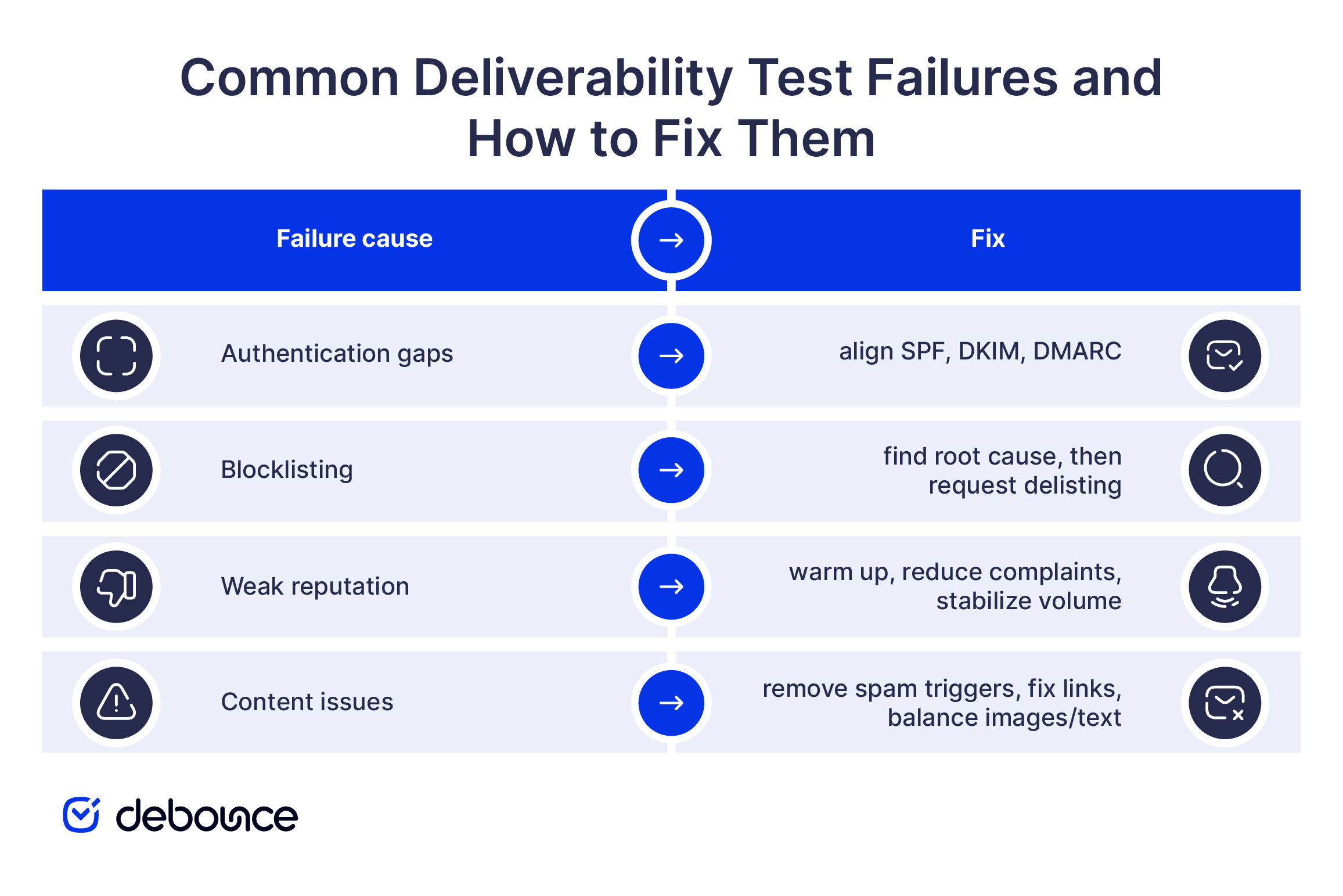
One root cause often shows up only indirectly: poor list quality. Sending to invalid addresses drives your bounce rate up, and hitting spam traps damages your reputation fast. Both problems can lower inbox placement across providers, not only with the mailbox provider where the issue first appeared.
This is where list hygiene becomes step zero. Clean your email list before you test or send, then monitor your list over time so it stays healthy between cleanings. A deliverability test diagnoses the symptom. List hygiene removes one of the leading causes before it ever shows up in a report.
Run a deliverability test before any large campaign, especially if the email supports sales, account access, onboarding, or an important announcement. You should also test after changing your email content, sending platform, domain, authentication records, or IP address. If you are warming up a new domain or IP, test more often. Early sending activity affects your reputation, so it is better to catch inbox placement problems before you increase volume.
After that, set a regular testing schedule. A single test only shows how your email performed at one point in time. Sender reputation, inbox placement, and blocklist status can change within days, especially after a campaign with high bounces, low engagement, or complaints.
Regular monitoring helps you catch problems before they affect a full campaign. It also gives you a clear baseline, so you can see whether a deliverability issue is a one-time problem or part of a larger pattern.
Deliverability testing gives you a clearer view of what happens after you send. A spam-score test gives you a fast read on content and setup, while an inbox-placement test shows where your email actually lands.
Use both before important campaigns, then fix the root causes each report points to. No single test is final because deliverability depends on sender reputation, and that reputation can change from one campaign to the next.
The best results start before testing. Clean your email list first, remove risky addresses, and keep bounces and spam traps out of your sends. A cleaner list gives every campaign a better chance of reaching the inbox.
Aim for a spam-score result near the top of the tool’s scale, such as 9 or 10 out of 10. For inbox placement, a rate above 90% is a strong benchmark. Still, scores are signals, not guarantees. A clean result does not always mean every provider will place your email in the inbox.
Free deliverability tools are enough for occasional checks, smaller lists, and quick pre-send testing. They can help you catch basic issues with content, authentication, blocklists, and inbox placement. Paid tools make more sense for high-volume senders, agencies, and teams that need ongoing monitoring across domains, IPs, and mailbox providers.
No. Sending to a spam-score tool or seed-test address does not harm your sender reputation. These tests are designed for deliverability checks. The bigger risk is not testing at all and discovering too late that your emails were already landing in spam.
Promotions placement is usually caused by marketing-style content, bulk-sending patterns, tracking links, and how recipients interact with your emails. It is not the same as spam, but it usually means lower visibility. If the message is important, test simpler formatting, clearer sender identity, and more direct content.
Delivery rate shows how many emails were accepted by receiving servers. Deliverability shows where those accepted emails actually landed. That means you can have a high delivery rate while still seeing poor inbox placement.
Find quick answers to your questions about our pricing and plans.

Do you run professional or business email campaigns? Are you wondering how to implement DMARC records for email validation and security? Did you know? You...

Now, more than ever, more business owners are beginning to see and use email marketing as a veritable tool to foster productive business relationships with...


Email reverse lookup helps identify who is behind an email address and adds missing contact details to improve data quality. The quality of...


Search engine optimization, or SEO, is crucial for the online visibility of any website and vital for billions of companies worldwide that want to promote...


You can create a Gmail filter from the search bar or from Settings, and both let you combine several actions in one rule....

Having a custom domain for your business emails adds a level of professionalism and credibility that generic email addresses like gmail.com or outlook.com cannot match....