
20–25% is a solid open rate for most marketing emails; above 40% is excellent, while below 15% can indicate potential issues. Open rates...

Key Takeaways
You open your browser, carefully type in your bank’s web address, and press enter. The page looks exactly right. Same logo. Same layout. Same login box. You enter your username and password without a second thought. Later, you find out it wasn’t your bank at all, and your credentials are already in someone else’s hands.
That’s pharming. It’s an attack that redirects your internet traffic before you ever see the page load, quietly sending you to a fake site designed to look identical to the real one. Unlike phishing, which tries to trick you into clicking a suspicious link, pharming doesn’t depend on an obvious mistake. You can type the correct address, avoid sketchy emails, even double-check the URL, and still end up in the wrong place without realizing it.
Understanding how pharming works makes it easier to notice subtle warning signs and take steps to protect your information before it’s exposed.
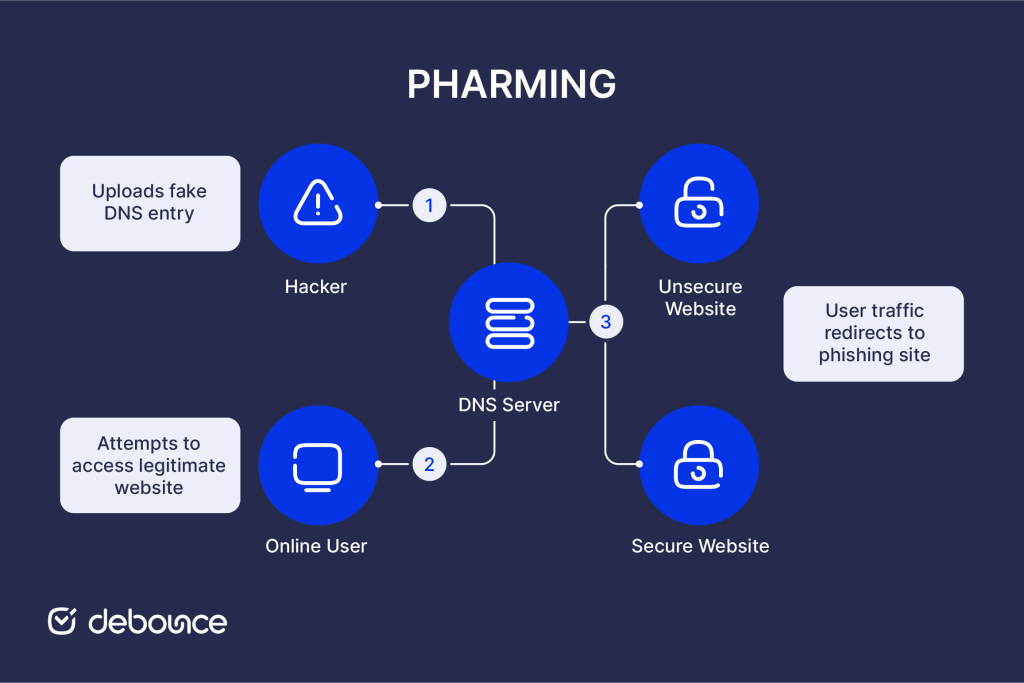
Pharming is a cyberattack that redirects users from legitimate websites to fraudulent replicas without requiring any user action or deception beyond the initial compromise of the infrastructure. The term combines “phishing” and “farming”, reflecting how attackers collect credentials and sensitive data in bulk. Rather than tricking individuals one by one, pharming allows attackers to capture information from many users at once by manipulating the systems that guide web traffic.
When you type a web address like “mybank.com,” your device doesn’t directly know where that website lives on the internet. It queries a Domain Name System (DNS) server to translate the human-readable domain into a numerical IP address that locates the actual server. Pharming corrupts this translation process, substituting attacker-controlled IP addresses for legitimate ones.
Users arrive at fraudulent sites through their own correct navigation, not through suspicious links or warnings. Without careful inspection of security certificates and subtle URL details, there’s often no visual indication that anything is wrong.
Pharming exploits the DNS resolution process that underlies every website visit, either at the infrastructure level or on individual devices.
Every website exists at a numerical IP address (like 203.0.113.42) that identifies its server location. DNS servers maintain databases that translate domain names (mybank.com) into IP addresses. When you type an address, your browser queries DNS, receives the IP address, and connects to that server.
Pharming attacks corrupt this process at one of two points: the DNS servers that serve many users, or the host files on individual devices that perform local translations before consulting DNS servers.
Pharming sites are designed for deception. Attackers build replicas that copy legitimate sites’ HTML, CSS, images, and functionality. They use the same color schemes, layouts, and brand elements. Login forms accept credentials, and sometimes even forward users to the real site after capturing their information, so victims don’t realize anything happened.
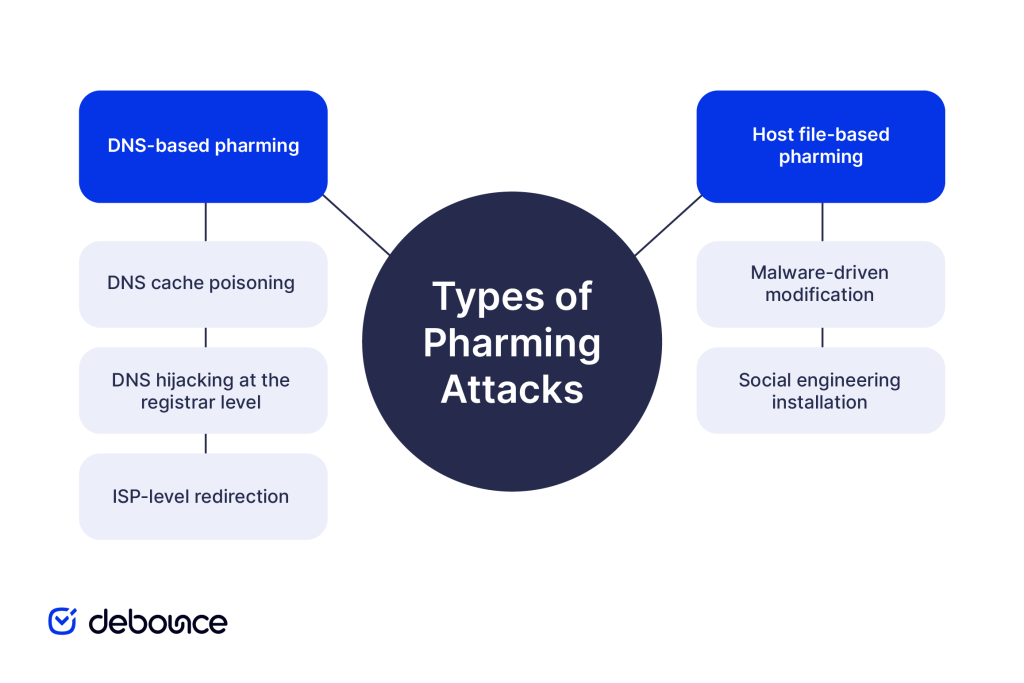
Pharming attacks fall into two primary categories based on where the DNS corruption occurs and how many users are affected.
DNS-based attacks target the shared infrastructure that serves many users, making them a more dangerous category in terms of scale.
Attackers exploit vulnerabilities in DNS server software to inject false records into server caches. Once cached, the false translation persists until the cache expires or is manually cleared, potentially affecting everyone using that DNS server for hours or days.
This attack type has been known since the 1990s, but vulnerabilities in DNS infrastructure continue to be discovered. The 2008 Kaminsky vulnerability revealed fundamental weaknesses in DNS, allowing cache poisoning at scale, prompting urgent industry-wide patching. Similar vulnerabilities have been found since.
Attackers who gain access to domain registrars (the companies that manage domain registrations) can modify the official DNS records for legitimate domains, pointing mybank.com to attacker-controlled servers at the authoritative level rather than just poisoning caches.
This attack is more difficult to execute but affects all users worldwide, not just those using a specific DNS server. High-profile domain hijacking incidents have redirected traffic for major organizations before being detected and reversed.
Compromised internet service providers or malicious ISPs can redirect DNS queries transparently, affecting all customers without touching individual devices or external DNS servers.
Host file attacks target individual devices rather than shared infrastructure, limiting their scale but making them accessible to less sophisticated attackers.
Viruses, Trojans, and other malware that infect computers often include functionality to modify the hosts file as part of their payload. Once modified, the infected device consistently routes targeted domains to attacker-controlled sites regardless of what any DNS server says.
Users can be tricked into running scripts or software that modifies their hosts file directly, through email attachments, fake software downloads, or drive-by website infections. Unlike DNS poisoning, which requires server access, host file attacks can be deployed by anyone who can trick a user into running malicious code.
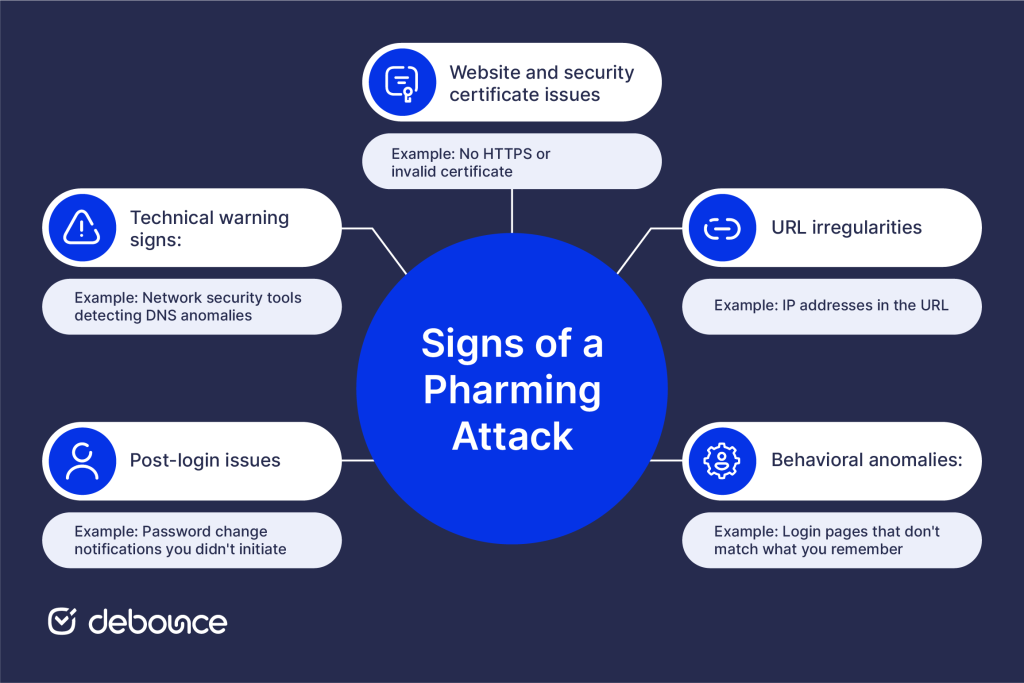
Pharming is designed to be invisible, but certain warning signs indicate you may have been redirected to a fraudulent site.
Website and security certificate issues:
URL irregularities:
Behavioral anomalies:
Post-login issues:
Technical warning signs:
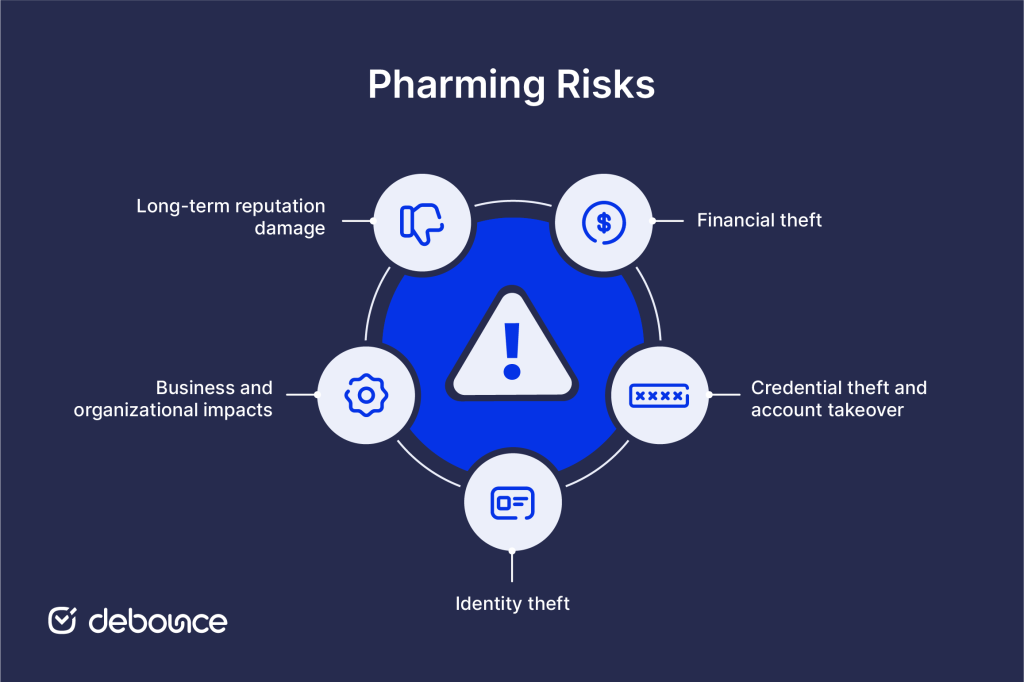
Successful pharming attacks create serious and often long-lasting harm across financial, privacy, and organizational dimensions.
Banking credential theft through pharming enables direct account access. Attackers log into captured accounts, initiate wire transfers, drain savings, and make purchases before victims realize anything is wrong. Financial fraud resulting from pharming can be difficult to recover from, particularly when international wire transfers are involved.
Payment card information captured on fake e-commerce sites enables fraudulent purchases and card cloning that continues generating losses until cards are cancelled and replaced.
Captured login credentials rarely stay limited to just one account. Many people reuse passwords across multiple services, so a stolen banking password might also open the door to email, cloud storage, social media, and more. From there, attackers can trigger password resets and move through connected accounts step by step, turning a single compromise into a much larger takeover.
Personal information captured through pharming, such as names, addresses, Social Security numbers, and dates of birth, can be used to commit identity theft. Once exposed, that data may allow criminals to open fraudulent accounts, file false tax returns, or misuse credit in the victim’s name. The financial damage can take years to detect and fully resolve.
Organizations targeted by pharming face operational disruption, customer data exposure, and regulatory consequences. A successful DNS hijacking affecting a company’s own domain can redirect all customers to fraudulent sites, damaging trust even when the company itself wasn’t compromised. Recovery requires DNS propagation time, which leaves users uncertain about which sites are legitimate.
Businesses whose customers were victimized through pharming, even when attackers, not the business, were responsible, face reputational consequences. Customer trust is difficult to rebuild after security incidents, particularly those affecting financial or personal data.
Email spam and pharming are often used together: phishing emails drive users to pharming-compromised URLs, combining delivery mechanisms for maximum impact.
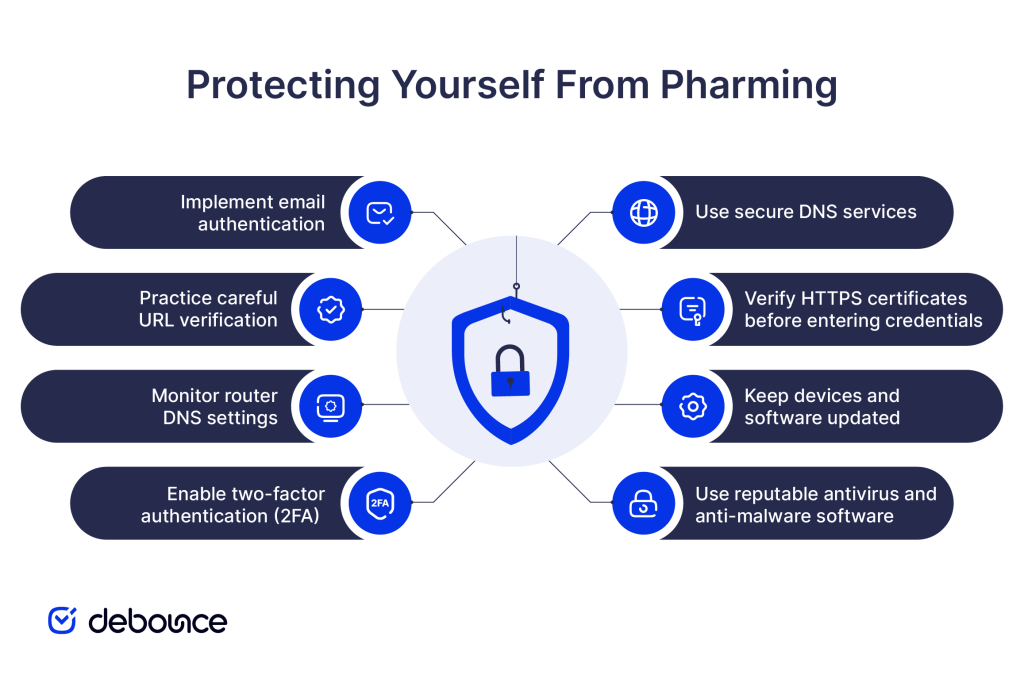
Protection against pharming requires technical precautions, behavioral habits, and organizational security practices.
Standard ISP-provided DNS servers offer minimal security. Switching to security-focused DNS providers that implement DNS Security Extensions (DNSSEC) and use encrypted DNS protocols reduces poisoning risk. DNSSEC digitally signs DNS records, making it significantly harder for attackers to inject false entries.
Before logging in to any sensitive site, like banking, email, or financial services, verify the HTTPS certificate:
Never enter login credentials on pages showing certificate errors, even if the site looks correct.
Security patches for operating systems, browsers, and antivirus software address known vulnerabilities that pharming malware exploits to modify host files or intercept DNS queries. Enabling automatic updates ensures patches are applied promptly without requiring manual monitoring.
Security software detects host file modifications, suspicious DNS changes, and malware that enables host-based pharming attacks. Real-time protection that monitors system changes catches modifications as they occur rather than after damage is done.
Even if pharming captures your login credentials, 2FA prevents attackers from accessing accounts without the second verification factor. Time-based one-time passwords (TOTP) and hardware security keys are particularly effective because they can’t be replayed by attackers who captured credentials from a pharming site.
Home routers are a common pharming target. Malware or attackers who compromise router admin credentials can modify DNS settings to redirect all household traffic. Periodically check router DNS configuration to ensure it points to your intended DNS provider rather than attacker-controlled servers.
Check URLs carefully before entering credentials. Especially after following links from any source. Look for subtle domain variations, ensure you’re on HTTPS, and verify the certificate before logging in.
Proper configuration of SPF records and DMARC helps prevent email-based attacks that often accompany pharming campaigns, reducing the phishing emails that direct users to pharming-compromised sites. Defending email infrastructure and web infrastructure together closes the combined attack vectors that attackers most commonly use.
Maintaining clean email lists reduces the organizational exposure from bounced emails and invalid contacts that attackers can exploit in reconnaissance prior to launching targeted pharming campaigns.
Pharming redirects users from legitimate websites to fraudulent replicas by corrupting DNS systems or manipulating device hosts files, without requiring any suspicious link or obvious deception. Users typing correct addresses can land on perfectly replicated fake sites and lose credentials, financial data, and personal information without realizing anything went wrong.
Protection requires layers: secure DNS services that implement DNSSEC, careful HTTPS certificate verification before entering credentials, updated devices and security software, two-factor authentication that remains valid even when passwords are captured, and router security that prevents DNS modification at the network level.
Switch your device and router DNS settings to a security-focused provider that supports DNSSEC and encrypted DNS queries today. Then enable two-factor authentication on all financial, email, and sensitive accounts, ensuring captured credentials alone aren’t enough for attackers to complete their work.
Maintain strong email security alongside web security. Use DeBounce to keep your email lists clean and your sending infrastructure healthy, reducing the phishing and spam exposure that often accompanies pharming campaigns. A secure email environment that reaches verified recipients is part of the same security posture that protects against web-based attacks like pharming.
Is pharming illegal?
Yes, pharming is illegal under computer fraud and cybercrime laws in most countries, including legislation such as the U.S. Computer Fraud and Abuse Act.
How common are pharming attacks?
Pharming is less common than phishing but significantly more dangerous when it occurs. Large-scale DNS poisoning incidents have affected millions of users simultaneously, while host file-based pharming through malware affects individual users continuously as part of broader malware campaigns.
Find quick answers to your questions about our pricing and plans.
20–25% is a solid open rate for most marketing emails; above 40% is excellent, while below 15% can indicate potential issues. Open rates...
Have you ever wondered how Google auto-completes your search request? It is through data appending and enrichment. How? Data Enrichment works with raw data. The raw data...


Almost all of us are email subscribers of some sort. From newsletters to promotional emails, we get one or more of these emails in our...
Now, more than ever, more business owners are beginning to see and use email marketing as a veritable tool to foster productive business relationships with...

Email subject line is the very first thing that a recipient of an email will notice. Will you open an email with the creepy or...

This post is about the 10-point framework of a perfect welcome email to delight your new subscribers. You know the feeling of getting a brand...
