There are certain best practices that every professional involved in email marketing knows. Things that most comprehensive guides detail, such as using email templates, setting...

Key Takeaways
Your last email campaign bounced at 3.2%. Now you’re staring at that number, wondering what it actually means. Is that fine? Should you be concerned, or is it normal for your industry?
Email bounce rate tells you how many of your messages never made it to the inbox. And knowing what’s typical for your industry matters, because it gives you context. A bounce rate that looks high at first glance might be fairly average for retail brands with large, diverse lists, while the same rate could signal serious problems for B2B SaaS companies with smaller, opted-in audiences.
Different industries see different bounce rate ranges for a reason. They collect emails in different ways, target different types of recipients, and deal with very different data quality challenges. E-commerce brands collecting emails at checkout encounter more typos and disposable addresses than B2B companies, where contacts come through sales teams and conferences.
This guide explains what email bounce rate measures, provides average bounce rates by industry, so you know where you stand, and shows you how to interpret your numbers and reduce bounces through better list management.
Email bounce rate measures the percentage of sent emails that failed to reach recipients’ inboxes, returned as undeliverable by receiving mail servers.
How bounce rate is calculated:
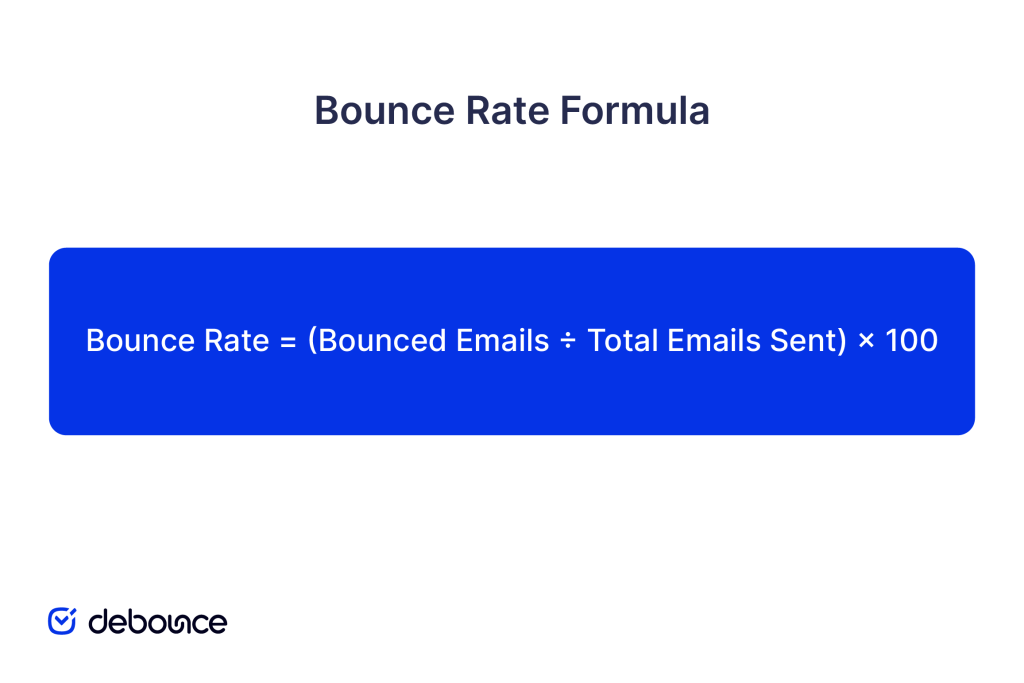
Example: You send 10,000 emails. 150 bounce back as undeliverable. Your bounce rate is (150 ÷ 10,000) × 100 = 1.5%
Bounce rate directly reflects list quality. Low bounce rates (under 2%) indicate clean lists with valid, active email addresses. High bounce rates (above 3-5%) signal problems: outdated contacts, poor data collection, purchased lists, or lack of regular list maintenance.
Bounce rates also impact sender reputation. ISPs monitor how many of your emails bounce, and consistently high bounce rates signal poor email practices, causing future messages to be filtered or blocked even when sent to valid addresses.
Important distinction: Email bounce rate measures undelivered emails, not website bounce rate (visitors leaving after viewing one page). This guide focuses exclusively on email marketing bounce rates.
Not all bounced emails fail for the same reasons. Understanding hard bounces vs. soft bounces helps you respond appropriately.
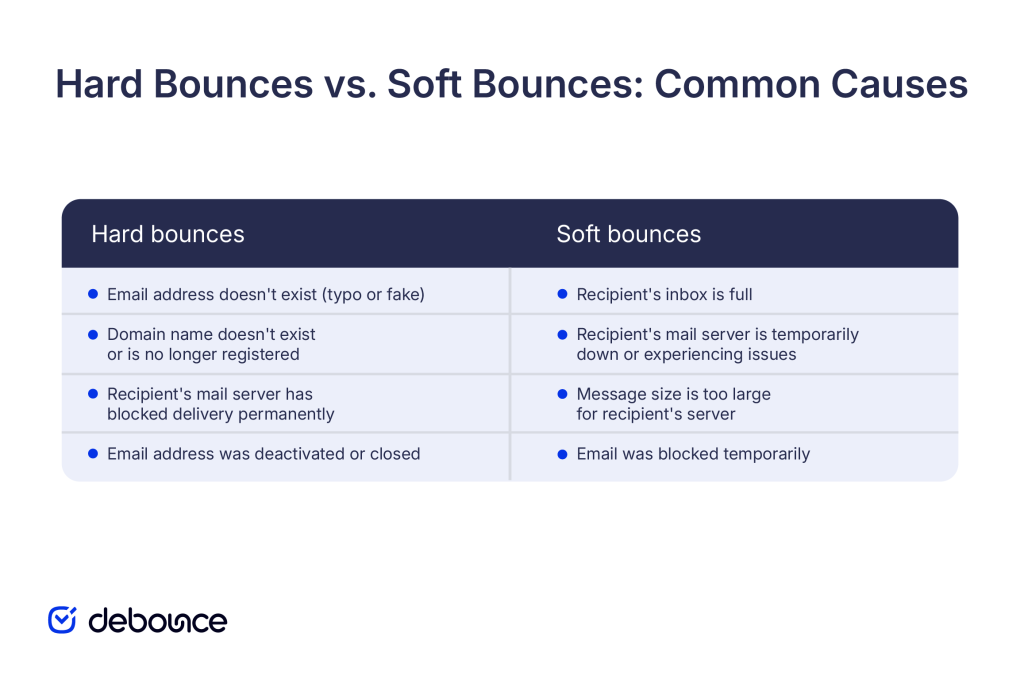
Hard bounces are permanent delivery failures. The email address is invalid, doesn’t exist, or the domain is no longer active.
Common causes:
Hard bounces should be removed from your list immediately. Continuing to send to hard-bounced addresses wastes resources and damages sender reputation because ISPs see you’re repeatedly attempting to deliver to addresses that will never work.
Soft bounces are temporary delivery failures. The email address is valid, but something prevented delivery this time.
Common causes:
Soft bounces don’t require immediate removal. However, if an address soft-bounces repeatedly over multiple campaigns (typically 3-5 consecutive sends), treat it as a hard bounce and remove it from your list.
Remember to monitor hard and soft bounces separately. Your ESP should categorize them automatically, allowing you to set different handling rules for each type.
Bounce rates vary significantly across industries due to different list-building practices, audience types, and data quality standards.
Typical industry-specific benchmarks (2024-2025):
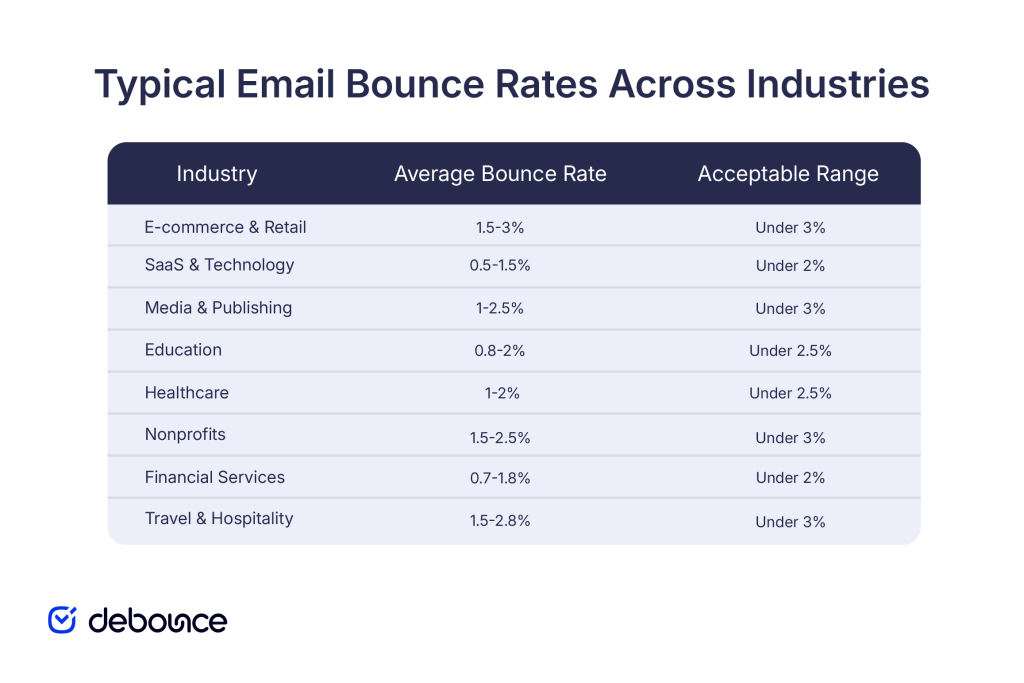
E-commerce sees higher bounces because they collect emails at checkout, through pop-up forms, and during account creation. These are all high-volume, lower-quality touchpoints where customers make typos, use disposable emails, or provide fake addresses to complete purchases quickly.
SaaS and B2B have lower bounces because leads typically come through sales teams, webinars, content downloads, and professional networks, where contact information is verified through conversations or multi-step signup processes.
Media and publishing sit in the middle because they combine newsletter signups (high quality, opted-in) with comment registrations and contest entries (lower quality, sometimes fake).
Education maintains relatively low bounce rates because contacts are often students, parents, and alumni whose email addresses are verified through institutional systems or formal enrollment processes.
Nonprofits see moderate bounces because donor and volunteer lists age over time as supporters move, change jobs, or become less active, but core supporters maintain stable contact information.
A “good” bounce rate depends on context, but general guidelines help you assess list health:
Bounce rates below 1% indicate exceptional list quality. You’re collecting emails through verified channels, cleaning regularly, and maintaining engaged, active contacts.
This is the target range for most marketing programs. It shows solid list management practices and reasonable data quality across acquisition sources.
Bounce rates in this range suggest room for improvement, but aren’t crisis-level. Review acquisition sources and implement regular list cleaning.
Rates above 3% indicate list quality problems that will hurt the sender’s reputation. Investigate immediately and clean your list before continuing to send.
Bounce rates over 5% are serious red flags. ISPs will notice that your sender reputation will suffer, and you risk being blocked or filtered. Stop sending and address the root cause before resuming campaigns.
Hard bounces should stay under 0.5-1%. Anything higher suggests poor list quality or verification practices. Soft bounces, on the other hand, can run 1-3% without immediate concern. However, consistently high soft bounces may indicate server issues or oversized messages.
ISPs and email providers monitor bounce rates as a key indicator of reputation. Consistently high bounce rates tell them you’re not maintaining your list properly, which makes all your future emails (even to valid addresses) more likely to be filtered or blocked.
Bounce rates above 3-5% sustained over multiple campaigns can get your sending domain or IP address blocklisted, affecting deliverability across all your email programs.
Understanding why emails bounce helps you fix the root causes rather than just treating symptoms.
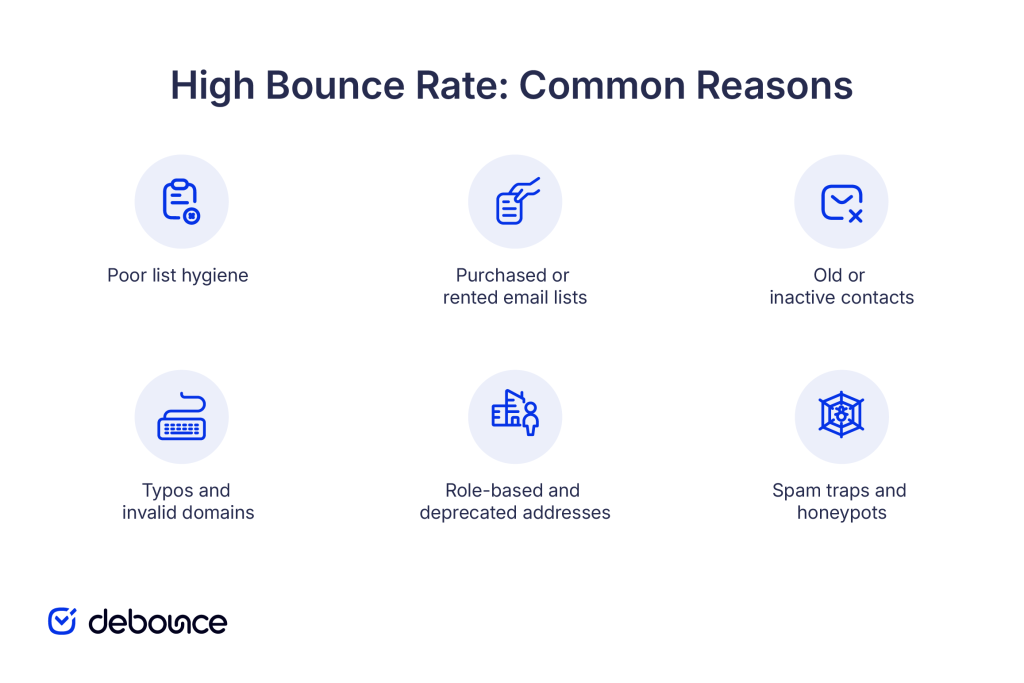
Email addresses naturally decay over time. People change jobs (abandoning work emails), close personal accounts, let inboxes fill up, or stop using old addresses. If you’re not regularly cleaning your list and removing inactive or invalid addresses, bounce rates creep upward as your list ages.
Buying or renting email lists guarantees high bounce rates. These lists contain:
Never use purchased lists. Build your own through legitimate opt-in methods.
Subscribers who signed up years ago and never engaged may have abandoned their email addresses. If someone has not opened an email in 12 or more months, there is a strong chance the inbox is no longer active. Continuing to send to these addresses increases bounce risk and reduces overall list quality.
When people manually enter email addresses during signup, they make mistakes:
Without real-time validation at signup, these typos enter your database and bounce on first send.
Generic role addresses such as info@, sales@, or support@ often have aggressive filtering rules or full inboxes, which increases the likelihood of bounces. Deprecated addresses like noreply@ or donotreply@ were never intended to receive incoming mail and will consistently fail delivery. Including these addresses on your list inflates bounce rates and weakens overall list quality.
When acquisition methods are poor, such as scraping websites, buying lists, or relying on unverified forms, spam trap addresses are more likely to enter your database. These addresses are designed to identify senders who fail to follow proper list-building practices. Hitting spam traps can trigger bounces and lead to serious, long-term sender reputation damage.
Preventing bounces is more effective than dealing with them after they occur:
Use real-time email validation on signup forms to catch typos, invalid domains, and disposable addresses before they enter your database. This stops bad data at the source rather than discovering it after bounces hurt your reputation. By preventing invalid addresses from being stored in the first place, you reduce downstream deliverability issues and keep your list accurate from the start.
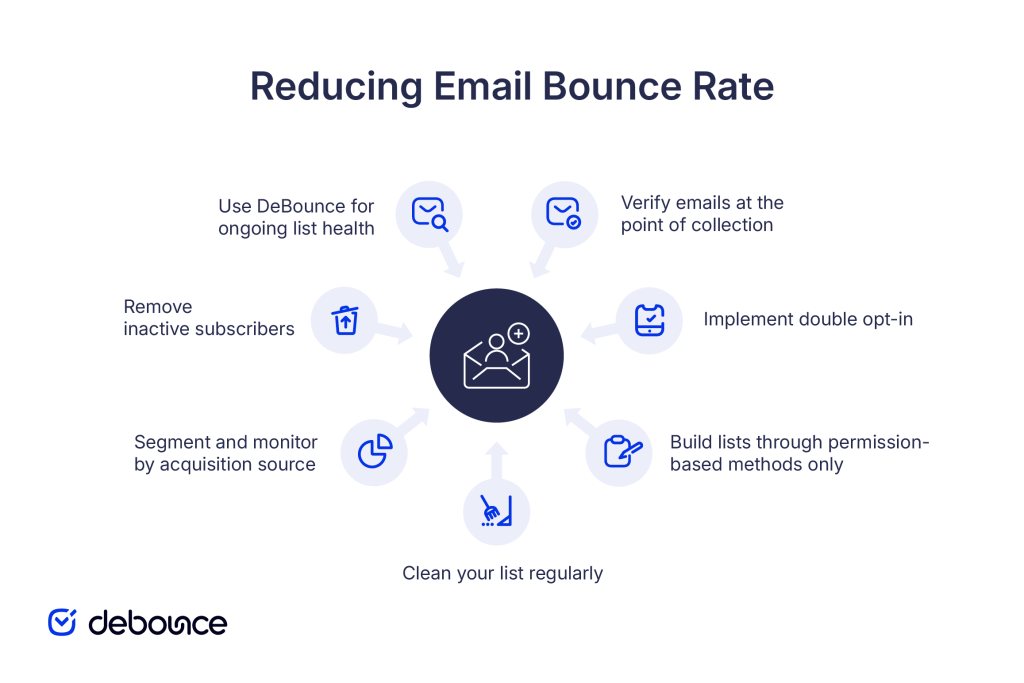
Require new subscribers to confirm their email address by clicking a link you send them. This ensures:
Double opt-in dramatically reduces bounce rates by filtering out typos and fake addresses.
Run your entire list through email verification every 3-6 months to identify:
Remove hard bounces immediately after each campaign. Monitor soft bounces and remove addresses that soft-bounce 3-5 consecutive times.
Every address on your list should come from someone who explicitly opted in through:
Track bounce rates separately for each list source, such as website signups, trade shows, or webinars. If one source consistently delivers higher bounce rates, investigate that channel’s data collection process and correct the issue. Monitoring sources individually makes it easier to identify problems early and prevent low-quality data from affecting your entire list.
If contacts haven’t opened or clicked in 6-12 months, send a re-engagement campaign. If they still don’t respond, remove them. Old, inactive addresses are more likely to have been abandoned, and removing them improves your overall bounce rate and sender reputation.
Email verification tools like DeBounce identify invalid, risky, and temporary addresses before you send, helping you maintain bounce rates under 2% and protect sender reputation. Verify new addresses before adding them to your database and run regular checks on your entire list to catch addresses that have degraded since initial signup. This ongoing verification process ensures your sending metrics reflect real, reachable recipients rather than accumulated list decay.
The average email bounce rate by industry ranges from 0.5% to 3%, with most healthy email programs maintaining rates under 2%. Your specific benchmark depends on your industry, list-building methods, and how actively you clean and maintain your database.
High bounce rates waste senders’ time and actively hurt their reputation, causing future emails to be filtered or blocked even when sent to valid addresses. Keeping bounce rates low requires preventing bad data from entering your list through real-time validation, regularly cleaning your database to remove invalid addresses, and building lists exclusively through permission-based, opt-in methods.
Monitor your bounce rate after every campaign, separate hard bounces from soft bounces, and remove problematic addresses immediately. Compare your performance to industry benchmarks, but focus more on your own trend: are your bounce rates improving or worsening over time?Use DeBounce to verify email addresses before they enter your database, identify risky addresses that could cause bounces, and maintain clean lists that support strong sender reputation and reliable deliverability. Start verifying your list today and bring your bounce rate into the healthy range for your industry.
Clean your entire list every 3-6 months via email verification, and remove hard bounces immediately after each campaign. High-volume senders should verify monthly, while lower-volume senders can extend to quarterly cleaning.
Yes, bounce rates can vary by region due to differences in email infrastructure quality, ISP policies, data privacy regulations, and email usage patterns. Emerging markets often see higher bounce rates due to less stable email infrastructure and higher address turnover.
Find quick answers to your questions about our pricing and plans.
There are certain best practices that every professional involved in email marketing knows. Things that most comprehensive guides detail, such as using email templates, setting...
In a time when everybody’s talking about hyper-segmentation and personalized promo messages, cold emailing may seem a bit outdated and obsolete. But it really isn’t....

Email marketing has become a critical success factor for any online business, and digital marketing experts use it to enhance customer communication and conversion. If...

If you’re seeing far too many bounces for outbound emails, you may first blame your email copy, the whole target list of emails, or the...


Almost all of us are email subscribers of some sort. From newsletters to promotional emails, we get one or more of these emails in our...


Most consumers won’t read your email. A study by ZipWhip reports that 56% of people receive from 25 to 100 emails a day. In addition,...