
Email regex checks format only: it cannot confirm whether an address actually exists or is active. A well-written email regex covers the local...

Key Takeaways
Email marketing in 2026 operates in a high-pressure environment, where crowded inboxes, stricter filtering, and rising user expectations leave little room for error. Some brands manage to stand out with campaigns that deliver strong ROI, while others invest heavily in design and personalization yet still fall short.
The difference often comes down to preparation. Even well-written emails and tailored content cannot perform without a smooth, reliable experience from send to inbox. Without a structured email testing checklist, small issues go unnoticed, and performance begins to slip.
Campaigns that are not properly tested tend to show it quickly through lower click-through rates, weaker ROI, and inconsistent conversions. An email testing checklist helps prevent this by ensuring each element is reviewed, tested, and optimized before sending.
Understanding what an email testing checklist includes and how to use it effectively has become essential for maintaining consistent results.
Sending emails without testing can affect more than a campaign. Broken links, incorrect personalization, rendering issues, or authentication gaps can reduce deliverability and weaken sender reputation. Over time, these repeated signals affect domain health, making Internet Service Providers more likely to filter or delay your emails, even when future campaigns are properly set up.
A systematic approach helps prevent these issues from compounding. Using a structured checklist ensures that each email is reviewed for accuracy, functionality, and relevance before it is sent. This consistency reduces subscriber fatigue, where recipients disengage after receiving emails that feel repetitive, broken, or poorly timed. When emails consistently meet expectations, unsubscribe rates remain lower, and engagement stays more stable.
The larger the send, the greater the impact of even a small mistake. When it comes to high-volume campaigns, errors scale quickly, affecting thousands of recipients at once and making recovery more difficult. A checklist creates a repeatable process that ensures every campaign meets the same standard before reaching your audience.
An email marketing checklist doesn’t have to be overwhelming or have too many components. This could be counterintuitive and not help you achieve anything. As with any marketing checklist, there are some staples you need to apply.
After all, having specific rules in place will ensure that you know precisely how to reach your end goal. It can also help you understand why an email marketing campaign didn’t perform as well as you would’ve liked.
So, when it comes to email testing, let’s see what an email marketing checklist consists of.
Email marketing is nothing without specific, attainable goals. A welcome email campaign will differ from an abandoned cart campaign. And the more you test, the better.
Before even setting your goals, the first step would be to invest in a robust email marketing platform that will carry all of the essential features – an intuitive email builder, A/B testing options, or lead generation features like landing pages and subscription forms are top of the list. Some of the most popular platforms, like Moosend and other Active Campaign alternatives, carry these features.
Now, it’s time for you to use them correctly. What is your aim? Do you need more sales, a better CTR, or brand awareness? Different goals call for different copy, content, and design.
Ensure that your platform can give you extra segmentation and personalization capabilities. You don’t want to miss out on targeting users at their funnel stage; missing out means you can’t nudge them in the right direction.
Let’s assume you’ve decided on your goals and are ready to start creating. What is the primary metric that expresses the intent of your campaign? If you’re going for awareness, you need email opens. If you’re going for a sale, you need the famous email ROI.
Also, clarify the following:
You’ll see why you need to answer those questions in a tick.
Before sending, confirm that your “From” name and email address are accurate, clearly branded, and recognisable to your audience. This helps build trust and reduces the chances of your email being ignored or flagged.
Check that the reply-to address is valid and monitored, so responses from recipients are received and handled appropriately. You also need to ensure that SPF, DKIM, and DMARC are correctly configured. These authentication methods confirm your identity to receiving servers and support consistent delivery.
Additionally, verify that your sending domain aligns with your authentication setup. Any mismatch can lead to delivery issues or reduced inbox placement.
I’m sure we all have received an email with faulty personalization at some point or another. It’s not the email marketer’s fault – sometimes, things fall into the cracks.
But sometimes, a little mistake can go a long – and wrong – way.
Of course, this case was an actual glitch, but users were concerned and began flagging the email as a phishing attempt. So, as you understand, this didn’t go as planned.
You need to ensure that the recipients won’t see a simple “Hey, [First Name]” but will experience your email’s contents as they should. Their information should look natural, not spammy, and be the ones the users willingly gave to you.
Not ensuring your personalization is on point is one of the worst mistakes you could make with your email campaign.
Let’s see what you’ll need.
Don’t stop creating email testing campaigns and sending them to your marketing team for proofreading before showing them to the world. This practice will save you from a lot of mistakes down the line.
Suppose you’re using video marketing, GIFs, or other forms of moving images in your email. In that case, you should ensure the look and feel of your email campaign is the same for various email clients.
You see, Gmail, iOS, Outlook, and various other email clients differ in how they display your email campaign. And videos in email marketing campaigns are pretty hard to get right.
| Client | Plays Video | Shows Fallback |
|---|---|---|
| Android 4, Native Client | ✔ | |
| AOL Mail | ✔ | |
| Apple Mail * | ✔ | |
| Gmail Webmail | ✔ | |
| Gmail Android | ✔ | |
| Gmail iOS | ✔ | |
| Lotus Notes | ✔ | |
| Outlook 2003-2016 | ✔ | |
| Outlook for Mac * | ✔ | |
| Outlook Android | ✔ | |
| Outlook iOS | ✔ | |
| Outlook.com | ✔ | |
| iOS 10+, Native Client | ✔ | |
| iOS 9, Native Client | ✔ | |
| Samsung Galaxy, Native Client | ✔ | |
| Thunderbird | ✔ | |
| Yahoo! Mail | ✔ | |
| Yahoo! Mail Android | ✔ | |
| Yahoo! Mail iOS | ✔ |
(Source)
So, suppose you want to include a testimonial video in an onboarding email campaign. In that case, you must ensure that the display is correct. Not testing how your email looks in various email clients means you risk sending emails with broken elements, making you look like a spammer at best.
What are the steps you need to follow?
If the content of your email runs smoothly, then it’s time to move to the next part.
Let’s assume you have decided on the design and copy and are happy with the result – at least the surface-level result. What happens next?
Of course, producing content is not easy, and it can save the day to reach your campaign’s goal, but sometimes the devil is in the details. So, it’s time to test the additional components of your campaign.
A faulty link could, again, mark you as a spammer. But even if not, leading to a 404 page or a page that doesn’t satisfy the user’s intent is another factor that can harm your ROI.
Users won’t bother to look for the right link for your CTA. And if your CTA is not a natural continuation of your original copy, things will be even more difficult for the point you’re trying to make.
Also, ensure the colors of your brand and the intent behind your email campaign flow together correctly. It’s common knowledge that colors elicit specific types of emotional responses. However, if your brand’s colors are subtle pastels, using bold reds won’t do, even if we’re talking about a huge sale.
Ensure your brand’s tone flows well with the colors you’d like to use. And if you’re unsure of how to proceed, ask your audience. A form or a survey can go a long way when you don’t know the color scheme that you could choose. Not to mention that asking for your audience’s honest opinion is an atypical form of testing.
If you’re using UTMs, this would be the perfect time to check them and see where they could lead your audience. Create branded short links. Generic URL shorteners are a no-go, as they could harm your deliverability.
If you’re sure you’ve got all of the above in check, now it’s time to test how responsive your email is. Various email marketing platforms allow you to preview your email on any screen. That way, you can figure out the details that could not show correctly, the GIFs that could be stuck on the first frame, and so on.
Of course, testing the subject line is a non-negotiable practice in this day and age. And you need a subject line that will stand out in a full inbox.
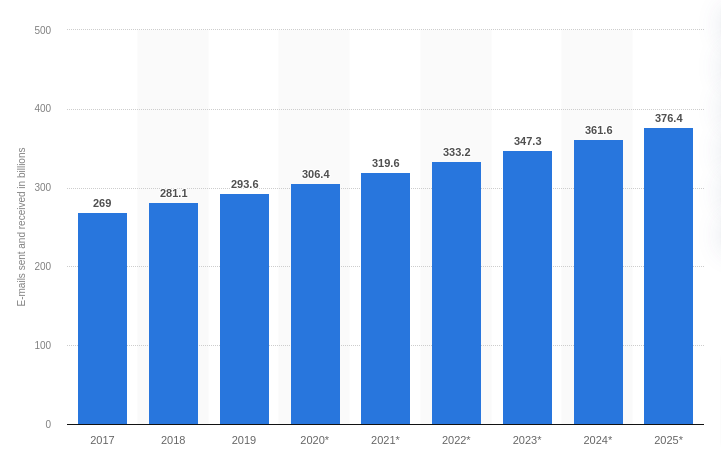
Think of your email subject line as the first step of a fantastic PR plan. In 50 characters or less, you have a unique chance to reach out, introduce yourself, and provide value.
You must test again to ensure all of the above are in place. Your subject line should be able to portray your brand’s unique characteristics without babbling. Typos, spam trigger words like “SAVE $$$,” or even a long subject line that doesn’t display correctly could harm your open rate.
Make sure you keep your email subject line short and sweet and add urgency where needed. A sales email needs a subject line that is more “active.” On the other hand, a welcome email doesn’t – not really.
Don’t forget to experiment and create different subject lines for different segments and the various stages of your sales funnel. It would help if you used the action that triggered your campaign in your subject line.
For example, a phrase like “Welcome! We’ve been expecting you” is perfect for when the user first signs up. A “Where did you go” will go a long way for an abandoned cart sequence. Bake these elements into your subject line and test it.
Before sending, check that all required footer elements are in place and working. Make sure the unsubscribe link is clearly visible and functions properly so users can opt out without issues. A broken link can lead to complaints and harm your sender reputation.
Include a valid physical mailing address in the footer, as this is required by most regulations and helps establish trust. And add a visible privacy policy link so recipients understand how their data is handled.
You also need to confirm your email meets relevant regulations such as CAN-SPAM and, where applicable, GDPR. This includes clear sender identification, honest subject lines, and a working opt-out option.
After all of the above, it’s highly about time you sent your first tested and optimized email campaign out to the world. But what happens now? Are we done?
Short answer: No. After you’ve sent your campaign, gather data and see how your audience responds to your content. Using a data-driven attribution model to understand the outcome of your email testing will help you evaluate the results in a way that will make sense for future campaigns.
And always make sure to share the data with the rest of your teams. Your customer support and sales team will find your information quite beneficial; testing your email marketing campaigns can provide unique insights into how your users interact with your brand that can be used across departments.
A/B testing is a method used to compare two versions of an email to see which one performs better. It works by sending version A to one group of recipients and version B to another, then measuring which version gets more opens, clicks, or conversions.
This approach helps identify what actually drives results. It can be used to test subject lines, email copy, design, call-to-action placement, send times, and personalization elements. It doesn’t rely on assumptions, but shows what your audience responds to based on real data.
Multivariate testing builds on this by testing multiple variables at the same time. Rather than comparing two versions, it looks at different combinations of elements within a single campaign. For example, you might test several subject lines, images, and CTA variations together to see which combination performs best.
While A/B testing is simpler and easier to apply regularly, multivariate testing is useful when you want deeper insights into how different elements interact. Both methods play an important role in improving email performance, helping you refine campaigns based on measurable results rather than guesswork.
A structured approach to testing reduces the risk of costly mistakes and ensures that every campaign meets a consistent standard before it is sent. This consistency plays a direct role in protecting sender reputation, as small issues caught early prevent long-term damage to deliverability.
Over time, each properly tested campaign contributes to more stable performance and more reliable inbox placement. Using an email testing checklist before every send supports this process by creating a repeatable system that keeps quality consistent across campaigns.
With the right process in place, performance improves steadily. Email List Validation offered by DeBounce can support this by helping maintain clean data and stable delivery, allowing each campaign to reach its intended audience more reliably.
Ensuring that all technical and functional elements work correctly is critical, as even small errors can affect delivery and engagement.
Most email platforms provide preview tools that simulate how emails appear across devices and clients, allowing you to test without needing physical devices.
Yes, sending to a smaller segment first allows you to identify potential issues and measure performance before sending the campaign to your full audience.

Find quick answers to your questions about our pricing and plans.
Email regex checks format only: it cannot confirm whether an address actually exists or is active. A well-written email regex covers the local...

Archiving never deletes a message; it just removes it from the inbox view, so unarchiving is always reversible. Gmail has no separate Archive...
Email tracking helps marketers understand how recipients interact with campaigns, but its accuracy depends on how data is collected and interpreted. Email tracking...

Email throttling limits how many messages can be delivered within a given timeframe to protect servers and reduce spam. Delays in email delivery...

A return path email is the address that receives bounce notifications when an email cannot be delivered. The return path is used during...


True email personalization uses behavioral, demographic, and real-time data to make every message feel relevant. Personalization only works when the underlying data is...
