
Imagine sending an important email to a client only for it to end up in their spam folder or not reach them at all. Even...

Key Takeaways
Every signup form has that one small field that ends up carrying more weight than it looks like it should: the email field. It’s the entry point to your audience. It affects how you communicate, how you measure engagement, and even how revenue comes together over time. In a modern web form, that single input quietly decides whether a new contact turns into a real customer or just sits there as another unusable record.
And this is usually where problems begin. Many businesses lose money on fake signups. Bots, obviously. But also mistyped addresses, disposable emails, or people just entering invalid details just to access an offer. None of those convert. They inflate your metrics and can quietly damage deliverability over time.
At first glance, basic checks appear to solve the issue. If the format looks correct, the system accepts it. But syntax checking only verifies that an email “looks” valid, not that it actually exists or can receive messages. That means it addresses only part of the problem.
This is where email validation becomes essential, going beyond surface-level checks to ensure that the contacts entering your system are real, reachable, and worth engaging.
Email validation in HTML forms refers to the process of checking whether an email address entered by a user meets certain criteria before the form is submitted.
Validation and verification are often treated as the same thing, but they serve different purposes. Validation checks structure and format, while verification confirms whether the email address actually exists and can receive messages.
From a user experience perspective, validation provides immediate feedback. Users can see errors while typing, correct them quickly, and submit forms with fewer issues. This reduces friction and improves completion rates without compromising data quality.
HTML5 offers a built-in way to handle email input through the <input type=”email”> attribute. When this is applied to a form field, the browser checks that the entered value follows a basic email structure, such as including an “@” symbol and a domain, before allowing the form to be submitted.
Additional attributes can strengthen these basic checks. The “required” attribute prevents users from submitting the form with an empty email field, while the “pattern” attribute allows you to define custom rules using regular expressions, giving you more control over how the input should be formatted.
These features also improve the experience on mobile devices. When users tap into an email field, virtual keyboards automatically display the “@” symbol and related characters, making input quicker and more intuitive.
Basic HTML5 and JavaScript validation can improve form usability, but they only go so far. Most JavaScript or jQuery validators focus on syntax, checking whether an email follows a structure like [email protected]. If the format looks correct, the form accepts it, regardless of whether the address is real or usable.
A user can enter something like [email protected], and the form will still submit without any issue. From the system’s perspective, the input passes validation, even though the address may not exist or may never be checked.
The limitation becomes more obvious when considering user behaviour. Anyone with basic knowledge can bypass these checks entirely by disabling JavaScript in their browser, allowing them to submit any input without restrictions. This means that client-side validation alone cannot be relied on to protect your data.
As a result, relying only on syntax checks or front-end validation leaves your database exposed to invalid, disposable, or low-quality email addresses. While these methods help guide user input, they do not confirm whether an email is real, reachable, or worth keeping.
Syntax validation confirms structure, not quality, and that leaves several gaps that directly affect your data and your results. One of the biggest issues comes from disposable email providers such as 10minutemail. These services are designed to generate temporary inboxes that disappear after a short time. They are not static either. New domains are introduced constantly, which makes them difficult to block with simple rules. Without a way to detect them (like DEBounce’s API for Detecting Disposable Email Addresses), these addresses enter your system easily, inflating your list with contacts that will never engage and cannot be reached later.
Double opt-in is often seen as a solution, but it has its own limitations. You still have to send a confirmation email to determine whether an address is valid, which means you are already interacting with low-quality or non-existent contacts. Over time, this can affect your sending reputation. More importantly, double opt-in does not stop disposable emails. A temporary inbox can still receive the confirmation message, complete the process, and then disappear, leaving you with a contact that no longer exists.
There are also simpler, everyday errors that syntax checks completely miss. Domain typos such as @gmal.com or @yaho.co pass basic validation because they follow the correct format, yet they lead to failed deliveries. These small mistakes cost real leads, as valid users unintentionally submit addresses that cannot receive your emails.
These limitations make it clear that syntax checking alone is not enough. It allows invalid, temporary, and mistyped addresses into your system, creating hidden problems that affect deliverability, engagement, and overall campaign performance.
Real-time validation ensures that email addresses are checked before they are stored or used. This prevents invalid data from entering your system in the first place.
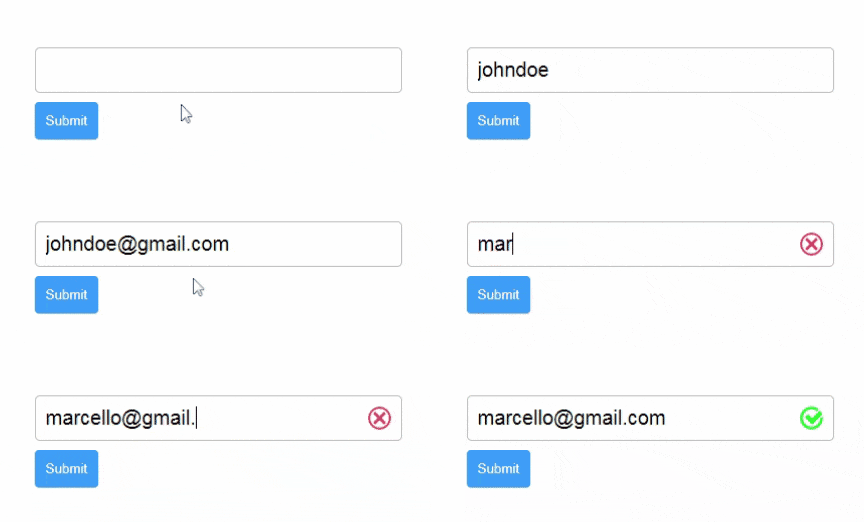
Demonstration of JavaScript real-time email validation.
The DeBounce JavaScript widget provides a low-code solution that integrates directly into HTML forms and validates email inputs as users interact with them. Implementation follows a simple process:
Once implemented, invalid email inputs are automatically cleared or blocked before submission, ensuring only valid data is captured.
Strong form validation works best when it is built in layers, combining usability on the front end with strict control on the back end:
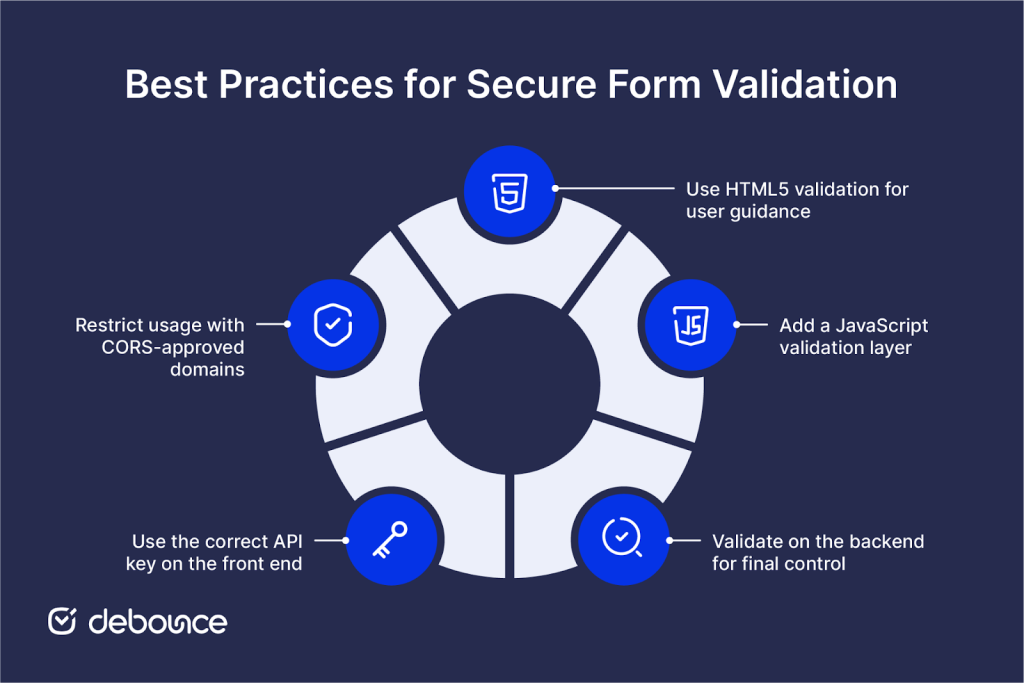
Relying on basic HTML validation alone leaves significant gaps in data quality. Syntax checks can improve usability, but they do not prevent invalid, disposable, or mistyped email addresses from entering your system.
Stronger validation methods reduce wasted resources, improve deliverability, and protect your sender reputation over time.
Testing your current forms is a practical starting point. Identifying weaknesses in your validation process allows you to address them before they affect performance. Choose DeBounce to validate email addresses in real time, helping ensure that every contact added to your database is usable and reliable.
Yes, HTML5 provides basic validation through the <input type=”email”> attribute, but it only checks format and does not verify whether the email address is real.
Blocking disposable emails requires a validation service that identifies temporary domains in real time and prevents them from being submitted.
Most forms rely only on syntax validation, which allows any correctly formatted string to pass, even if the email address does not exist or cannot receive messages.
Find quick answers to your questions about our pricing and plans.

Imagine sending an important email to a client only for it to end up in their spam folder or not reach them at all. Even...

A clean email list removes undeliverable, disposable, and high-risk addresses before they inflate bounces, skew metrics, and damage sender reputation. Lists decay every...


Client-side JavaScript, whether HTML5 attributes, regex, or libraries, can only confirm email format. It cannot verify that a mailbox exists or that an...
Skipping warmup on a new domain or IP often leads to throttling, spam placement, or blocked delivery. Strong warmups depend on clean lists,...

The relevance of email deliverability to an organization's email marketing strategy may have been discussed frequently. Still, you may not fully comprehend how it applies...


A spam-score test checks your content and setup. An inbox-placement test shows where real mailboxes actually route your message. Authentication gaps in SPF,...
