
A business email uses your own domain name and immediately signals professionalism to customers, partners, and inbox providers. Setting up a business email...

Key Takeaways
An email syntax error can stop an email from being sent before it ever reaches the recipient. Depending on where it occurs, the message may be rejected by your email platform, fail during SMTP transmission, or never leave your Outbox. Email syntax errors usually appear in one of two situations: an improperly formatted email address or a broken dynamic variable inside an email template. While both produce the same result, the cause and solution are different. Understanding what triggers an email syntax error makes it much easier to troubleshoot sending failures and ensure your emails are processed correctly.
An email syntax error occurs when an email address or email message contains formatting that doesn’t follow the rules required for successful processing.
The most common type of email syntax error involves an improperly formatted email address. Examples include a missing @ symbol, consecutive dots, unsupported characters, or an incomplete domain name. Since the address doesn’t meet the required format, the email cannot be processed.
In email marketing platforms, an email syntax error can also refer to a broken or incorrectly configured dynamic variable (merge tag). A missing bracket, incorrect variable name, or empty personalization field can prevent the platform from generating the final email correctly.
Although these issues occur in different places, they produce the same outcome: the email is rejected or never delivered.
Email syntax errors generally fall into two categories, depending on where they occur.
In email marketing platforms (Mailchimp, Klaviyo, Kit, and similar tools):
In SMTP servers and email clients (Outlook, Apple Mail, custom scripts):
The right solution depends on where the syntax error occurs. Start by checking the email address itself. If the address is valid, review your email template or SMTP configuration to identify the source of the error.
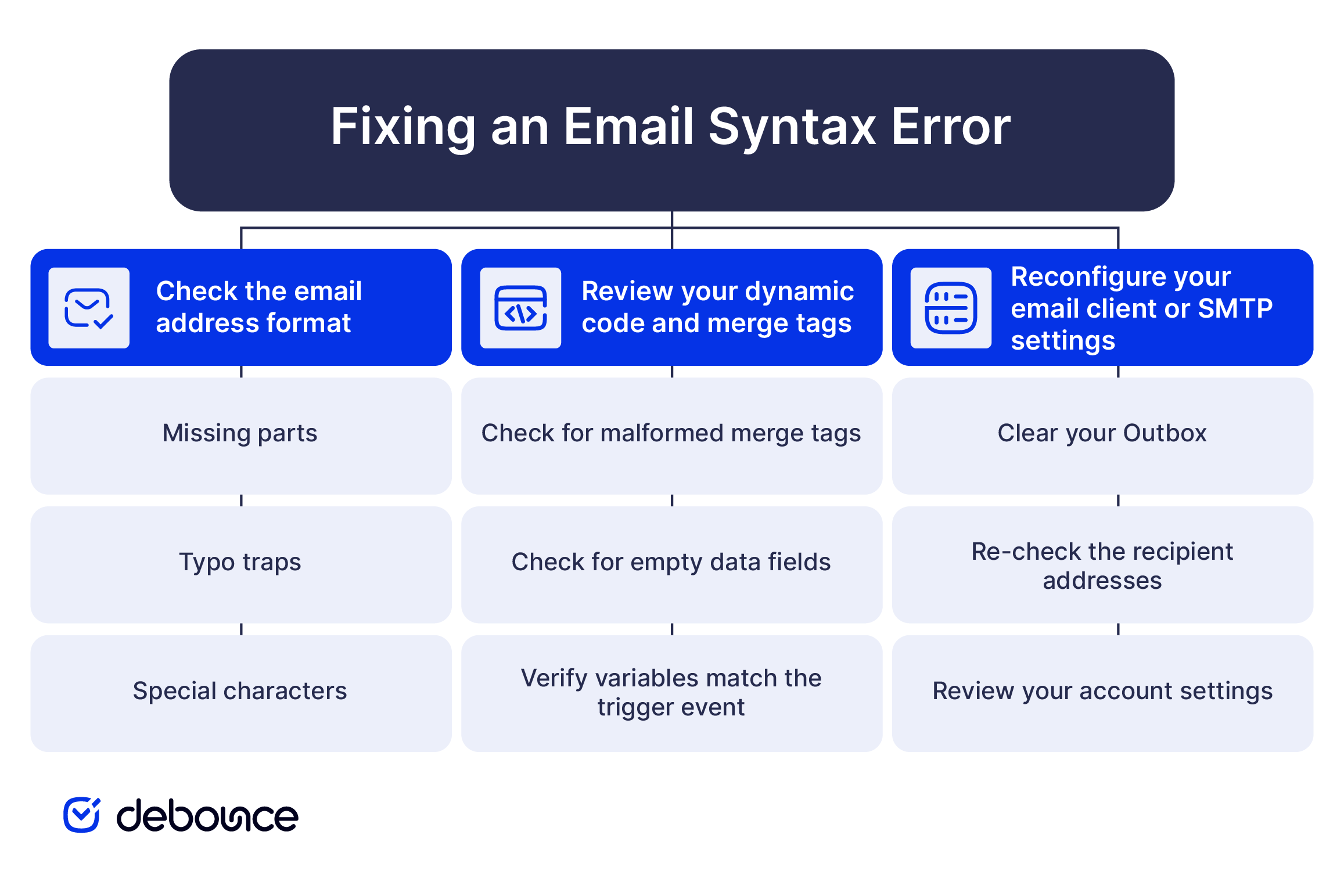
Start with the email address itself and look for common formatting mistakes.
If the error appears in an email marketing platform and the recipient’s email address is valid, the problem may be inside the email template.
If you receive errors such as “Syntax Error in Arguments” or “RCPT TO Syntax Error”, the issue is usually related to your email client or SMTP configuration.
Every email address consists of three parts, and each one has its own formatting rules. If any part doesn’t follow the required syntax, the email address becomes invalid.
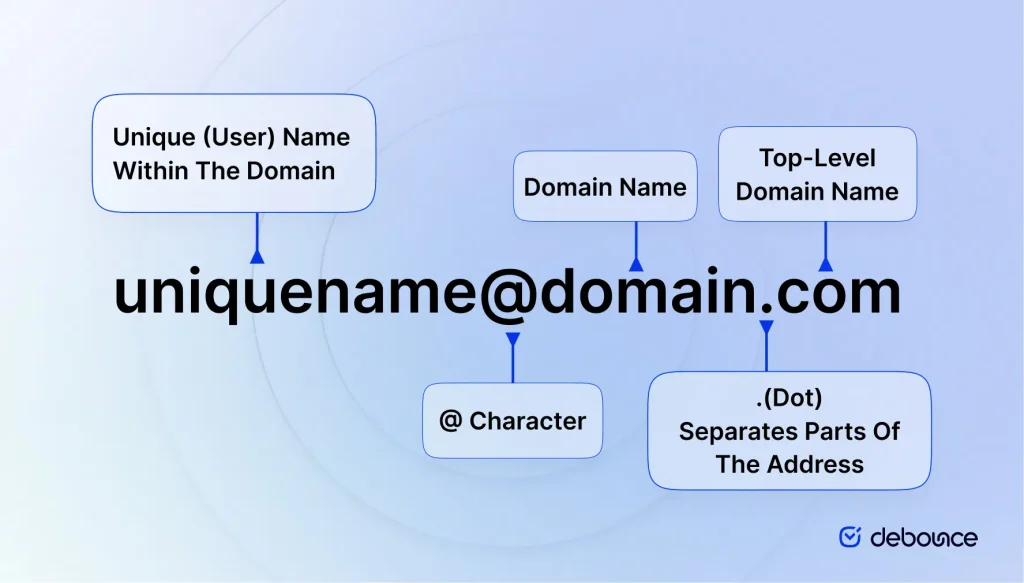
The local part is everything before the @ symbol. It usually identifies an individual user, department, or mailbox.
Every email address must contain exactly one @ symbol separating the local part from the domain part. Having more than one @ symbol or leaving it out completely creates an email syntax error. A missing @ is one of the most common formatting mistakes made when entering email addresses into web forms.
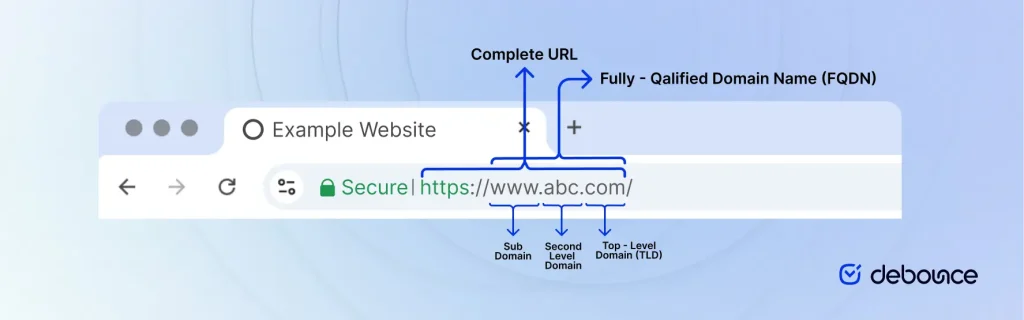
The domain part appears after the @ symbol and identifies the mail server responsible for receiving the email. It consists of the domain name followed by a top-level domain.
A domain name is a series of letters and digits describing a space owned and operated by a single mailbox provider or entity on the Internet. These characters are allowed for the domain name part:
The top-level domain is expressed by the right-most label; for example, the domain name www.debounce.com uses the top-level domain .com.
Here are some of the most common domain extensions used in 2026.
It is worth mentioning that the domain part (domain name + TLD) cannot exceed 255 characters.
The examples below show common email address formats and explain why they either pass or fail syntax validation.
| Email Address | Valid Syntax? | Reason |
| [email protected] | Yes | – |
| xyz.example.com | No | No @ character. |
| x@y@[email protected] | No | Only one @ is allowed outside quotation marks. |
| #!$%&’*+-/=?^_`{}|[email protected] | Yes | Strange, but this is valid 😉 |
| [email protected] | No | Double dot before @ not allowed. |
| [email protected] | No | Local part cannot end with a dot. |
| mark@@example.com | No | Only one @ symbol is allowed. |
| mark@gmail | No | Missing a valid top-level domain. |
A valid email address is the first requirement for successful email delivery. If the address or email template contains a syntax error, the message may never be sent, regardless of your sender reputation or authentication setup.
It’s also important to distinguish syntax validation from deliverability. Syntax validation confirms that an email address follows the correct format, while deliverability checks determine whether the mailbox actually exists and can receive mail.
Before every campaign, validate your email list with DeBounce to identify invalid, inactive, and risky email addresses. A properly formatted address is only the first step toward reaching the inbox.
No. A syntax error occurs before an email is sent because the address or message format is invalid. A bounce happens after the email is accepted for delivery but cannot be delivered to the recipient’s mailbox.
A valid email address contains a correctly formatted local part, one @ symbol, and a valid domain name with a recognized top-level domain. For example: [email protected]
You can inspect the address manually for common formatting mistakes such as missing @ symbols, extra dots, or invalid characters. An email verification tool like DeBounce can also perform syntax validation automatically before you send your emails.
Find quick answers to your questions about our pricing and plans.

A business email uses your own domain name and immediately signals professionalism to customers, partners, and inbox providers. Setting up a business email...

Email systems rely on three core protocols: SMTP, IMAP, and POP3. SMTP sends messages between servers, while IMAP and POP3 retrieve emails from...


Having multiple SPF records causes an SPF PermError, so every email sent from that domain fails SPF authentication, even legitimate messages. Duplicate SPF...


The highest-impact subdomain decision is separating marketing, transactional, and outbound traffic. Transactional emails should always have the strongest deliverability protection because they trigger...

Email overload is the state of receiving more email than you can reasonably process, leading to lost productivity and decision fatigue. The most...

Domain reputation is a trust score that decides whether your emails reach the inbox or get filtered to spam. Monitoring domain reputation requires...
