Accept-all (catch-all) and unknown are not the same as valid. They mean the check could not prove the mailbox is real — treat...

Key Takeaways
Scam and phishing emails are more convincing than they used to be. The obvious misspellings and fake inheritance stories are still out there, but they’ve been joined by emails that look like real messages from banks, delivery companies, software tools, and online services. Anyone can be targeted, and the realistic ones are easy to miss on a busy day.
You can usually tell if an email is a scam by checking three things: the sender’s real address, where the links actually go, and what the message is pressuring you to do. From there, the next steps are simple: recognize the red flags, verify the sender safely, and act quickly if you have already responded.
To tell if an email is a scam, check that the sender’s real address matches the company it claims to be from, hover over links to see where they truly lead, and be wary of urgency, requests for passwords or payment, and offers that seem too good to be true.
Most scam emails use more than one warning sign. A fake bank email, for example, might have an urgent subject line, a slightly misspelled sender domain, and a link that leads to an unfamiliar site. One issue might be easy to overlook, but several together are a clear warning. The red flags below cover the most reliable signs to check first.
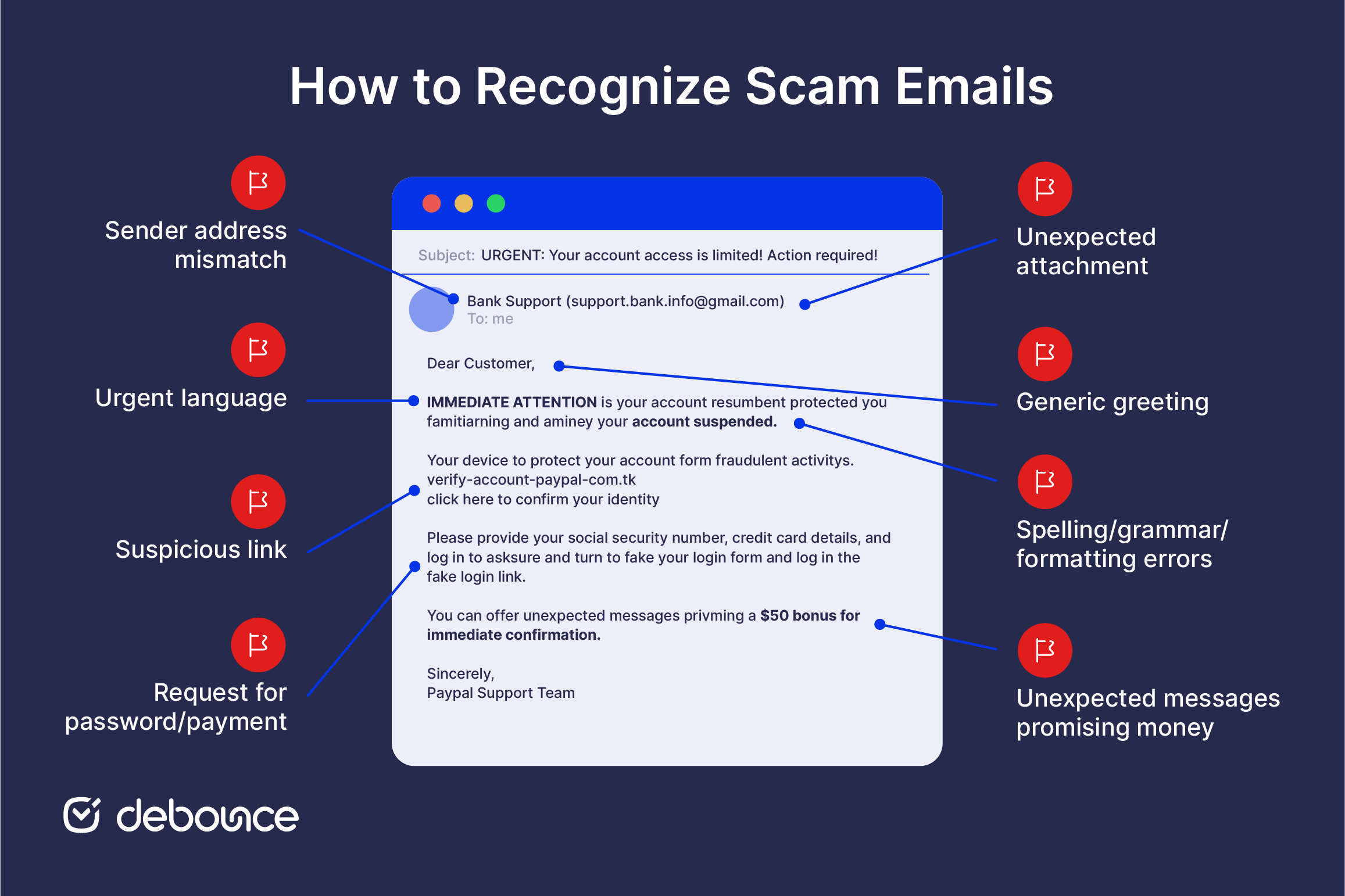
This is the most reliable indicator. Every email has a display name, which is the friendly label you see in your inbox, and a real sending address behind it. Scammers often set the display name to “PayPal” or “Amazon Support” while the actual sending address is something entirely unrelated or a convincing near-copy.
Always open the full email address before trusting the message. Watch for lookalike domains such as amazom.com instead of amazon.com, paypa1.com with a number replacing a letter, or netflix-support.info on an unfamiliar extension. These substitutions are easy to miss when you’re moving quickly.
Email spoofing can fake a familiar-looking address, so a correct-looking sender is not proof that the email is safe. For sensitive messages, always verify through a separate channel.
Scammers manufacture panic because rushed decisions make people less careful. Common pressure tactics include account-suspended notices, failed-payment alerts, threatened legal action, and short deadlines that give you 24 hours or less to act.
Treat forced urgency as a warning sign. Real organizations rarely demand instant action by email or attach immediate, irreversible consequences to one missed message. For example, a bank will not close your account in 24 hours without proper notice, and a delivery company will not destroy your parcel because you did not click a link within the hour.
Certain requests are almost always a scam signal:
Legitimate companies do not ask for passwords by email. They do not ask for gift cards as payment. They also will not ask you to verify sensitive account details through a link in an unexpected message. If an email asks for any of these, treat it as suspicious until you confirm it through an official channel.
Links are the most common delivery mechanism in phishing emails. The visible link text may look safe, such as paypal.com/security, but the real URL can lead somewhere completely different.
Before clicking any link in a suspicious email, hover over it on desktop, and the real destination appears in the browser’s status bar. On mobile, press and hold the link to preview the URL before tapping. If the visible text and real destination don’t match, don’t click.
Also, be careful with shortened links and unusually long URLs. Short links hide the real destination, while long URLs can bury a suspicious domain inside a string of characters. When a link looks familiar, but the URL does not match the official site, verify through a separate route instead.
Unexpected attachments are a common way scammers spread malware. Be especially careful with files labeled as invoices, receipts, shipping documents, or anything that asks you to enable macros or log in.
Do not open attachments you were not expecting. Banks and reputable companies usually do not send unsolicited attachments. If an invoice comes from a company you do not recognize, or a file asks for your credentials, contact the supposed sender through their official website to confirm whether they actually sent anything.
Mass-sent scam emails use openings like “Dear Customer,” “Dear User,” or “Valued Member” because the sender doesn’t know who you are. A company you have a real account with will typically address you by your name.
That said, a personalized greeting isn’t proof of safety. Some scams include your name because it appeared in a data breach, and sophisticated phishing campaigns pull real names specifically to appear more convincing. A personal greeting reduces suspicion but doesn’t remove the need to check the other signals.
Obvious misspellings, awkward phrasing, inconsistent fonts, or a stretched logo are signs of a low-effort scam. When something looks like it was assembled quickly or translated poorly, treat that as a warning sign.
However, this is one of the weaker checks today. Scammers can use AI tools to write clean, polished emails that look much more convincing than older phishing attempts. Good grammar does not prove an email is safe. Use design and writing quality as supporting clues. If the email still has a strange sender address, suspicious link, urgent demand, or unexpected attachment, do not trust it just because the wording looks professional.
Unexpected prizes, unclaimed refunds, lottery winnings, inheritances from distant relatives, or rewards programs you never joined are bait. So are messages that promise money but require a small upfront fee or your personal details to claim it (a pattern known as an advance-fee scam).
Remember this rule: if you didn’t enter it, apply for it, or do anything to earn it, treat it as suspicious. Genuine rewards do not appear out of nowhere by email. If an offer requires urgency, your details, or any upfront payment, it’s almost certainly not real.
Spotting red flags is the first step. When you’re still unsure after checking, there are reliable ways to confirm whether an email is real without engaging with the message itself.
The most reliable verification method is to close the email and contact the supposed sender independently. Go to the company’s official website by typing the address directly into your browser (not by clicking any link in the email) and use the contact information there. Alternatively, call a number from official correspondence you’ve already confirmed is genuine.
This works because it bypasses any contact information the scammer controls. If the email is fake, the phone number and support address inside it point back to the scammer. Reaching the company through a channel you already trust means you’re talking to the real organization.
Confirm the actual sending address beyond the display name, as explained in Red Flag 1 above. For a deeper check, open the email’s full headers; most email clients include a “show original” or “view raw” option. Inside, look for SPF, DKIM, and DMARC authentication results. A failed or missing authentication result on a message claiming to be from your bank is a strong spoofing signal.
You can also verify the sender’s email address to confirm it actually exists and is associated with a real domain. This is a useful step before responding or taking any action on an unfamiliar sender. Scammers frequently send from disposable email addresses built to be used once and then discarded, which is itself a sign the sender isn’t who they claim to be.
Scams follow recognizable templates. Knowing the most common types makes them easier to identify on first contact:
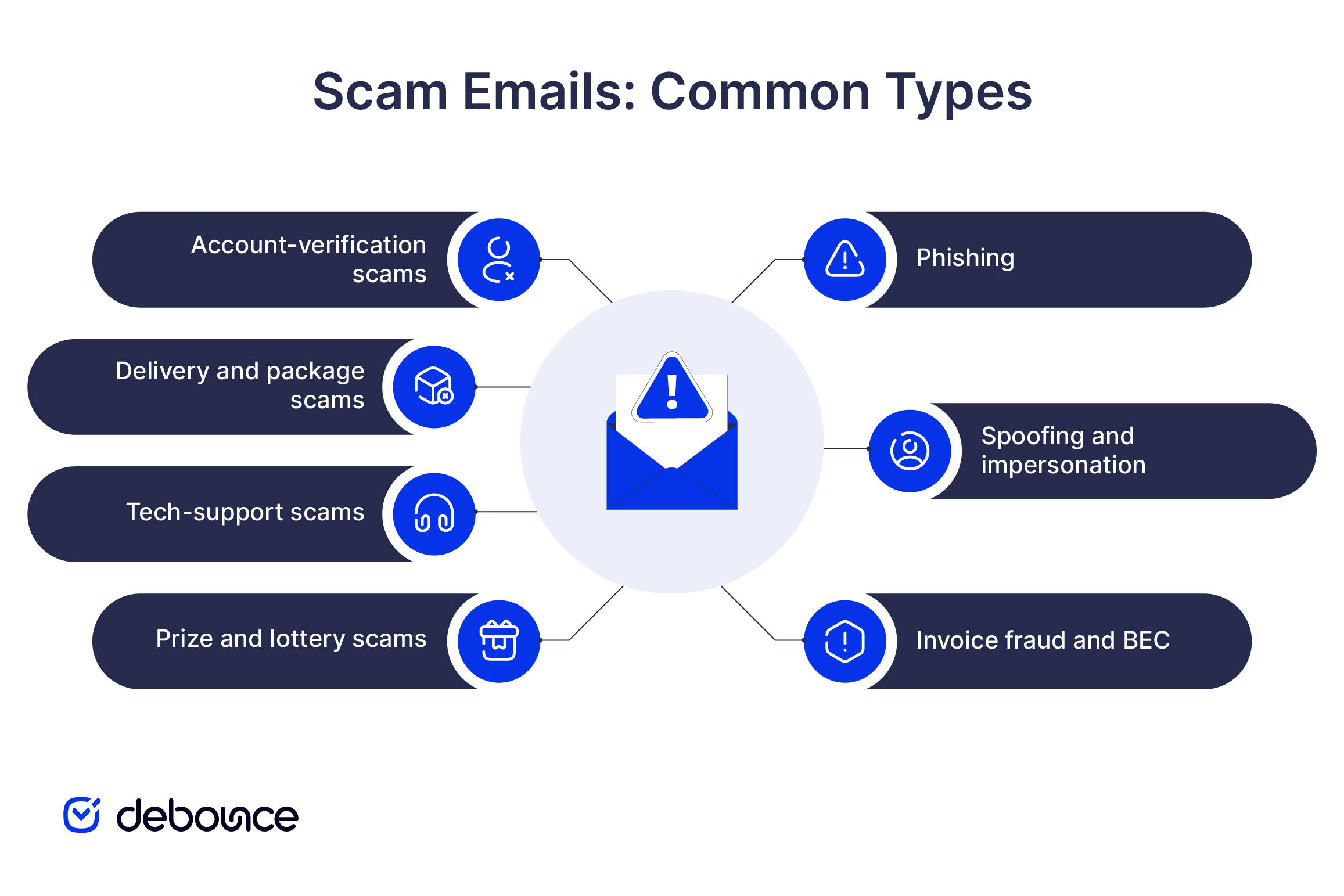
A scam email will usually fit one of these templates closely. Recognizing the type gives you a head start before you even check the sender address or inspect the links.
Receiving a scam email doesn’t require anything complicated. The response is quick, and acting promptly is most important if you’ve already engaged with the message.
If you haven’t clicked anything:
Reporting takes less than a minute and helps providers and authorities identify active campaigns and protect other people from the same sender.
Act quickly, but do not panic. Scam emails are designed to pressure people into mistakes, and being caught by one does not mean you were careless.
If you clicked a link but did not enter anything, close the page and run a security scan on your device as a precaution.
If you entered credentials or personal information:
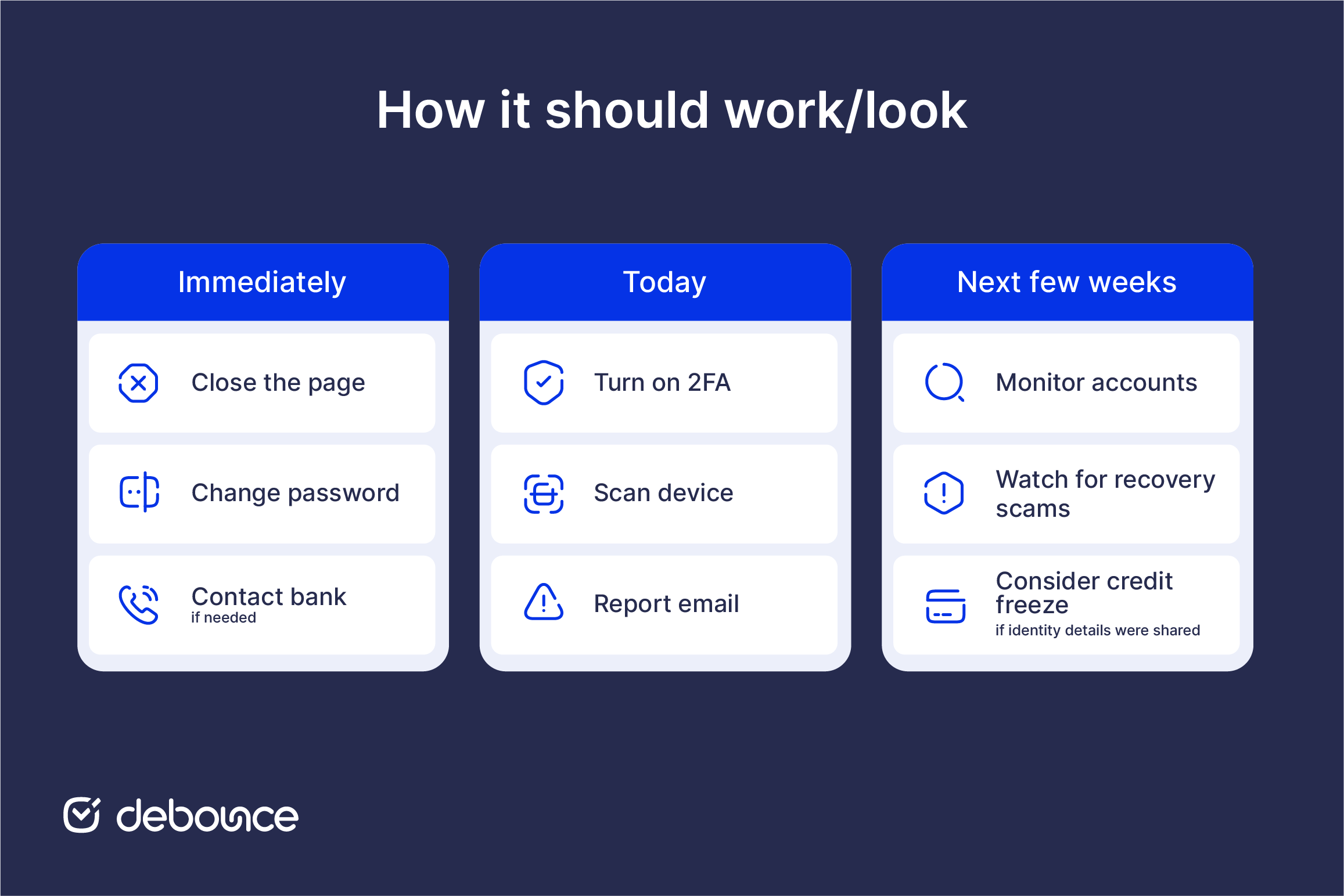
If you shared sensitive identity details, consider placing a credit freeze with the major credit bureaus. This can help prevent someone from opening new accounts in your name.
Most scam emails give themselves away when you slow down and check the details. When a message pressures you to act immediately, asks for information a real company wouldn’t request by email, or comes from an address that looks slightly wrong, trust that hesitation.
Verify through a separate, official channel. Close the email, go to the company’s real website, and check from there. If the message is legitimate, you will confirm it quickly. If it is not, you avoid clicking, replying, or sharing information with a scammer.
When a sender’s address looks unfamiliar or slightly off, you can verify the sender’s email address before deciding whether to trust it. A quick sender check can remove the guesswork from an uncertain situation.
Usually no. Simply opening an email is generally safe in modern email clients; the risk comes from clicking links, opening attachments, or entering information on a page the email leads to. Avoid those steps, and you’re typically fine.
Yes. Scammers can spoof a familiar-looking sender address, and compromised accounts can send scam emails without the owner knowing. Do not trust an email based on the sender alone. Look at what the message is asking you to do.
No. Replying tells the scammer that your address is active, which can lead to more scam emails. Report the message, block the sender, and delete it instead.
No. Spam filters catch many scam emails, but newer and more convincing messages can still get through. That is why it helps to know the warning signs yourself.
Yes to both. Reporting takes seconds and helps email providers and authorities identify active campaigns and warn others. Most email scams constitute fraud and are illegal in most jurisdictions, so reporting them matters beyond just your own inbox.
Find quick answers to your questions about our pricing and plans.
Accept-all (catch-all) and unknown are not the same as valid. They mean the check could not prove the mailbox is real — treat...
A spam-score test checks your content and setup. An inbox-placement test shows where real mailboxes actually route your message. Authentication gaps in SPF,...
Who doesn’t have an email? Almost everyone has. It’s one of the most popular communication channels across the globe. Not only does it let you...

Email marketing mistakes can eat a lot of your email marketing budget. Avoiding this deadly email marketing mistakes is important not only for lowering the...
Links in the email are like fire. What do I mean? They are beneficial if used correctly. Yet, they can cause severe damage if you...


Most consumers won’t read your email. A study by ZipWhip reports that 56% of people receive from 25 to 100 emails a day. In addition,...