Are you using influencers for brand awareness? If not, here are some statistics that may interest you. You fall in the 7% who are not...

Key Takeaways
In a perfect world, every email would verify as valid or invalid. You would keep the good addresses and delete the bad ones.
Real mailbox providers are messier. Some domains accept mail for any local part. Others rate-limit or greylist validation traffic. That is why verification results often include accept-all (also called catch-all) and unknown — not because the tool failed, but because the server would not give a definite answer. See the verification result codes for the full status list.
The real question is not “are these statuses useless?” It is: should you keep, suppress, or re-check accept-all and unknown emails before you send?
Accept-all (catch-all): The domain’s mail server accepts messages for almost any address at that domain. A standard SMTP probe cannot prove whether [email protected] is a real mailbox or a made-up local part. Background: what is a catch-all or accept-all?
Unknown: The check could not return a clear valid or invalid outcome — often because of greylisting, temporary blocks, timeouts, or provider anti-probe controls. Unknown is uncertainty, not a soft “probably fine.”
Neither status equals “safe to send.” Both mean you still have risk to manage. For how DeBounce handles hard providers and second-layer checks, see how to validate accept-all and hard-to-validate emails.
Most list policies fail at one of two extremes. Keep everything — “accept-all might still be real, so leave it in” — inflates list size while quietly raising bounce, complaint, and block risk, especially on cold or high-volume sends. Delete everything uncertain — “if it is not clearly valid, purge it” — removes recent opt-in customers on catch-all corporate domains and shrinks reachable revenue for no good reason.
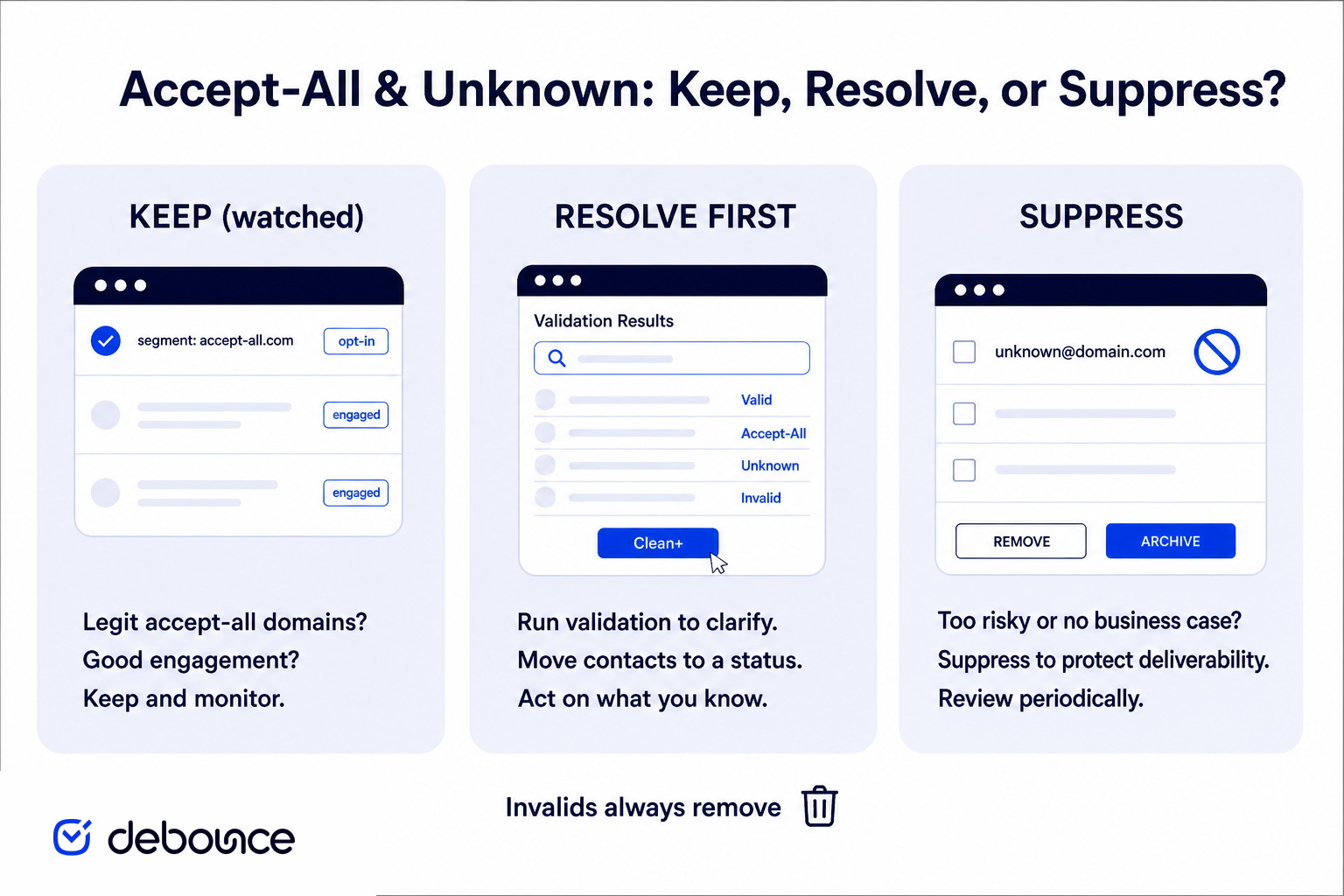
A better approach is a decision matrix: keep (watched), resolve first, or suppress — based on collection quality, contact age, send type, and how large the uncertain share is.
Use the verification status as one input. Pair it with how the contact entered your list and how you plan to send.
| Path | When it fits | What to do |
|---|---|---|
| Keep (watched) | Recent opt-in, warm/engaged, permission-based, low volume or transactional context. | Put accept-all / unknown in a separate segment. Watch bounces and complaints. Sunset faster than your valid segment. |
| Resolve first | Large uncertain share, cold or high-volume plans, enrichment/CRM import spend at stake. | Run catch-all validation (Clean+) before you decide keep vs suppress. |
| Suppress | Purchased/scraped lists, stale no engagement, elevated bounces, aggressive cold outreach. | Exclude from marketing sends. Do not “hope” the next campaign will be fine. |
Invalids always remove — before any of the three paths above. Disposable and other clearly risky categories should leave the sendable pool too.
The decision matrix above is only as good as the inputs you feed it. Four factors determine where most accept-all and unknown contacts should land.
Collection quality is usually a stronger risk signal than the status label alone. If contacts opted in — form signup, checkout, webinar registration, confirmed double opt-in — accept-all and unknown addresses are more likely to belong to real people who wanted your mail. Complaint risk is lower, and the consent story is stronger even if engagement lags behind clearly valid addresses.
If the list was purchased, scraped, enriched from names, or built for cold outreach, accept-all and unknown rows are higher risk. Weak collection plus uncertain verification is one of the most common paths to bounces, complaints, and reputation damage.
Many accept-all domains are business mail servers. Work addresses go stale when people change jobs — an address from two years ago may no longer be monitored even if the domain still accepts mail at the SMTP level. Newer, recently engaged contacts are safer to keep carefully. Long-inactive accept-all or unknown contacts are better suppressed or re-validated before you include them again.
Useful signals to combine with age: last open, click, or purchase date; last form submit or account login; whether prior campaigns already showed soft bounces or blocks on that segment.
Volume multiplies uncertainty. Ten uncertain addresses on a boutique list is a different problem from ten thousand on a weekly blast. Match your policy to send size and how much reputation you can afford to risk.
A handful of uncertain rows on an otherwise clean opt-in list is manageable. Thirty to forty percent of a cold list stuck in accept-all or unknown is not. When the uncertain share is large, a small uncertain pocket can be segmented and watched; a large one can dominate bounce and complaint outcomes if treated like your valid segment. Large uncertain shares often signal your acquisition mix includes catch-all corporate domains, hard-to-validate free providers, or enrichment noise — all of which benefit from a deeper resolution pass before CRM import or paid send.
You may keep accept-all or unknown contacts in a watched segment when they are recent and permission-based, you are not blasting cold volume to them, you have already removed invalids and other high-risk rows, and you have alerting on bounce rate, complaint rate, and blocklist signals. Even then, expect performance to trail your clearly valid segment — and be ready to suppress if metrics turn. Keeping is not “set and forget.” It is “keep with a shorter leash.”
Good habits for a kept segment: lower send caps than your valid pool, separate subdomain or IP when volume justifies it, faster sunset rules than your main list, and no aggressive win-back sequences until an address proves engagement.
Suppress when the list was purchased, scraped, or low-trust; when contacts are stale with no recent engagement; when you are running cold outreach or aggressive volume; when you are already seeing elevated bounces, blocks, or spam-folder placement; or when the uncertain share is large and you cannot run a deeper validation pass before send. Suppression is not lost opportunity if the alternative is damaging the domain that powers your best customers. Also suppress rows that repeatedly land in unknown after retries — persistent uncertainty after a careful re-check is still not a green light.
If you keep some accept-all or unknown addresses, define an exit path so they do not linger indefinitely:
Sunset policy turns “keep watched” into a controlled experiment instead of a permanent exception.
Standard email validation classifies most addresses as valid or invalid but often cannot decide on catch-all domains and some hard providers. That is where a second-layer pass helps. DeBounce catch-all validation (Clean+) re-checks those uncertain rows with additional signals to classify more of them as valid or invalid.
Best-fit situations for running Clean+ before deciding:
After the deeper pass, still apply the matrix: send primary volume to clearly deliverable addresses, segment remaining uncertainty, and suppress weak-collection or stale rows. For provider-level detail, see validate accept-all and hard-to-validate emails.
Accept-all and unknown are risk labels, not green lights. The right decision depends on how the contact was collected, how old they are, what kind of send you are planning, and how large the uncertain share is. Remove invalids first, send primary volume to clearly deliverable addresses, and segment the rest. Encode the policy in your ESP or CRM — store verification status, collection source, and suppression reasons as durable fields so sales, growth, and RevOps all follow the same keep / resolve / suppress rules.
When you need to resolve more catch-alls, use DeBounce catch-all validation (Clean+) as a second layer to classify more uncertain rows before your next import or send. Risk reduction, not a zero-bounce promise — but a much clearer split to work with.
No. Accept-all (catch-all) means the domain accepted the probe for that address pattern. It does not prove the mailbox exists or that mail will stay deliverable. Treat it as uncertain risk, not a bounce and not a green light.
Not always. Unknown means the check could not confirm the mailbox. For cold or high-volume sends, suppressing unknowns is usually safer. For recent opt-in contacts, you may keep them in a watched segment or run a deeper validation pass first.
You can, with caution. Permission-based, recent accept-all contacts are lower risk than purchased or stale lists, but they still belong in a separate segment with bounce monitoring and faster sunset rules than your clearly valid pool.
Accept-all means the domain is configured to accept mail for any local part, so a standard check cannot prove the specific mailbox. Unknown means the check could not return a definite answer — often due to greylisting, timeouts, or anti-probe controls.
Catch-all validation is a second-layer process that re-checks accept-all and many unknown results to classify more of them as valid or invalid. It reduces uncertainty so you can keep or suppress with a clearer policy — it is risk reduction, not a zero-bounce guarantee.
Resolve first when a large share of the list is accept-all or unknown, when you plan cold or high-volume sends, or before CRM import and enrichment spend. Run a deeper catch-all pass, then apply keep/suppress on the clearer results.
Find quick answers to your questions about our pricing and plans.

Are you using influencers for brand awareness? If not, here are some statistics that may interest you. You fall in the 7% who are not...

Mailchimp Omnivore is an abuse-prevention system that scores uncontacted addresses for predicted hard bounces, complaints, and spam-trap risk — then can block sending...


Email sender reputation determines whether your messages reach the inbox, the spam folder, or get blocked entirely. Email reputation is influenced by spam...


Email marketing might not sound like the most glamorous way to promote your dropshipping business. However, any expert marketer knows just how effective this tactic...

Mail routing describes how email moves from a sending server to a receiving inbox through a series of DNS queries and server connections....

Believe it or not, the majority of our business transaction happens via email. So much so that in 2023, there were an estimated 4.2 billion...