
When comparing dedicated vs. shared IP for email, the differences show up in the control you have, how quickly you can send, and...

Key Takeaways
A persistent misconception online describes SIP as a protocol for “initiating email sessions.” That’s incorrect, and it often sends people in the wrong direction when troubleshooting Microsoft 365, Teams, or unified communications environments.
SIP and SMTP are two different protocols built for two different jobs. SIP manages real-time voice, video, and instant messaging, while SMTP is responsible for sending email. A simple way to remember the difference is that SIP is to VoIP what SMTP is to email. Both are fundamental to modern business communication, but they don’t compete. They operate alongside each other in the same technology stack, often using the same user identity while performing entirely separate functions.
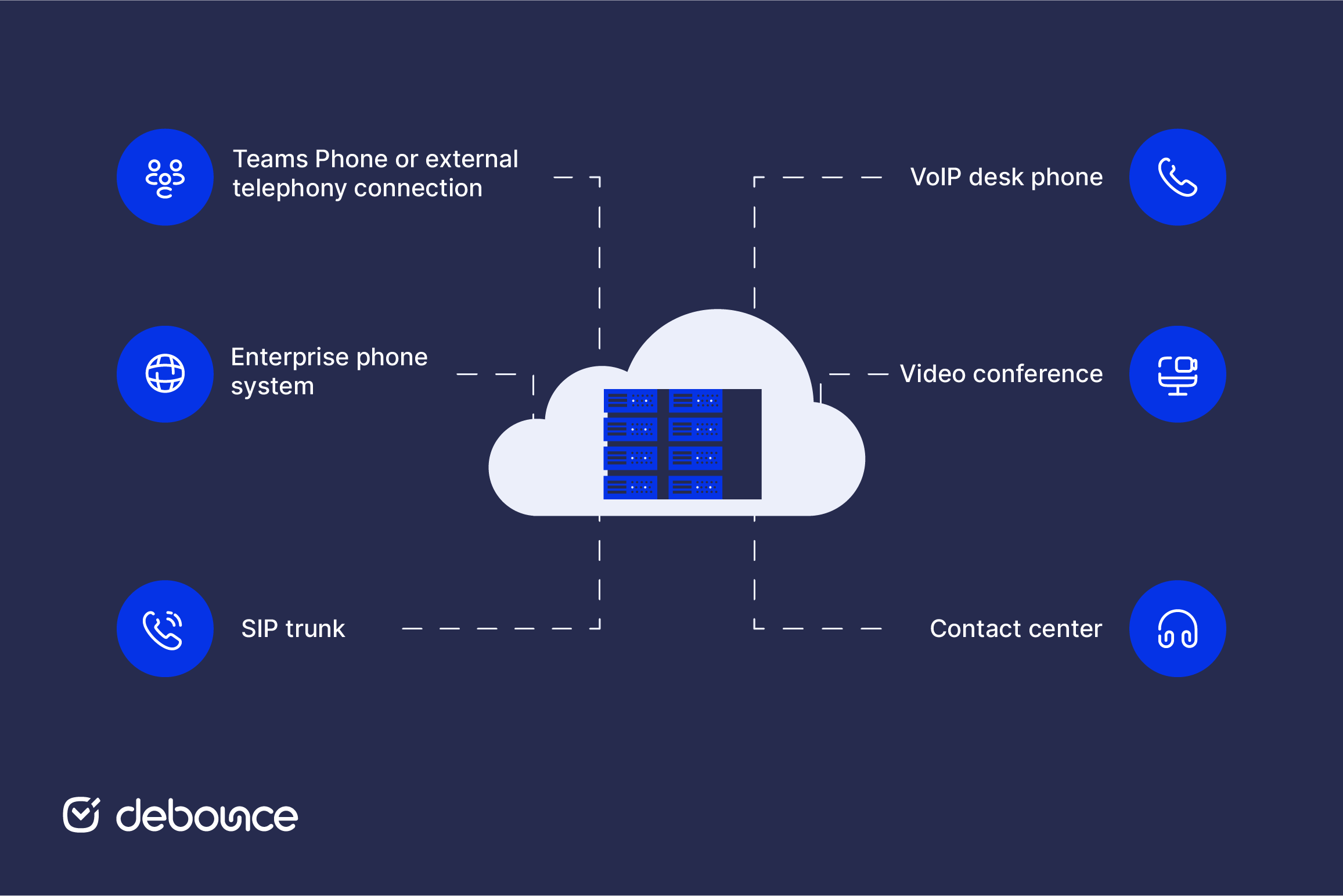
SIP (Session Initiation Protocol) is the standard that sets up, manages, and tears down real-time communication sessions over IP networks. When you make a VoIP call, join a Teams meeting, or initiate a video conference, SIP is the protocol that negotiates the connection between the parties involved.
SIP doesn’t carry the actual voice or video, but only handles the signaling. This includes who is calling, where to connect, what media types are supported, and which codecs to use. The audio and video travel over separate protocols (primarily RTP, the Real-time Transport Protocol) once SIP has set up the session.
SIP is defined in RFC 3261 and is widely used in:
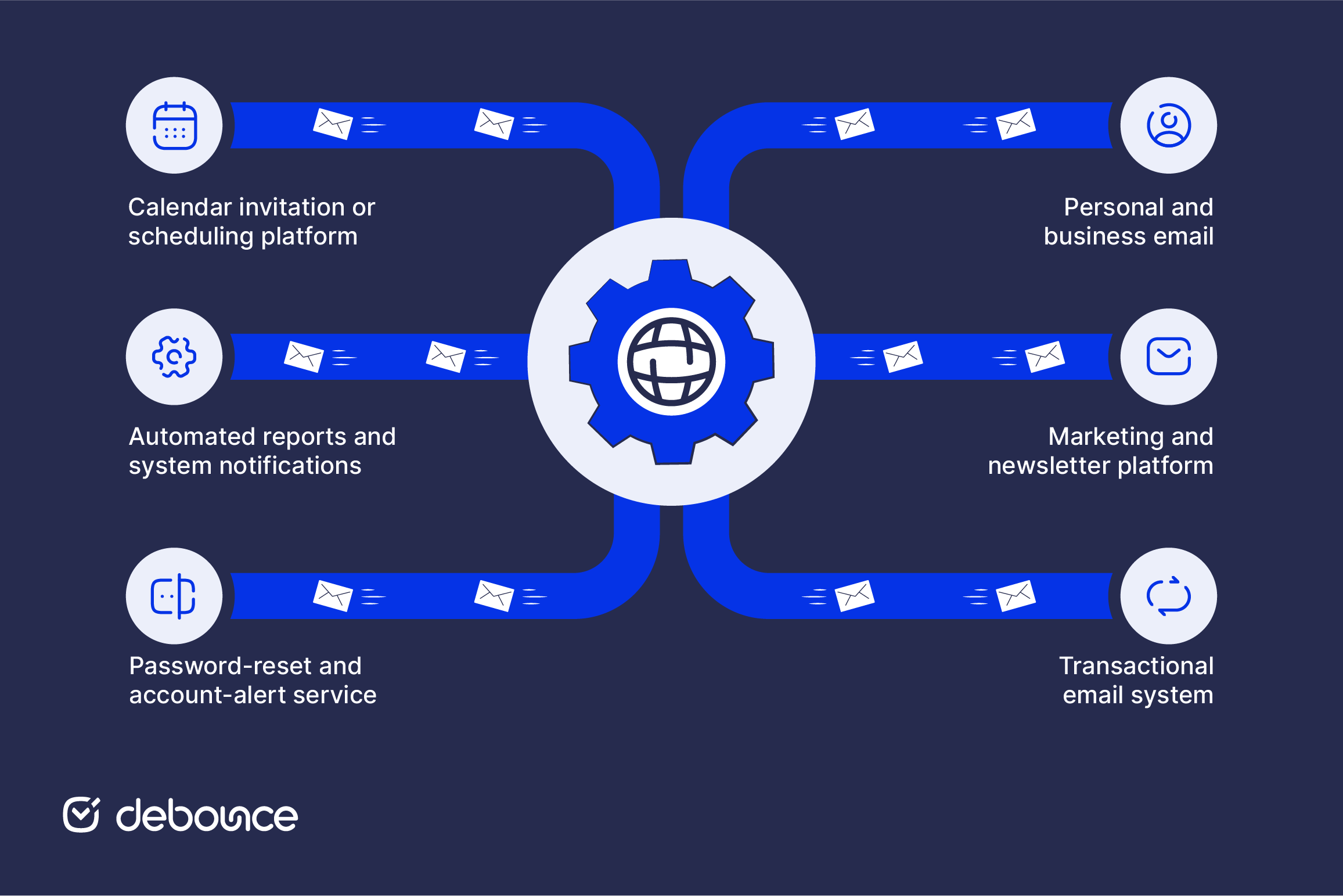
SMTP (Simple Mail Transfer Protocol) is the standard protocol used for sending email between mail servers. When you send a message, your email client submits it to an outgoing mail server, which then transfers it to the recipient’s mail server. SMTP uses a store-and-forward process, meaning a server may queue the message temporarily before passing it to the next server or delivering it to its destination.
Unlike SIP, SMTP transfers the email itself, including its headers, body, and attachments. SMTP servers also queue messages, retry delivery when a receiving server is temporarily unavailable, and return delivery failure notices when a message cannot be delivered.
SMTP is defined in RFC 5321 and supports:
SPF, DKIM, and DMARC work alongside SMTP to authenticate sending domains, detect spoofing, and help receiving servers decide how to handle suspicious messages.
SIP and SMTP are both application-layer protocols, but they handle entirely different forms of communication. Here’s how they compare across seven dimensions.
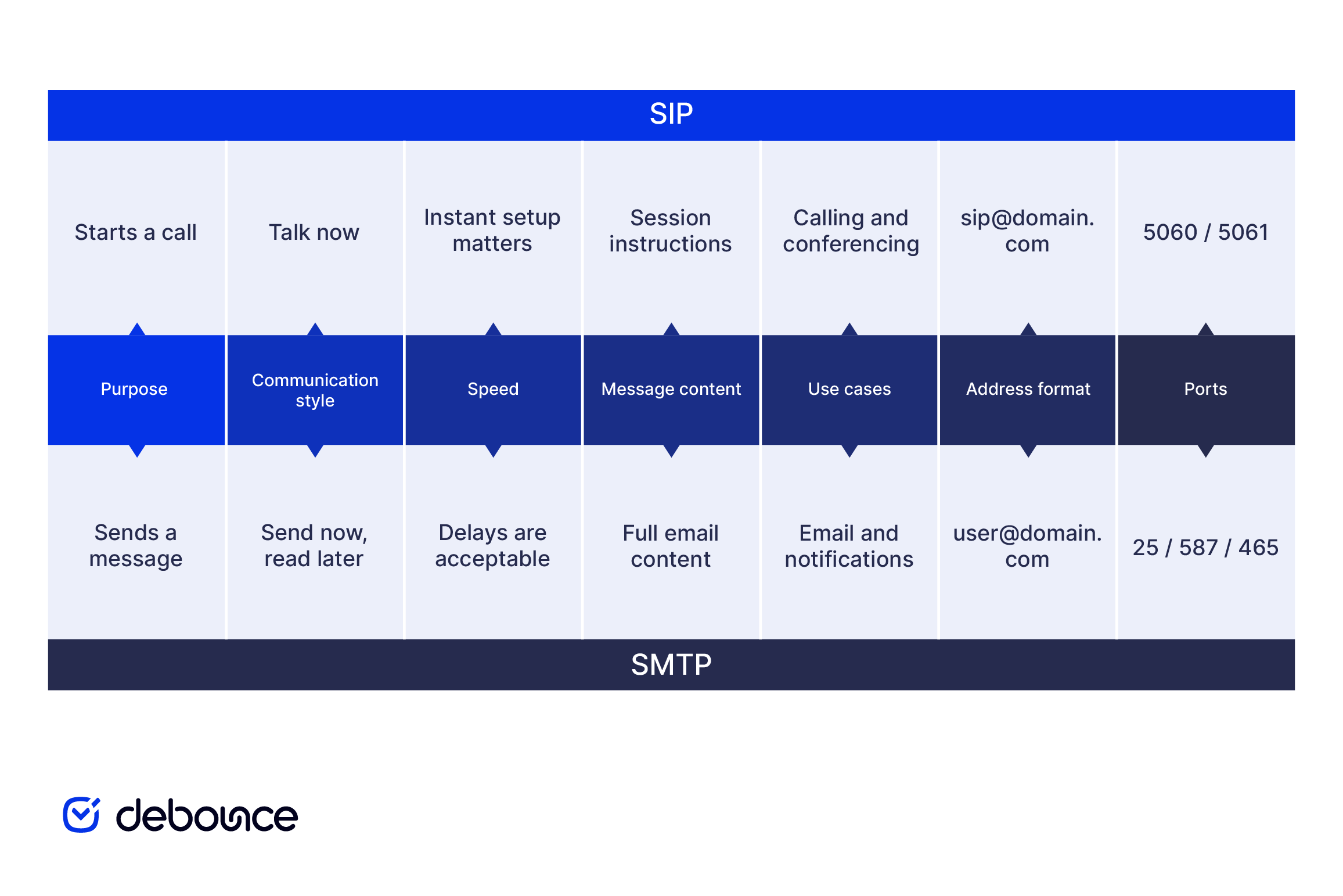
SIP establishes and manages real-time communication sessions, including voice and video calls. SMTP transfers email messages between mail servers.
Put simply, SIP acts as a coordinator, while SMTP acts as a courier. SIP negotiates a live connection between participants, whereas SMTP moves a complete message through a store-and-forward delivery system.
SIP supports real-time communication, so the participants or their endpoints must be available when the session begins. SMTP is asynchronous, meaning the recipient does not need to be online when the message is sent. The email can remain queued until the receiving server accepts it, which may happen within seconds or after several delivery attempts.
SIP is designed for live interaction, while SMTP delivers messages that recipients can open later.
SIP session setup is designed to happen quickly so a call or video session can begin with minimal delay. If setup takes too long, the real-time experience suffers.
SMTP delivery usually takes seconds or minutes, although it may take longer when servers are busy, messages are queued for retry, or delivery passes through several systems. That delay is acceptable because email does not require both parties to communicate at the same time. For anything time-sensitive at the connection level, like a live call or a video session, SMTP isn’t an option.
SIP messages are signaling only. Methods such as INVITE, ACK, BYE, and REGISTER contain instructions about the session, including who is calling, where the session should be routed, and which media parameters are supported. The actual audio and video usually travel over RTP once the session is established.
SMTP carries the complete email message, including its headers, subject line, body, and encoded attachments. That content passes through the mail servers involved in delivering the message.
SIP is commonly used in systems that support real-time voice and video communication, including:
SMTP is used to send and relay email, including:
Most businesses rely on both protocols: SMTP for email delivery and SIP for at least part of their voice or video infrastructure.
SIP addresses include a protocol prefix: sip:[email protected]. They identify a specific device or communication client and route to a session manager. SMTP addresses use the familiar format: [email protected]. They identify a mailbox and route to a mail server for asynchronous retrieval.
The similar appearance can cause confusion in environments that use both email and SIP-based calling. For example, a Microsoft 365 user may have [email protected] as an email address and sip:[email protected] as a SIP address. The first routes email to her mailbox, while the second is associated with real-time communication services. Although the two addresses may belong to the same person and use the same directory information, they serve different protocols and cannot be used interchangeably.
SIP uses port 5060 for unencrypted connections over UDP or TCP, and port 5061 for encrypted connections using TLS.
SMTP uses port 25 for server-to-server relay, port 587 for authenticated client submission with STARTTLS, and port 465 for message submission over implicit TLS. Knowing which port each protocol uses is essential when configuring firewalls, diagnosing connectivity issues, or setting up email and voice infrastructure.
SIP and SMTP run side by side in every major business communication platform. Most users interact with both hundreds of times a day without realizing it.
Microsoft 365 demonstrates why the distinction can become confusing. Exchange Online uses SMTP to route email, while Microsoft Teams uses a wider set of technologies for meetings and calls. SIP remains relevant in areas such as Teams Phone connectivity, Session Border Controllers, Direct Routing, and interoperability with external telephone systems. Some Microsoft environments also retain SIP addresses in their directory attributes, but this does not mean that every Teams call is handled as a conventional SIP session.
Google Workspace follows a different model. Gmail relies on SMTP for email delivery, while native Google Meet communication uses WebRTC. SIP is available mainly for interoperability, allowing compatible third-party conferencing systems to join Meet through supported gateways. It is therefore inaccurate to describe SIP as the underlying signaling protocol for ordinary Google Meet calls.
Contact center platforms make this coexistence most explicit. SIP may carry inbound and outbound calls or connect the platform to a telephone provider, while SMTP delivers follow-up emails, customer notifications, call summaries, transcripts, and internal alerts. Both protocols can support the same customer interaction without performing the same function.
For teams responsible for email, SMTP delivery is only one part of reaching the inbox. Authentication, sender reputation, sending practices, and address quality also affect whether a message lands in the inbox. DeBounce email list validation supports the list-quality layer by identifying invalid and risky addresses before they lead to avoidable bounces and damage sender reputation.
SIP and SMTP are complementary, not competing. SIP supports real-time communication, such as voice and video calls, while SMTP sends and relays email using a store-and-forward model. Although SIP URIs and email addresses often look similar, they identify different services and serve entirely different purposes.
In business environments, the same user may be associated with both protocols. An email address identifies the user’s mailbox, while a SIP address or identity may be used by voice and unified communications systems. They can share the same directory information and domain without being interchangeable.
For most organizations, the SMTP half of this comparison is the one that directly affects day-to-day email operations. Getting email to the inbox reliably requires clean lists, authenticated sending domains, and a healthy sender reputation, none of which are automatic. Run your list through DeBounce email list validation to remove the addresses that generate bounces before they affect your deliverability. Start with 100 free verifications; no commitment required.
No. SMTP is designed for asynchronous email delivery and has no mechanism for establishing real-time sessions. Voice and video calls require SIP (for session setup) and RTP (for media transport); SMTP plays no role in either.
The SMTP address routes to the user’s Exchange Online mailbox for email. The SIP address routes to their Microsoft Teams identity for voice, video, and presence. They look nearly identical but serve entirely separate services.
Neither protocol is inherently more secure because they protect different types of communication. SIP signaling can be encrypted with TLS, while SRTP protects the voice or video media. SMTP uses STARTTLS or implicit TLS to encrypt connections, while SPF, DKIM, and DMARC help receiving systems verify the sender and detect spoofing.
Both protocols can operate securely or insecurely. Their security depends on the encryption, authentication, access controls, and configuration used in each deployment.
Almost certainly yes, though you may not manage them directly. Generally, any business that sends email uses SMTP, and any business using VoIP, Teams, Zoom, or a modern phone system uses SIP.
A business, therefore, needs SMTP for email, while its need for SIP depends on how its calling system is configured.
SIP trunking is a service that connects an organization’s on-premise phone system to the public telephone network over IP using SIP. It has no relationship to SMTP. SIP trunking is entirely within the voice and telephony layer. The only point of overlap is that both SIP (for call routing) and SMTP (for email notifications or follow-up messages) might appear in the same contact center or unified communications workflow.
Find quick answers to your questions about our pricing and plans.
When comparing dedicated vs. shared IP for email, the differences show up in the control you have, how quickly you can send, and...

The sender’s real email address is one of the most reliable scam signs. Display names are easy to fake, but the actual sending...
Spoofing attackers manipulate email headers to display trusted sender names and addresses without accessing real accounts, making messages appear legitimate. Authentication protocols are...

A poor-quality email list damages sender reputation, increases bounce rates, and wastes email marketing budget. Email verification tools help remove invalid, disposable, duplicate,...

Now, more than ever, more business owners are beginning to see and use email marketing as a veritable tool to foster productive business relationships with...

Smishing combines “SMS” and “phishing.” It uses text messages to impersonate trusted organizations and pressure recipients into opening links, sharing information, or sending...
