Whenever you read anything on sending emails, it’s common to see abbreviations SPF, DMARC, and DKIM thrown around casually. Don’t feel bad if you aren’t...

Key Takeaways
Email deliverability conversations almost always come back to the sending IP. Mailbox providers (Gmail, Yahoo, Outlook, and others) track how mail from that IP behaves — bounces, complaints, engagement — and use that history when deciding inbox vs. spam. If you move to a dedicated email IP, that history starts at zero. Warming it up is how you earn a positive reputation without flooding unknown volume into cold filters.
This guide explains what a dedicated IP is, when you need one, why warm-up matters, and how to ramp volume with an example schedule. Pair the ramp with a clean list so early sends build trust instead of bounce signals.
A dedicated email IP is a sending IP address assigned to one sender (or one organization). You control the reputation on that IP. Nobody else’s campaigns share it.
On a shared IP, many customers send through the same address. Reputation is pooled: strong neighbors can help, weak neighbors can hurt. Shared IPs usually already have established volume, so they typically do not need a from-scratch warm-up the way a brand-new dedicated IP does.
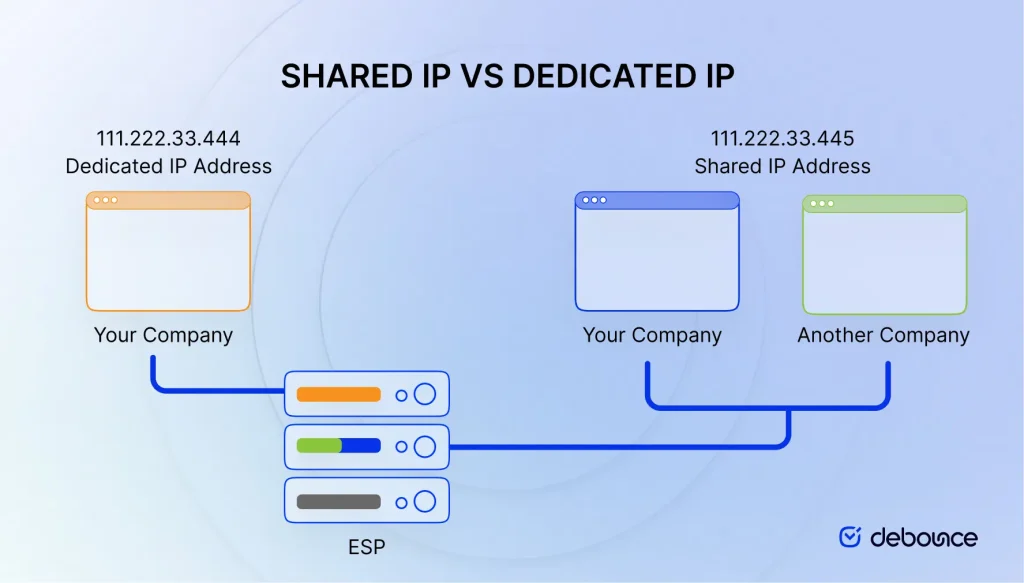
Use this comparison when deciding which model fits your volume and operations:
| Factor | Shared IP | Dedicated IP |
|---|---|---|
| Ownership | Used by multiple senders on the same ESP infrastructure. | Assigned to one sender or organization. |
| Reputation | Shared across tenants; ESP monitoring helps, but you do not fully isolate risk. | Fully yours — good practices help you, poor practices hurt only you. |
| Cost | Usually included in standard ESP pricing. | Typically an add-on (often tens to a few hundred dollars per IP per month, depending on provider). |
| Volume & warm-up | Steady pooled volume; no from-scratch IP warm-up for most senders. | Needs a gradual warm-up before full volume. Inconsistent sending slows reputation building. |
| List quality | Still important; ESPs often enforce import and bounce rules. | Critical. Invalid addresses, traps, and high complaints damage the IP you alone own. |
| Best for | Low to mid volume, or teams without dedicated deliverability ops. | High, consistent volume with strong hygiene and monitoring habits. |
A dedicated IP does not guarantee inbox placement. It gives you control and isolation — and it demands discipline.
Consider a dedicated IP if you:
Stay on a shared IP if you:
As a rough rule of thumb used across the industry, many senders below roughly ~150,000 emails per month are better served by a reputable shared IP. Confirm thresholds with your ESP — they vary.
For the full acquisition path (ESP add-on vs. raw IP space), see How to Get a Dedicated IP Address.
When warm-up and hygiene are done well, dedicated IPs can help with:
They do not automatically improve placement. A poorly warmed or dirty dedicated IP often performs worse than a healthy shared IP.
Mailbox providers treat a new IP as an unknown sender. If you suddenly push full production volume, filters see a spike with no positive history — a common path to throttling, deferrals, or spam-folder placement.
IP warm-up means sending smaller volumes first, watching results, then increasing gradually until you reach normal daily volume. The timeline is often measured in weeks (commonly in the 30–60 day range for full capacity, depending on volume and ESP guidance), not a single weekend blast.
During warm-up, prioritize:
Target the most engaged users first. Volume without engagement builds the wrong reputation signal.
Build a schedule, then adjust it to your list size, ESP limits, and observed metrics. Factors that change the pace include list hygiene, domain reputation, complaint rates, content quality, and subscriber engagement.
Practical ramp rules:
Validate and clean the list before the ramp. Hard bounces on a new dedicated IP are expensive reputation damage. DeBounce email list validation and ongoing list monitoring help keep invalid and risky addresses out of warm-up traffic.
The table below is an example ramp for illustration. Scale the numbers to your real daily target and follow your ESP’s warm-up guidance when it differs.
| Week 1 | Daily Volume | Notes |
|---|---|---|
| Day 1 | 200 | During weeks 1–2, send to the most active subscribers (opened or clicked in the last 30 days). |
| Day 2 | 500 | |
| Day 3 | 1,000 | |
| Day 4 | 2,000 | |
| Day 5 | 5,000 | During weeks 3–4, expand to subscribers active in the last 60 days. |
| Day 6 | 10,000 | |
| Day 7 | 20,000 | |
| Week 2 | ||
| Day 8 | 40,000 | Do not send to subscribers who have not opened or clicked in the past 90 days during the first 45 days of warm-up. |
| Day 9 | 100,000 | |
| Day 10 | 250,000 | |
| Day 11 | 500,000 | |
| Day 12 | 1,000,000 | |
| Day 13 | 2,000,000 | If warming above 5 million, do not send more than double the previous day’s volume. |
| Day 14 | 5,000,000 | |
Example two-week dedicated IP warm-up schedule. Adjust daily volume to your list size, engagement, and ESP guidance. Many programs continue ramping beyond two weeks until full production volume is stable.
Consistency beats hero days. If you send rarely, reputation builds slowly. If engagement is weak mid-ramp, hold volume flat until metrics recover — then continue.
Warming up a dedicated email IP is reputation work: start small, favor engaged subscribers, increase only when metrics stay healthy, and keep the list clean. A dedicated IP rewards that discipline with isolation and clearer control — it does not replace authentication, content quality, or list hygiene.
If you are preparing a warm-up, clean the audience first with DeBounce email validation, then ramp with the schedule your ESP recommends.
Find quick answers to your questions about our pricing and plans.
Whenever you read anything on sending emails, it’s common to see abbreviations SPF, DMARC, and DKIM thrown around casually. Don’t feel bad if you aren’t...

Client-side JavaScript, whether HTML5 attributes, regex, or libraries, can only confirm email format. It cannot verify that a mailbox exists or that an...

Unlike phishing, pharming works by corrupting DNS systems or device hosts files so that typing a correct address automatically routes users to fraudulent...

A return path email is the address that receives bounce notifications when an email cannot be delivered. The return path is used during...


Email verification codes prove both that an email address is valid and that you control the inbox associated with it. Most codes expire...
In a time when everybody’s talking about hyper-segmentation and personalized promo messages, cold emailing may seem a bit outdated and obsolete. But it really isn’t....