
You’ve gathered a list of contacts for your email list. Maybe you’re starting a newsletter, or maybe you’re cold-emailing prospects to gain new clients. Now,...

Key Takeaways
You get an email from your bank telling you to urgently verify your account details. The sender name looks right. The email address looks familiar. You click the link, enter your password, and only afterward realize the page wasn’t your bank’s website at all.
Email spoofing makes this possible. It’s one of the most common techniques behind phishing attacks, fraud, and malware delivery, and it works because people instinctively trust emails that appear to come from familiar sources. What makes email spoofing especially dangerous is that attackers don’t need to hack into anyone’s real account. They manipulate the technical fields that control how sender information appears in your inbox, making a message look legitimate without ever accessing the actual system it claims to represent.
Understanding how email spoofing works makes it easier to spot red flags early and take practical steps to protect personal and business email from being exploited.
Email spoofing is the deliberate falsification of email sender information to make a message appear to originate from someone or somewhere it did not. The “From” address, sender name, or reply-to field is manipulated to display a trusted identity, like a colleague, a bank, a government agency, or a well-known brand, while the actual sending source is entirely different.
A legitimate email’s technical sending information and displayed sender information match. When your colleague sends you an email, the address shown in your inbox matches the address that actually transmitted the message through the mail servers.
In a spoofed email, these don’t match. The displayed “From” name or address is fabricated, while the actual transmission happens from a different, often unrelated server controlled by the attacker. Recipients see only the displayed information, not the technical routing details hidden in email headers.
Spoofing serves several goals depending on the attack:
Data shows that phishing still accounts for over 90% of reported social engineering incidents, and email spoofing is a foundational technique enabling most of those attacks.
Email spoofing takes advantage of a weakness in the Simple Mail Transfer Protocol (SMTP), the technology responsible for sending emails. When SMTP was first designed, it did not include built-in requirements to verify the sender’s identity.
Every email contains headers: technical metadata fields that record transmission details like sending server, timestamps, and sender information. The key headers attackers target are:
SMTP allows senders to set these fields to anything they choose. When an email client displays a message, it shows the “From” field value, not the underlying transmission details. That disconnect between what users see and what is actually transmitted is the vulnerability that spoofing exploits.
Attackers use SMTP servers (either their own, compromised servers, or open relays) to send messages with manipulated headers. They set the “From” field to a trusted address (your bank, your CEO, a known vendor) while the actual sending server has no relationship with that organization. Most recipients never look beyond the displayed name and address, making display-level forgery highly effective.
Properly configured authentication protocols (SPF, DKIM, DMARC) are designed to catch spoofing by verifying that sending servers are authorized to send on behalf of claimed domains. However, Microsoft Research found in 2025 that shared email infrastructures significantly amplify spoofing vulnerabilities, and that SMTP smuggling techniques allow attackers to bypass SPF and DMARC protections in certain configurations, highlighting why authentication alone isn’t a complete solution.
The return path email field often reveals the real sending address, but most recipients and even many security tools don’t examine it closely enough during initial delivery evaluation.
Spoofing takes several forms, and each exploits different aspects of how email sender information is displayed and processed.
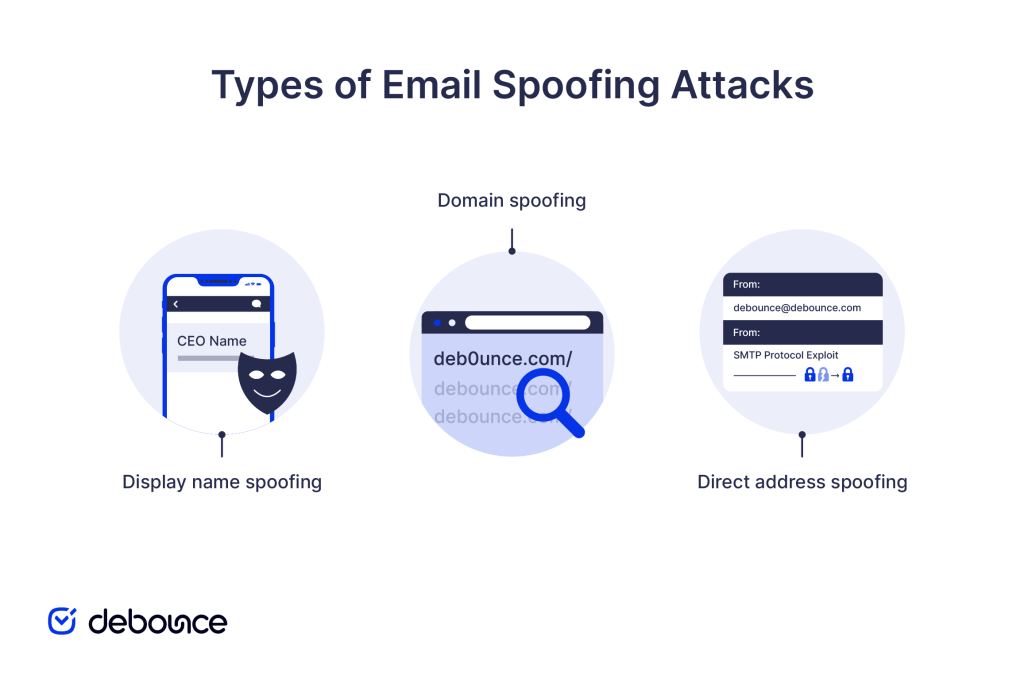
Display name spoofing changes only the visible sender name while using a completely different, often obviously unrelated, email address. Your inbox shows “Sarah Chen, CEO,” but the actual sending address is something like [email protected] or a clearly unrelated domain.
This technique works because many email clients prominently display the sender name while showing the address in smaller text or hiding it entirely on mobile. Attackers rely on recipients focusing on the name rather than inspecting the full address. Common targets include executives, IT support, and financial institutions whose names recipients recognize and trust.
Domain spoofing uses fake or lookalike domains to make sending addresses appear legitimate at first glance. Instead of sending from company.com, attackers register company-inc.com, cornpany.com, or c0mpany.com, often passing a casual visual inspection.
This approach is particularly damaging for businesses because attackers can impersonate entire organizations, not just individuals. Customers receiving emails from a spoofed domain may make payments, reveal account information, or download malware, believing they’re interacting with a legitimate company.
Monitoring multiple SPF records and ensuring authentication is properly configured prevents your own domain from being used this way against your customers and partners.
Direct address spoofing forges the actual “From” field to display a real, legitimate email address that the attacker doesn’t control. This is technically the most convincing form because recipients see a real, recognizable address (not a lookalike) in their inbox.
This relies on the absence of strict DMARC enforcement on the spoofed domain. When organizations haven’t configured DMARC to reject or quarantine unauthenticated messages, attackers can use their real addresses in the “From” field with reasonable confidence that the messages will reach recipients. Direct address spoofing is commonly used in business email compromise and executive impersonation attacks.
Spoofed messages are designed to look legitimate, but careful inspection reveals inconsistencies.
Sender address issues:
Unexpected urgency and unusual requests:
Language and formatting inconsistencies:
Link and attachment risks:
Cleaning up email habits, including pausing before acting on urgent requests and verifying through separate channels, reduces the risk of falling for well-crafted spoofed messages.
Email spoofing and phishing are closely related but distinct concepts that are often confused. Phishing is an attack strategy aimed at deceiving recipients into disclosing sensitive information, clicking harmful links, or downloading malicious software. Phishing is the goal, the scam itself.
Email spoofing, on the other hand, is a technique used to make phishing attacks more convincing. Spoofing makes the message appear to come from a trusted source, increasing the likelihood that recipients will trust and act on the phishing content.
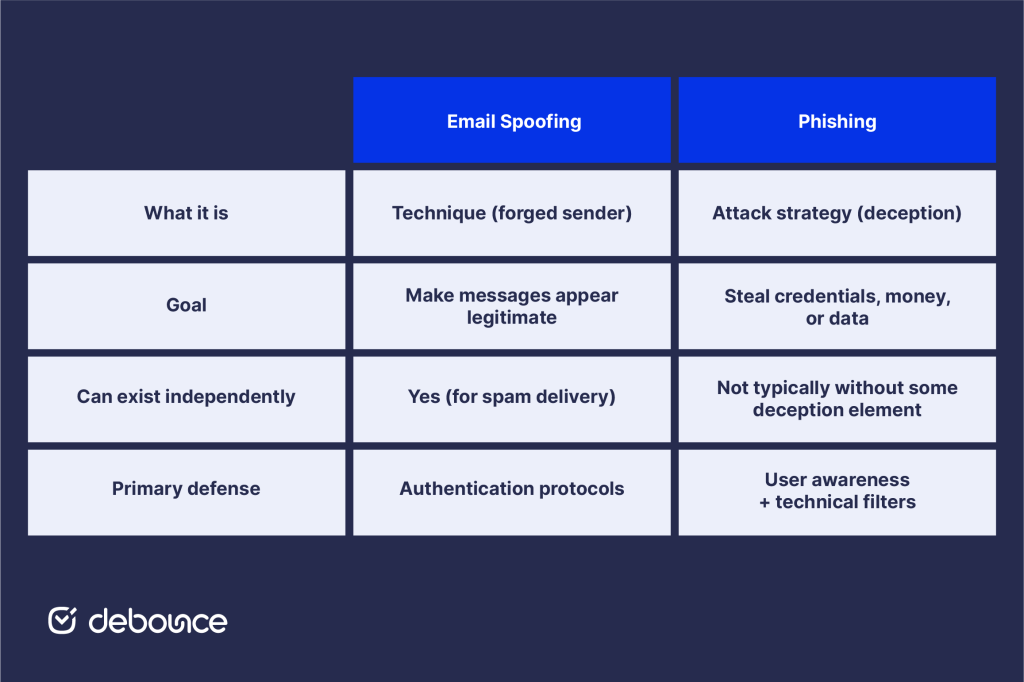
Not all phishing uses spoofing: some phishing emails come from real attacker-controlled addresses. And not all spoofing is phishing: some spoofing is used simply to deliver spam while hiding the true sender. But the combination of spoofing and phishing is particularly effective and accounts for the majority of email-based fraud.
Understanding both concepts helps clarify why defenses need to work at two levels: technical controls that catch spoofed messages before delivery, and user awareness that catches deceptive content that gets through.
Effective protection calls for different habits at the individual level and stronger technical controls at the organisational level.
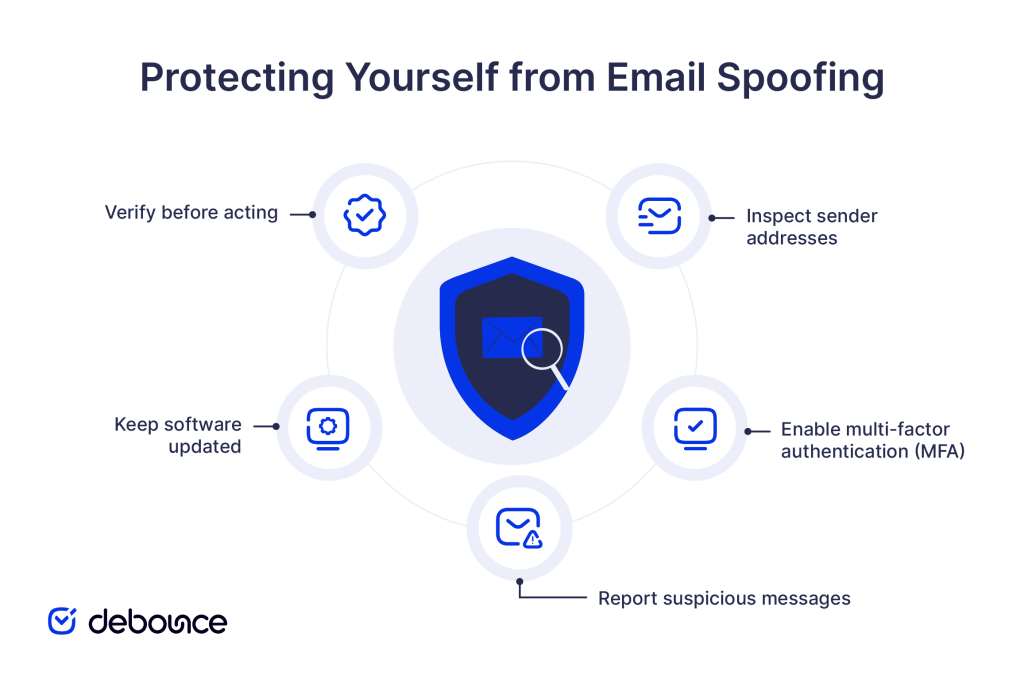
Staying safe often comes down to slowing down and verifying before responding to unexpected messages. The steps below reduce the risk of acting on a spoofed email.
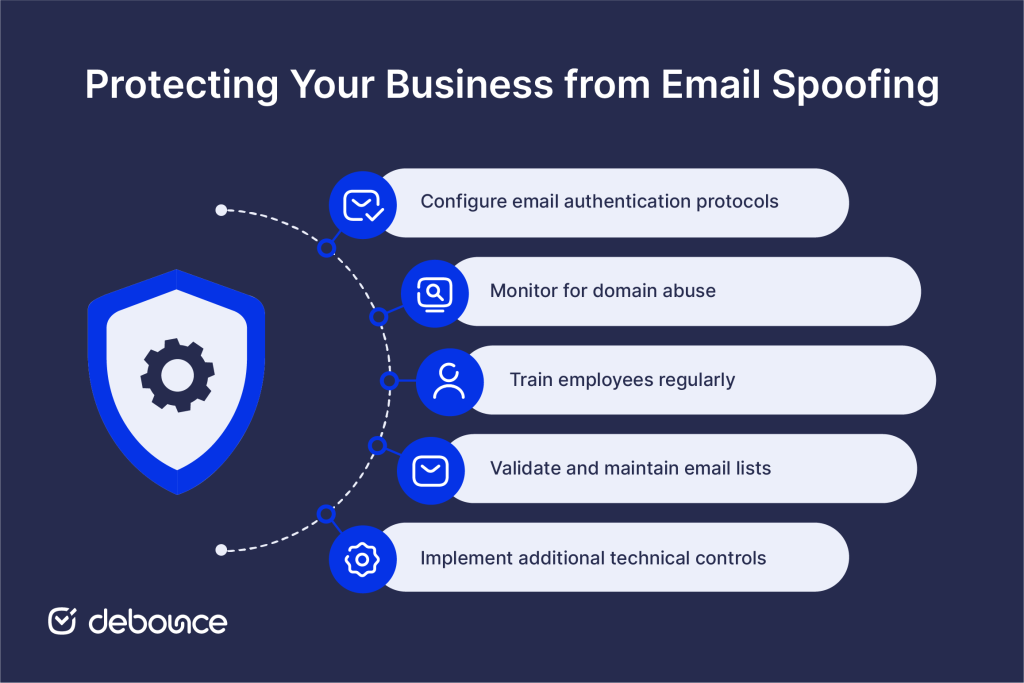
Organisations must combine authentication, monitoring, and employee awareness to reduce both technical and human risk.
Email spoofing forges sender information to make malicious messages appear trustworthy, exploiting the fundamental gap between what email displays and what’s technically happening beneath the surface. Attackers use display name spoofing, lookalike domains, and direct address forgery to deceive recipients into revealing credentials, approving payments, or downloading malware.
No single measure eliminates spoofing entirely, but organizations and individuals that combine technical controls with awareness and verification procedures significantly reduce their risk of successful spoofing attacks.
Check whether your organization’s domain has DMARC configured and at what enforcement level. If you don’t have DMARC in place or it’s set to p=none (monitoring only), moving to p=quarantine or p=reject is the highest-impact step you can take to stop attackers from impersonating your domain in spoofing attacks that target your customers and partners.
Maintaining clean, validated email lists is part of responsible email security. DeBounce removes invalid, disposable, and risky addresses from your contact database, ensuring your email infrastructure stays healthy, your sender reputation remains strong, and your organizational data doesn’t become raw material for attackers crafting the next spoofing campaign.
Start verifying your lists today to reduce both deliverability and security risk across all your email communications.
Can email spoofing be stopped completely?
No, spoofing cannot be eliminated entirely, but properly configured DMARC, SPF, and DKIM authentication records, combined with user awareness training, block the vast majority of spoofing attempts before they reach recipients.
Is email spoofing illegal?
Yes, in most jurisdictions, using spoofed email addresses to commit fraud, phishing, or harassment violates laws, including the US CAN-SPAM Act, computer fraud statutes, and equivalent legislation in other countries, though enforcement is difficult given the global nature of attacks.
Can spoofed emails harm my device?
Spoofed emails themselves don’t harm devices, but the malicious links or attachments they contain can: clicking links leading to malware downloads or opening infected attachments in spoofed messages can compromise your device, regardless of the spoofed sender.
Find quick answers to your questions about our pricing and plans.
You’ve gathered a list of contacts for your email list. Maybe you’re starting a newsletter, or maybe you’re cold-emailing prospects to gain new clients. Now,...
Email analytics is important. It lets you in on a lot of information about your subscribers and their behavior towards your emails. In this post,...

Are you looking for a Mailchimp alternative? Mailchimp is a popular email marketing platform, but its lengthy customer service response times and arbitrary rules have...


Did you know that 58% of people check their emails first thing in the morning instead of checking social media? More people care about what’s...

Emojis aren't just for texting anymore. In fact, they've become such a powerful marketing tool that more and more companies are using them in their...

In some cases, you have a list of employees who are working in a company (with Internet address on example.com) and cannot find their email...
