
As an email marketer, you may often encounter a formidable obstacle in your campaigns — ambiguous email bounce codes. These codes can be perplexing and...

Key Takeaways
Finding accurate contact information is harder than it looks. Public directories are incomplete, company websites rarely list direct emails, and outdated data leads to bounced messages. Knowing how to find someone’s email address requires more than a quick search. It requires methodical steps and verification to ensure accuracy.
Professionals often need direct contact details for legitimate business reasons. Sales teams rely on accurate emails for outreach. Recruiters need them to connect with candidates. Founders and partnership managers use them to open collaboration discussions. PR professionals depend on them to pitch media contacts. In each case, accuracy determines whether the message reaches the right inbox or disappears into the void.
Understanding how to find someone’s email address correctly helps you avoid wasted effort, protect sender reputation, and increase the likelihood of a meaningful response.
Finding a valid email address requires structured research. The goal is to identify contact information that is publicly available, accurate, and appropriate to use. The methods below focus on legitimate sources that professionals commonly rely on.
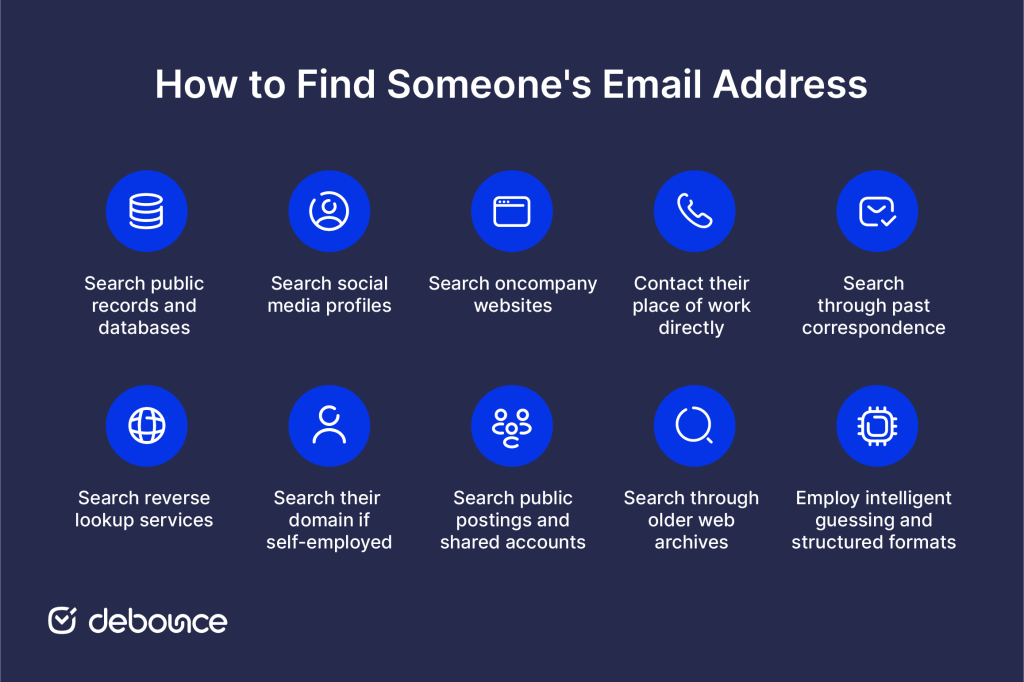
One of the first places to search is public records and databases designed to collect and share contact information. Sites like Spokeo, Whitepages, and Pipl let you search by name and location for potential email leads. Government databases, such as your state Department of Motor Vehicles website, may also list emails for driver’s license records. Business professional networking sites like LinkedIn are also valuable resources, as many professionals list their work email on their profiles or include links to their e-business cards. Not all information will be current, but it’s a good starting point to search larger compiled records.
Another effective strategy is to reach out directly to individuals through social media platforms, where many people willingly share their contact details, including email addresses, in their profiles or through direct messages.
Most people these days have some social media presence on platforms like Facebook, Twitter, Instagram, and more. Take some time to search their full name on each major network to see if you can find a matching profile. Often on professional profiles or personal pages, people will list their email address publicly as a point of contact. You may also find shared emails posted in things like status updates, photo tags, or other public content that could provide a lead. Just be aware that not all profiles contain accurate contact info.
If you know where the person works, visit the company website and search employee directories, leadership pages or other relevant sections where contact details may be publicly provided. Many businesses list staff work emails online, especially in marketing, sales, support, or executive roles, to encourage outside contact. You can also search any available company databases, like SEC filings, if it’s a public firm. While internal emails usually stay private, commercial addresses are commonly published.
As a follow-up to searching company websites, you may be able to find an email address by contacting the person’s employer directly. If it’s a smaller business, calling their main office number to ask to be transferred or to leave a message requesting the email is an option. For larger organizations, use their general inquiry email or online contact form to politely ask the correct contact information, explaining why you need to reach them. While they won’t share private details, a receptionist may provide a publicly listed work email if available.
Search through any old emails, documents, or social media conversations you’ve had with the person. Review past email threads, attached contact lists, or archived files—you might uncover an address they previously used. If you share mutual contacts, consider asking them to check their address books as well; they may still have the person’s email saved.
Some niche online services are designed specifically for “reverse lookup” – searching for contact details based on a name. Sites like Whitepages, Spokeo, and Pipl allow you to input basic identifiers like full name, location, and age range and search their aggregated databases compiled from public records and sources. The results often include any associated email addresses, though accuracy depends on how up-to-date the service keeps its information caches. These targeted lookup services can be more fruitful than general web searches.
If you know the person is self-employed or runs their own business, look up the custom domain name they may have registered – for example, [theirname].com. Many solo entrepreneurs and small companies will use their domain email as their primary point of contact. Perform a WHOIS search on the domain registration to find hosting and technical details like name servers that may include an admin email. You could also try sending an email to a generic format like [firstname]@[theirdomain] to see if it gets delivered.
Scour places like public forums, comment sections on articles, message boards, and shared social media accounts for any instances where the person may have posted their email address. Check locations like neighborhood websites, alumni networks, hobbyist groups, and professional associations where they potentially interact online. Context clues from threading can also reveal emails mentioned in conversations, even if not directly posted. You never know where a digitally shared detail might turn up.
If conventional searching has no leads, try exploring historical archives of older web pages on the Wayback Machine. Enter searches of their name combined with location details and relevant dates to view snapshots of past websites, profiles, and pages that may contain dated contact info no longer publicly visible on live sites. Sometimes, addresses get removed but linger in caches for a while longer. You never know what a deep archive dive may uncover about how a digital footprint appeared further back in time.
As a last resort, you could also search publicly available email spoofing services to see if any emails matching their name format get accepted for registration, but this method borders on an invasion of privacy. Ultimately, email addresses are private details shared at each person’s discretion. While some avenues may succeed, respect boundaries and don’t cross ethics lines in efforts to track down contact info not willingly offered to you. With diligent searching of the above digital trails, you can find an email lead without compromising privacy.
There are different ways to find someone’s email address. You can do that by searching the internet and copying the email addresses from the personal web pages. This method is not always successful because most people do not have a website, or it is not updated. Another way is to buy some lists. I do not recommend this method because buying email lists is against email marketing rules, and there is no guarantee that those addresses are valid and up-to-date. Here, I want to show you a new method of finding email addresses. Let’s begin.
First, you need to find the first name, last name, and the company the person works for. You can find this information in multiple sources, like LinkedIn and company websites. Once you’ve found this information, create an Excel file containing your desired information. Then, we need to create possible email addresses that can be created with a combination of this information. For instance, assume John Doe is working for the example.com company. Then John may have one of these possible email addresses:
Then, I need to validate these email addresses and determine which one is valid. The valid one is possibly the email address I am looking for. This is how we can find a potential customer’s email address.
The problem is that if we have an Excel file containing many leads, creating the combination of email addresses is time-consuming. This is why we have created a simple tool to automatically generate possible email addresses and validate them. This is a demonstration of how it works in action:
As you can see, you only need to provide the first name, last name, and the company domain. The finder tool will create possible email addresses and start validating them. There is an extra option: “Pause the validation process when the first valid email address is found.” If you prefer the tool to abort the validation process once the first valid email address is found, you can select this option and save your validation credits.
Finding contact information requires care. Shortcuts often create legal risk, damage sender reputation, and reduce campaign performance. Avoid practices that compromise data quality or compliance.
Finding an email address requires structured research across reliable public sources. Company websites, professional networks, public records, archived pages, and past correspondence can all provide useful clues. While results are never guaranteed, a careful and methodical search often uncovers accurate contact information without crossing ethical or legal boundaries.
Accuracy matters just as much as discovery. Even when you locate an address, verification is essential to prevent hard bounces and protect your sender reputation. Before using any newly found contact in outreach campaigns, validate it properly.
To safeguard your deliverability and ensure every address you collect is legitimate, explore DeBounce’s email validation tool. Clean data reduces bounce rates, strengthens sender credibility, and supports more reliable email performance.
It can, especially if the contacts are unverified. High bounce rates, spam complaints, or low engagement from cold outreach can weaken your sender reputation.
Verify new contacts before adding them, and re-clean your full list at least every 3 to 6 months. High-volume senders may need more frequent checks.
Yes. Consistently high hard bounce rates or repeated failed deliveries can trigger filtering, temporary throttling, or even full domain blocking.
Find quick answers to your questions about our pricing and plans.
As an email marketer, you may often encounter a formidable obstacle in your campaigns — ambiguous email bounce codes. These codes can be perplexing and...
Spoofing fakes trusted identities to bypass filters and build credibility; phishing uses that credibility to manipulate victims into harmful actions. Most sophisticated phishing...

Basic HTML and JavaScript validation only check email format, not whether the address is real or usable. Disposable and invalid emails can enter...
Email marketing might not sound like the most glamorous way to promote your dropshipping business. However, any expert marketer knows just how effective this tactic...

Archiving never deletes a message; it just removes it from the inbox view, so unarchiving is always reversible. Gmail has no separate Archive...
Email verification codes prove both that an email address is valid and that you control the inbox associated with it. Most codes expire...
