
Search engine optimization, or SEO, is crucial for the online visibility of any website and vital for billions of companies worldwide that want to promote...

Key Takeaways
When someone sends an email to your domain, like [email protected], their mail server needs to know where to deliver it. Instead of guessing, it checks a DNS record that tells it which mail server to use. That record is called an MX record.
MX stands for Mail Exchanger. It’s one of several record types stored in your domain’s DNS (Domain Name System), and it has one job: tell the world which server handles your incoming email. If you get it wrong, email sent to your domain either bounces or disappears entirely.
Understanding what an MX record is and how it works is essential for anyone setting up a new domain, switching email providers, or even troubleshooting delivery issues.
DNS is often compared to a phone book. You look up a person’s name to find their phone number, and then use that number to call them. DNS does something similar. It takes a simple name like yourcompany.com and helps computers find the right place to connect.
Different record types handle different tasks. These are the most common ones:
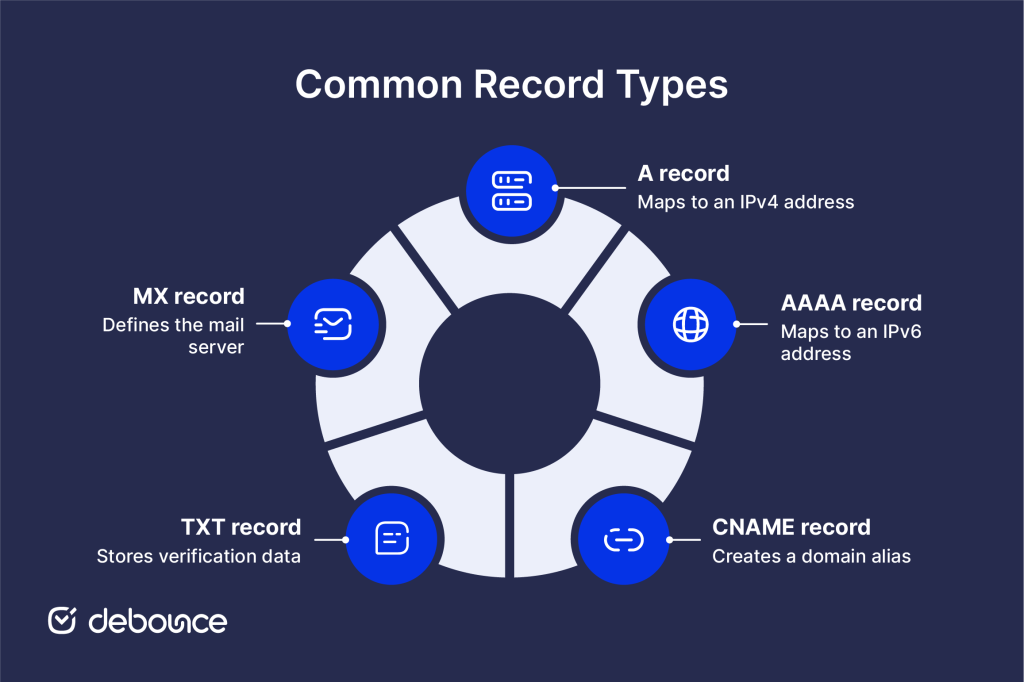
MX records sit in the same DNS infrastructure as all the others, but they’re the only ones dedicated to email routing. When you set up multiple SPF records or add DKIM entries, those go into TXT records, but the MX record is always where incoming mail gets directed.
The moment someone clicks “send” on an email to your domain, a series of steps begins behind the scenes to make sure the message reaches the right servers:

The mail server hostname in your MX record, for example, mail.yourprovider.com, is what the sending server actually connects to. The MX record itself doesn’t do the receiving; it just points to the server that does.
Every MX record includes a priority value, which is a number that tells mail servers which server to try first. The lower the number, the higher the priority.
For example:
Most domains have at least two MX records for redundancy. If your primary server is down or unreachable, the sending server falls back to the next one in the list. This failover behavior is built into how email routing works, which is why providers like Google Workspace and Microsoft 365 give you multiple MX records to add during setup.
If two MX records have the same priority, the sending server doesn’t prefer one over the other. It will choose one of them, often at random. This helps spread incoming emails across multiple servers instead of sending everything to just one, which is a simple way to share the workload and avoid overload.
An MX record has five components. Here’s what each one means:
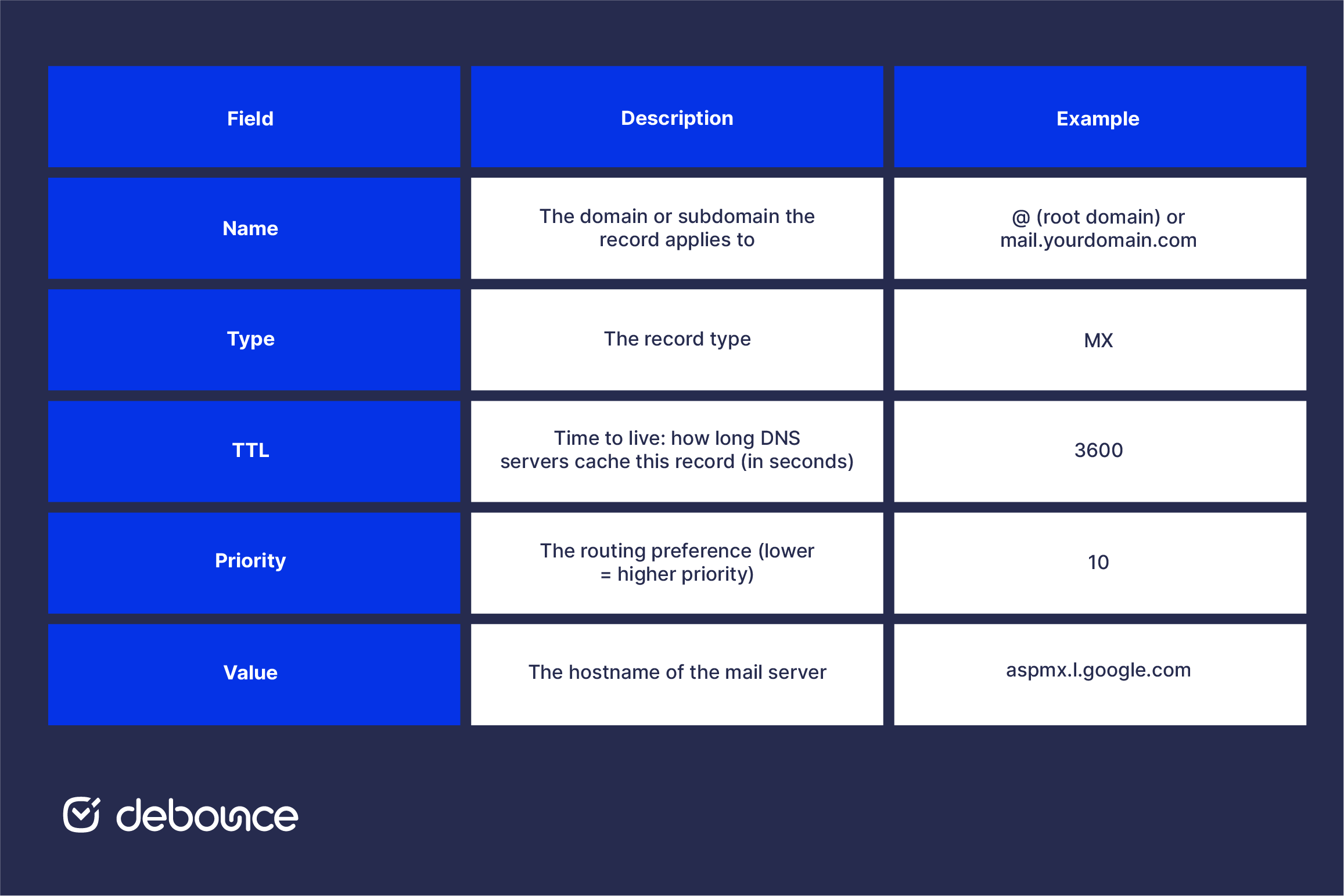
When you look up MX records using a tool or the command line, you’ll see all five of these fields. The value (mail server hostname) is what the sending server connects to; it must resolve to a valid IP address, which is why mail server hostnames have their own A records in DNS.
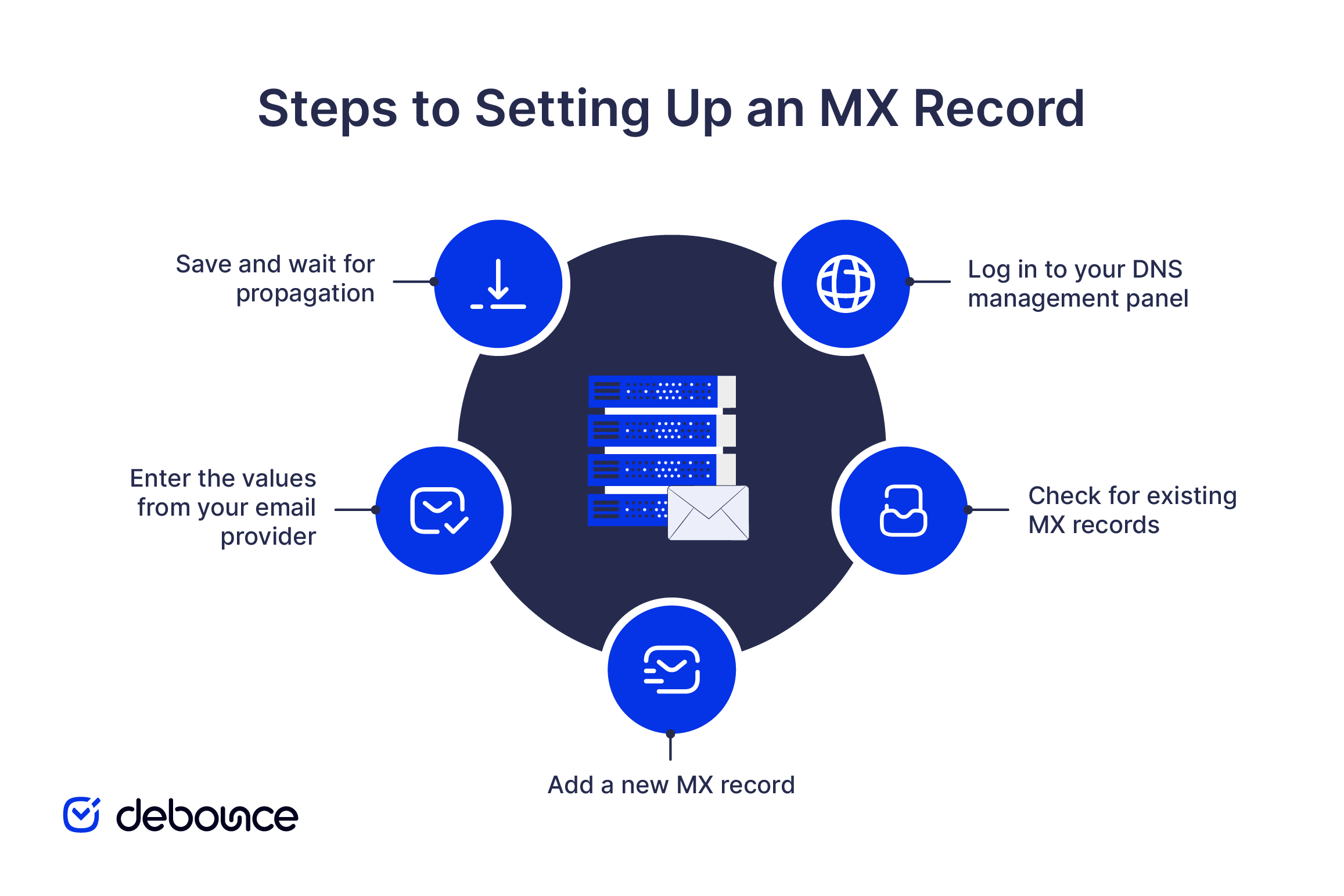
MX records are added through your domain’s DNS management panel. This is usually found at your domain registrar or your hosting provider, depending on where your DNS is managed.
General setup steps:
Checking MX records is useful when troubleshooting delivery issues, confirming a new setup, or making sure a domain can receive email. It also helps during migrations, when emails aren’t arriving or are going to spam, and when setting up services like Google Workspace or Microsoft 365. There are two main ways to do it.
Method 1: Use a browser-based MX lookup tool
Online tools let you enter a domain and instantly see its MX records without any command-line knowledge. DeBounce’s MX lookup tool is a quick option for this. You’ll see the mail server hostnames, priority values, and TTLs at a glance.
Method 2: Use the command line
If you prefer working in a terminal, two commands work well:
Using nslookup (Windows/macOS/Linux):
nslookup -type=MX yourdomain.com
Using dig (macOS/Linux):
dig MX yourdomain.com
Both return the same information: your domain’s MX records, including the server hostnames and priority values. If you get no results, it usually means the domain has no MX records configured, which explains why email to that domain isn’t being delivered.
MX lookups are also helpful for email senders. If a domain doesn’t have a valid MX record, emails sent to it will bounce. That’s why checking for an MX record is one of the first steps in email validation.
Understanding how your domain is set up also ties into email security. If records are missing or misconfigured, it becomes easier for attackers to exploit your domain for phishing or spoofing. Good DNS hygiene supports other protections like email encryption and working with trusted email security providers. A clean setup is what everything else relies on.
An MX record is a small part of your DNS with an important role. It tells the internet where to deliver emails for your domain. If it’s missing or set up incorrectly, your emails won’t arrive.
You add MX records in your DNS using details from your email provider, priority numbers decide which server is used first, and having more than one record helps keep email working if a server goes down.
If you’re building or cleaning an email list, it’s worth knowing that MX record checks are part of how email verification tools confirm whether an address can receive mail. If a domain has no MX record, emails to it will bounce. Catching those addresses early is much easier than fixing deliverability issues later.
If you want to improve your email results, run your list through DeBounce to remove invalid, risky, and undeliverable addresses before your next send.
Yes, most domains have two or more MX records to provide redundancy. If the primary server is unavailable, the sending server falls back to the next one based on priority.
Email sent to that domain will bounce. Without an MX record, the sending server has no way to find a mail server to deliver to.
No. An A record maps a domain to an IP address and handles web traffic. An MX record points to the hostname of a mail server and is used exclusively for email routing.
MX records for Gmail (when using it through Google Workspace) are the DNS entries that tell the internet to deliver your domain’s email to Google’s mail servers. Google provides a set of MX records with different priorities, such as aspmx.l.google.com with priority 1.
If you want to receive email at your domain, yes. A missing MX record means any email sent to your domain addresses will bounce. Also, consider a regular email cleanup process to keep your list healthy once email is flowing.
Find quick answers to your questions about our pricing and plans.

Search engine optimization, or SEO, is crucial for the online visibility of any website and vital for billions of companies worldwide that want to promote...

Basic HTML and JavaScript validation only check email format, not whether the address is real or usable. Disposable and invalid emails can enter...


Having multiple SPF records causes an SPF PermError, so every email sent from that domain fails SPF authentication, even legitimate messages. Duplicate SPF...


You’ve gathered a list of contacts for your email list. Maybe you’re starting a newsletter, or maybe you’re cold-emailing prospects to gain new clients. Now,...

Google Postmaster Tools V2 replaces reputation scores with compliance-based evaluation, making authentication and policy alignment the core requirement for inbox placement. The new...

A bounced email is a message that fails to reach the recipient and is returned with a delivery error. High bounce rates damage...
