Email logos appear primarily in signatures (professional emails) and headers (marketing emails), each with different sizes and optimization requirements. Logos should be under...

Key Takeaways
Sometimes you write a great email: sharp subject line, solid copy, and a real offer. But when you hit send, a portion of your audience never sees it, because it landed in spam.
Most of the time, this isn’t a content problem. It’s a reputation problem. Inbox providers like Gmail, Outlook, and Yahoo make trust decisions about your sending domain and IP before your message even reaches a recipient. If you haven’t built that trust yet, you need email warmup.
When starting with a new domain, switching to a dedicated IP, or even waking up an account that’s been sitting idle for a while, warmup is what helps establish that baseline trust. It’s the process that shows inbox providers you’re a legitimate sender, before you start sending at scale.
Email warmup is the practice of gradually increasing the number of emails you send from a new domain or IP address over a period of days or weeks. The goal is to make your sending volume look natural to inbox providers so you don’t trigger throttling, greylisting, or blocking.
It’s similar to starting a new role. You don’t take on everything at once: you build trust first, show consistency, and then handle more. Inbox providers expect the same pattern from new senders.
When you send from a brand-new domain or IP, mail servers have no history to assess. They don’t know if you’re a legitimate business or a spammer. A sudden spike in volume from an unknown sender reads as suspicious by default, even if every contact on your list is real and opted in. Email warmup fixes that by letting you start small, build a track record of positive engagement, and scale from there.
If you’re sending from an established domain with a healthy track record, you may not need a full warmup from scratch. But if you’re doing any of the following, a warmup process is worth taking seriously:
Note: Email warmup is especially important when using a new domain or IP, so you can build a positive reputation before running large campaigns.
Spam filters have gotten significantly smarter. Gmail, Outlook, and Yahoo now use AI-powered systems that analyze sending patterns to decide where a message lands.
In practice, this means that a neutral reputation is now treated more like a suspicious one. If inbox providers have no data on your domain, they don’t give you the benefit of the doubt. They hold back delivery, route to spam, or throttle volume until they see consistent, positive signals from your sending history.
Email spam statistics tell the story clearly: a large share of legitimate emails never reach the inbox, and new senders have the hardest time getting there.
Without warmup, even well-crafted emails sent to verified contacts can hit spam folders simply because the sending infrastructure hasn’t established a reputation yet. This can damage the reputation of your sender ID and its deliverability going forward.
Warmup is not optional anymore. Consider it as the cost of entry for reliable inbox placement.
Email warmup follows a structured process, usually progressing through the steps below:
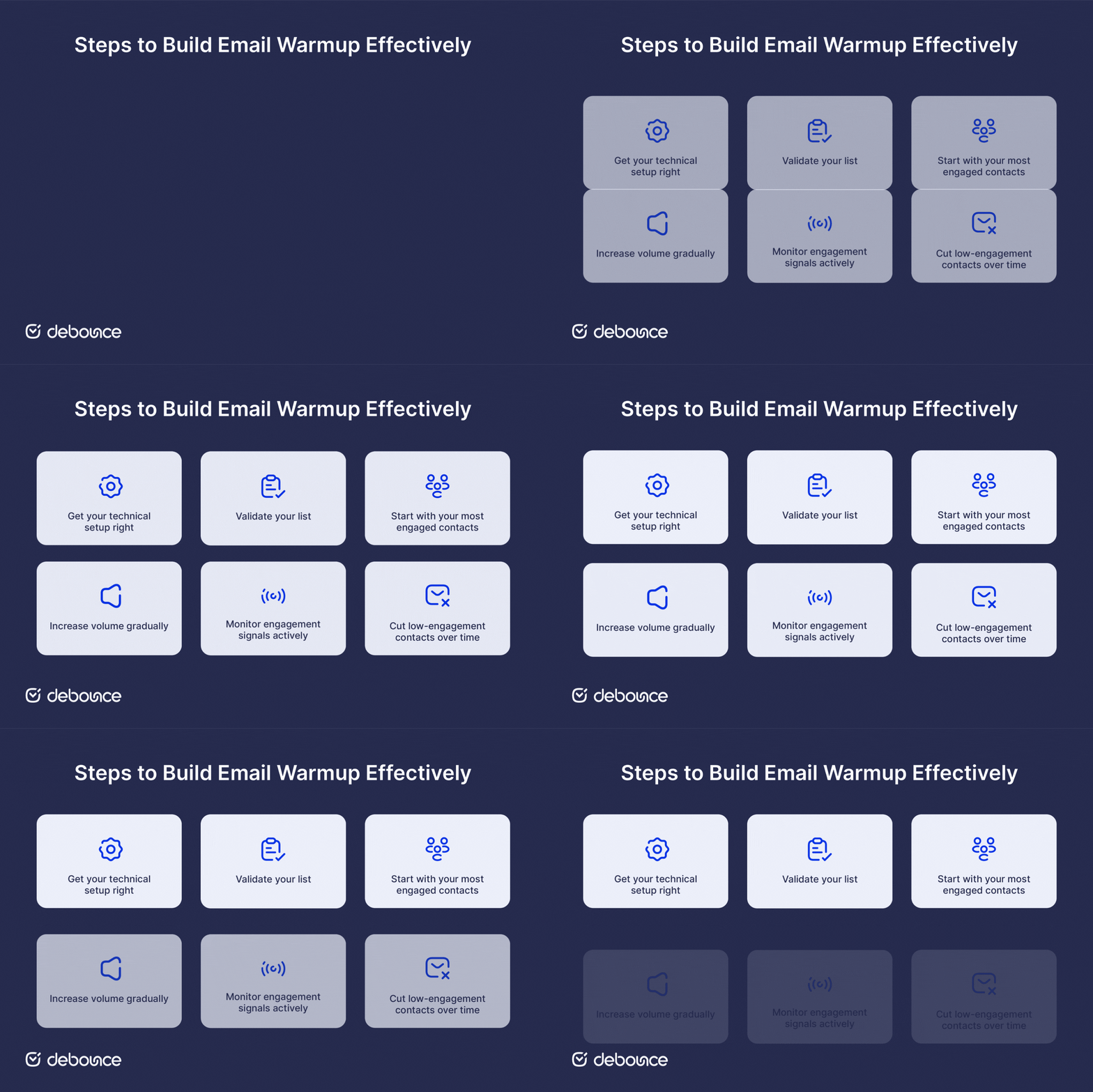
Before you send a single warmup email, your authentication records need to be in order. SPF, DKIM, and DMARC are the baseline. Without them, inbox providers have no way to confirm your emails actually come from you, so any warmup progress stops before it even begins.
This step is regularly skipped, and it’s a costly mistake. Sending warmup emails to invalid, inactive, or risky addresses works against the very reputation you’re trying to build. Before you send anything, run your list through Email List Validation to remove addresses that will bounce, trigger spam complaints, or simply never engage.
In week one, send only to recipients who are most likely to open, click, and reply. These positive signals tell inbox providers that people want your emails. Start with your most engaged users and gradually add less engaged audiences as your reputation grows.
A common starting point is 20–50 emails per day in week one, increasing steadily each week. The exact schedule depends on your ESP and infrastructure, but the goal stays the same: make the volume growth look natural to mail servers.
Opening, clicking, and replying are all positive signals during warmup. They tell inbox providers your domain is reputable. Letting warmup emails get opened and generate replies actively builds the sender trust you’re working toward.
By weeks three and four, exclude recipients who haven’t opened your messages in the past 90 days. Continuing to send to unresponsive contacts at this stage slows your reputation growth rather than supporting it.
What matters most in a warmup is maintaining consistent, credible sending over time. These practices help build trust steadily and reduce the risk of setbacks while your reputation is still developing.
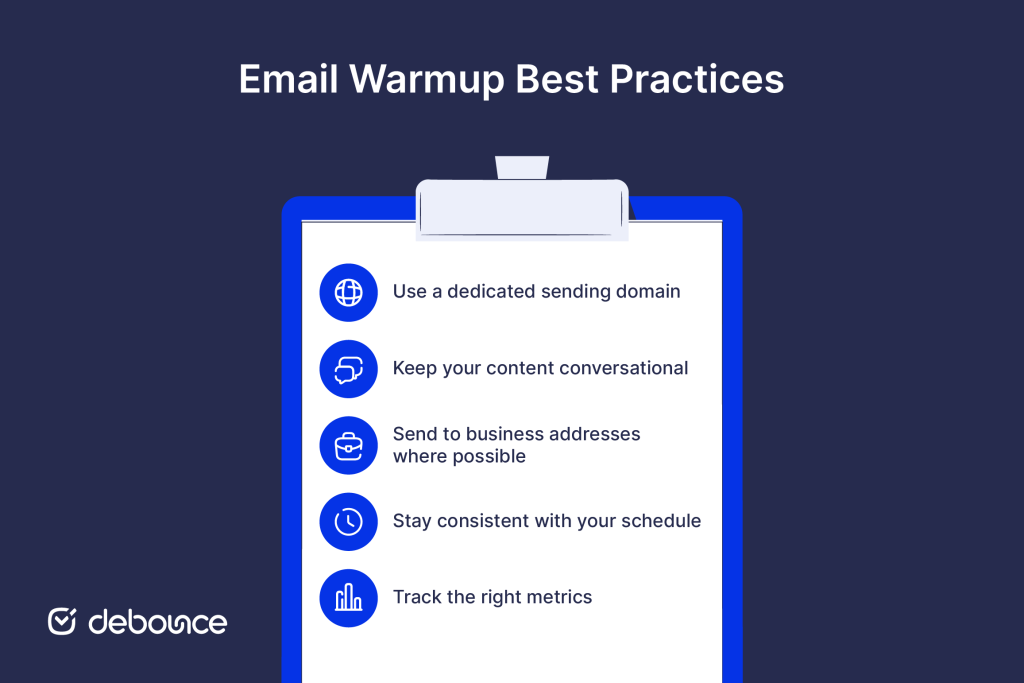
There are two main approaches to email warmup: manual warmup and automated warmup. The first one involves sending emails to real contacts, such as colleagues, partners, or engaged subscribers who are likely to reply. It’s slower and harder to scale, but the interactions are genuine and fully under your control.
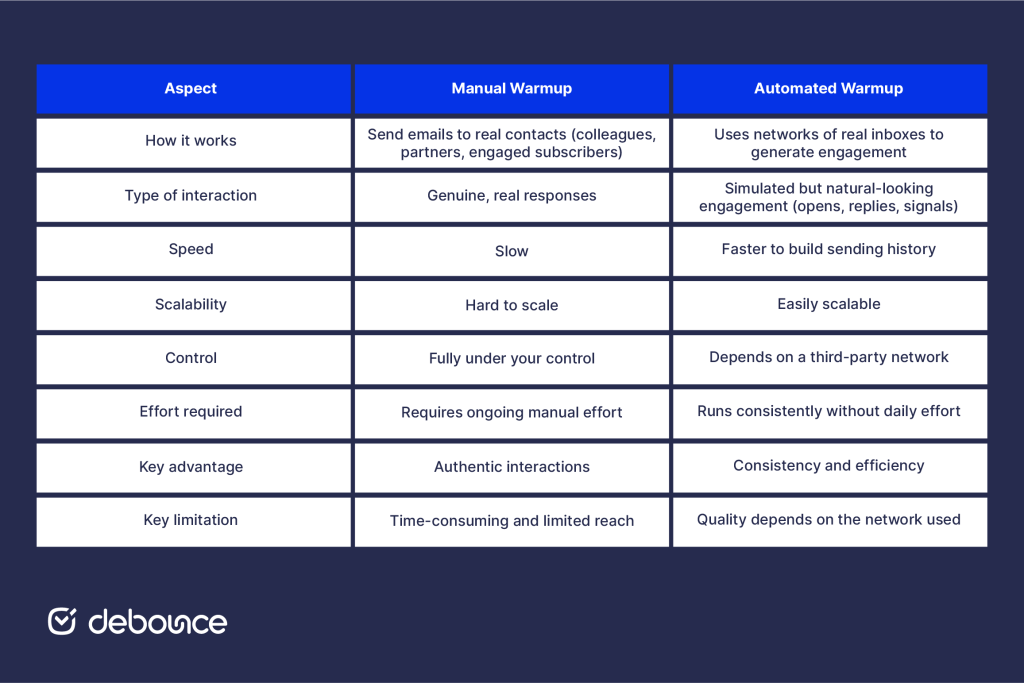
Automated warmup tools take a different approach. They use networks of real inboxes to generate natural engagement on your behalf, including opens, replies, and other positive signals. This allows you to build sending history much faster than doing it manually.
The main advantage of automation is consistency. Engagement happens daily without requiring constant effort. At the same time, you’re relying on a third-party network, so the quality of those inboxes and how the tool operates directly affects your results.
Whichever approach you use, the foundation stays the same: proper authentication and a clean, validated list need to be in place before you start.
As your domain reputation grows, you need to protect it. That means keeping invalid and risky addresses off your list on an ongoing basis.
Email List Monitoring automatically re-validates your list on a schedule, so new invalid or risky addresses are caught before they can damage the reputation you’ve worked to build. It’s a straightforward way to maintain what your warmup started.
A sender reputation takes time to build and far less time to damage. Monitoring is what protects the investment.
Email warmup is how you earn inbox placement before you need it. It’s a structured process that signals to inbox providers that your domain is trustworthy, your emails are wanted, and your sending patterns are consistent.
Core steps include: configuring your authentication, validating your list, starting with your most engaged contacts, scaling gradually, and tracking your metrics against established benchmarks.
But, before any of it begins, make sure your list is actually ready. Sending warmup emails to invalid or risky addresses works directly against the reputation you’re trying to build, no matter how carefully you manage everything else.
Verify your first 100 emails for free on DeBounce and start your warmup with a list that’s prepared to perform.
Most warmup processes run for 4–8 weeks. According to 2026 benchmarks based on 10,000+ domain warmups, 84% of properly managed warmups reach target inbox placement rates by day 28.
The best tool depends on your sending volume, infrastructure, and budget. Look for options that use real inboxes for engagement signals, support custom warmup schedules, and integrate cleanly with your ESP.
Warmup tools use networks of real email accounts to automatically open, reply to, and interact with your outgoing messages, generating the positive engagement signals that inbox providers use to assess your sender reputation.
Find quick answers to your questions about our pricing and plans.

Email logos appear primarily in signatures (professional emails) and headers (marketing emails), each with different sizes and optimization requirements. Logos should be under...

Want your email address to look professional? Worried you used "[email protected]" instead of "[email protected]" and now you're locked out of something important? TLDR: Email addresses...
Email encryption secures the message body and attachments, but typically doesn't hide the sender, recipient, subject line, or transmission timestamps. Transport encryption (TLS)...

Track hard and soft bounces separately. Hard bounces are permanent failures and the metric that most damages sender reputation. For permission-based campaigns, aim...
Contacting inactive or invalid email addresses is a waste of your email marketing budget and can have other negative repercussions for your business’s email marketing....


If you’ve been in the business long enough, you’ve probably heard of at least a few significant data breaches involving small and medium-sized businesses, small...