Email warm-up tools help new domains and cold outreach inboxes build a gradual sending history, but they cannot replace good authentication, list hygiene,...

Key Takeaways
Dozens of sign-ups hitting your form in minutes: gibberish names, addresses you’ve never heard of, domains that don’t exist. It’s messy, and it usually happens fast.
Start with real-time email verification, which blocks invalid and disposable addresses without adding visible friction, regardless of whether they were submitted by a bot or a person. The problem comes from two sources: bots that submit at scale, and real people who enter disposable or made-up addresses. The goal is to block both, without adding so much friction that you push away the people you actually want.
Stop fake sign-ups with eight layered controls across five points of contact: the network, browser, form, email address, and account. Score and limit IPs, track browser contexts, restrict attack origins, add honeypots, verify addresses, challenge risky submissions, confirm ownership, and monitor results. Because these problems happen in different ways, you need several controls working together.
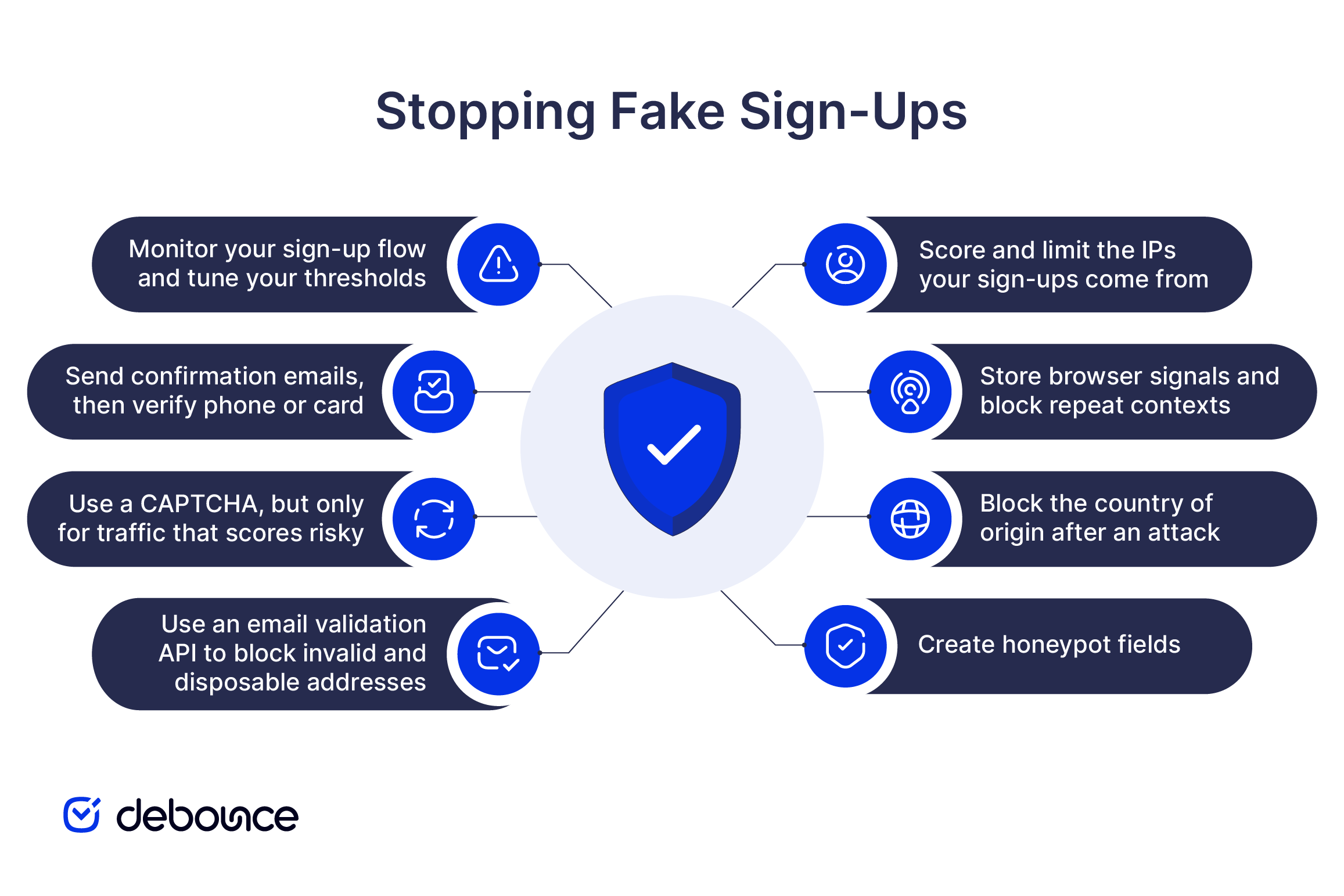
For most sites, email verification is the best first control to implement. The sequence below groups the controls by where they act in the sign-up process rather than by implementation priority.
| Step | Point of contact | Main control | Primary target | User friction |
| 1 | Network | IP scoring, rate limits, and ASN controls | Risky networks and registration bursts | None |
| 2 | Browser | User-agent, screen, and session signals | Repeat browser contexts | None |
| 3 | Network | Temporary country restrictions | Attacks from a known origin | None outside the blocked country |
| 4 | Form | Honeypot fields and timing checks | Generic bots and untargeted scripts | None |
| 5 | Email address | Real-time email validation | Invalid and disposable addresses | None for accepted addresses |
| 6 | Form | Risk-based CAPTCHA | Bots that pass silent checks | Low and risk-based |
| 7 | Account | Email, phone, or card verification | Unverified users and trial abuse | One click or more |
| 8 | All five | Logging, alerts, and threshold tuning | New and changing attack patterns | None |
One IP lookup supports all three controls in this step. Query it before account creation to identify residential, mobile, datacenter, VPN, Tor, or proxy traffic, together with its country, ASN, and risk score.
Cap registrations per IP and time window, but keep the limit loose for universities, coworking spaces, and corporate networks that share addresses through NAT. During an attack, use step 8’s logs to identify and temporarily restrict the ASN behind the activity. A VPN user may resemble datacenter traffic, so pass that signal to step 6 instead of rejecting the sign-up here.
Stops: Network bursts and traffic from risky infrastructure.
Friction: None.
IPs rotate cheaply, but browser contexts often persist longer. These signals help identify attackers using residential proxies. Store the raw user-agent string and check recent records for rapid repetition. Because legitimate devices may share the same user-agent value, repetition should raise the risk score rather than trigger an automatic rejection.
Read the screen dimensions when the form loads and combine them with the user agent. You can also issue a signed session cookie at the first page load. Several registrations from one session may indicate repeated use of the same browser tab. These signals can be spoofed, so use them for scoring rather than blocking.
Stops: Repeat registrations from the same browser context.
Friction: None.
The IP lookup in step 1 already identifies the visitor’s country. The harder decision is whether to act on that information. Blocking a country may reduce repeat attacks from a known origin, but it also prevents every legitimate user in that country from signing up. Only apply the rule when your logs connect the country to an active attack.
Keep the restriction temporary and set a date to review it. If the country also produces customers, increase its risk score instead and let step 6 challenge suspicious submissions.
Stops: Repeat attacks from a known country.
Friction: None outside the blocked country; complete blockage within it.
A honeypot is a form field that real users do not see, but bots often complete. Hide it with CSS rather than the HTML hidden attribute, since simple scripts may skip fields marked as hidden. Give it a plausible name, such as company_url.
If the field contains a value, reject the submission server-side while returning the normal success response. This prevents the bot operator from learning that the honeypot detected the submission.
You can also add a signed timestamp when the form loads. A submission completed in 400 milliseconds is likely automated, while a minimum of two seconds still allows for fast autofill.
Stops: Generic bots and untargeted scripts.
Friction: None.
Steps 1 through 4 evaluate the sender. This step checks the email address they entered. Use a real-time email verification API when the form is submitted. It should check the address format, domain, MX records, and mailbox availability before the account is created.
Reject invalid, undeliverable, known spam-trap, disposable, and unsuitable role-based addresses. An API is important because new disposable domains appear constantly.
For B2B SaaS trials, rejecting free providers such as Gmail or Yahoo may reduce trial farming. This approach does not suit consumer forms because many legitimate customers use free email providers.
Stops: Invalid, fake, selected role-based, and disposable addresses.
Friction: None for accepted addresses.
Most fake submissions should be gone before this point. Use a CAPTCHA only when a request passes the silent checks but still looks suspicious. Give each earlier signal a weight and combine the results into one risk score. Set one threshold for accepting the sign-up, another for showing a challenge, and a final level for blocking it.
Google reCAPTCHA v3 scores activity in the background, while Cloudflare Turnstile often verifies users without showing a puzzle.
Avoid placing a CAPTCHA in front of every user because the extra step may reduce completed sign-ups. Always verify the CAPTCHA token server-side so attackers cannot bypass it by submitting directly to the form endpoint.
Stops: Bots that pass the silent checks.
Friction: Low and limited to risky traffic.
Keep the account inactive until the user clicks a confirmation link. Make the link signed, time-limited, and valid for one use. This step confirms that the person controls the inbox. Run email validation in step 5 first, since sending confirmation messages to invalid addresses can generate hard bounces.
Reserve phone or card verification for accounts that unlock significant value, such as API access, free credits, or compute-heavy trials. A card adds a cost to repeated account creation and helps identify reuse, but it may also reduce the number of people who begin a trial.
Stops: Users who do not control the inbox and repeated trial abuse.
Friction: One confirmation click, with additional checks for higher-value accounts.
Every threshold begins as an estimate. Your sign-up data should determine how it changes over time. Log the IP, ASN, country, user agent, screen size, session ID, timestamp, outcome, and control triggered. These records may reveal the ASN behind an attack or show that a rate limit rejected users from a legitimate office.
Watch for controls that stop working. A honeypot that never detects anything may be broken. Alerts for sudden increases in sign-up volume can also identify an attack early.
Measure sign-up quality rather than sign-up volume alone. Reducing fake registrations is not a success if the same change also removes a large number of real users. Monitoring only covers new activity, so clean your existing list as well.
Stops: Nothing by itself; it keeps the other controls effective.
Friction: None.
The biggest problem with fake sign-ups is not the fake account itself, but what happens when you start emailing that address.

Sending to invalid, disposable, or non-existent addresses generates hard bounces. Too many bounces signal to inbox providers that your sending domain isn’t well-managed, which lowers your sender reputation and pushes future campaigns toward spam folders, even when they are sent to real subscribers. Some fake addresses are spam traps planted specifically to catch senders with poor list hygiene, and hitting one can result in your domain being blocklisted. The deliverability consequences affect your entire list, not just the segment with bad addresses.
Fake sign-ups also create problems beyond deliverability:
Not every site needs every control at full strength. Use more controls when a new account gives users more value or creates more risk.
Here’s how that maps to common site types:
Review how each control affects legitimate registrations, fake submissions, bounce rates, and complaints. Continue cleaning your existing list because some bad addresses will still get through.
The best way to stop fake sign-ups is to combine low-friction controls and reserve visible checks for higher-risk submissions. Start with real-time email verification, catch bots silently with a honeypot and rate limiting, and reserve any visible challenge for traffic that genuinely looks risky. Double opt-in closes the loop. This combination protects your deliverability, your data, and your budget while keeping sign-up simple for real users.
Start with real-time email verification today. Add DeBounce’s real-time email verification API to your sign-up form and stop bad addresses from entering your list at the source. Test it with 100 free verifications, with no commitment required.
A sudden spike usually does not mean you were targeted personally. Bots scan the web for unprotected forms and submit them in large numbers. They may be testing the form, supporting list-bombing, or collecting data as part of a wider abuse pattern. In most cases, the spike means your form was found.
Yes. Real-time email verification, honeypot fields, rate limiting, and IP checks can block many fake sign-ups without adding visible steps for users. A CAPTCHA or challenge should come later, only when traffic looks risky. Many sites can run these silent controls without showing users any challenge at all.
Yes. Emailing the invalid addresses and spam traps that fake sign-ups introduce can land your domain or sending IP on a blocklist, after which even legitimate mail to real subscribers may be blocked or filtered to spam.
Not always. Some real users choose disposable addresses for privacy. Disposable addresses often create lower-quality lists, weaker engagement, and higher abuse risk. For most sign-up forms, blocking them is a reasonable tradeoff, but privacy-focused audiences may need a softer approach.
No. These controls are designed to stop fake sign-ups and form abuse. Other threats, such as scraping, credential stuffing, and denial-of-service attacks, need separate protection. A web application firewall, CDN bot management, or account security tools may be needed outside the sign-up form itself.
Find quick answers to your questions about our pricing and plans.
Email warm-up tools help new domains and cold outreach inboxes build a gradual sending history, but they cannot replace good authentication, list hygiene,...

The best list-growth tactics combine clear value (like lead magnets and landing pages), smart placement (like pop-ups and social links), and quality control...

Email overload is the state of receiving more email than you can reasonably process, leading to lost productivity and decision fatigue. The most...
Email sender reputation determines whether your messages reach the inbox, the spam folder, or get blocked entirely. Email reputation is influenced by spam...


Domain reputation is a trust score that decides whether your emails reach the inbox or get filtered to spam. Monitoring domain reputation requires...

Both SPF and DKIM must be configured and aligned with your sending domain before DMARC works correctly. Publishing DMARC over broken authentication causes...