
The email sending limit varies across various hosts, ranging from per minute to hourly and even daily. Knowing the exact limits in the case of...

Key Takeaways
In a perfect email-validation world, every address would resolve to valid or invalid. Real mailbox providers are messier. When DeBounce checks an address, common outcomes include:
Catch-all is a domain-wide mail server setting. Because the server accepts almost everything, a basic SMTP probe cannot tell you whether [email protected] is a real mailbox or a black hole. That ambiguity is why catch-all and unknown results show up so often on B2B lists — and why sending those addresses cold is risky for bounces and reputation. For background on the status itself, see what is a catch-all or accept-all? and the guide on whether to keep or delete accept-all and unknown emails.
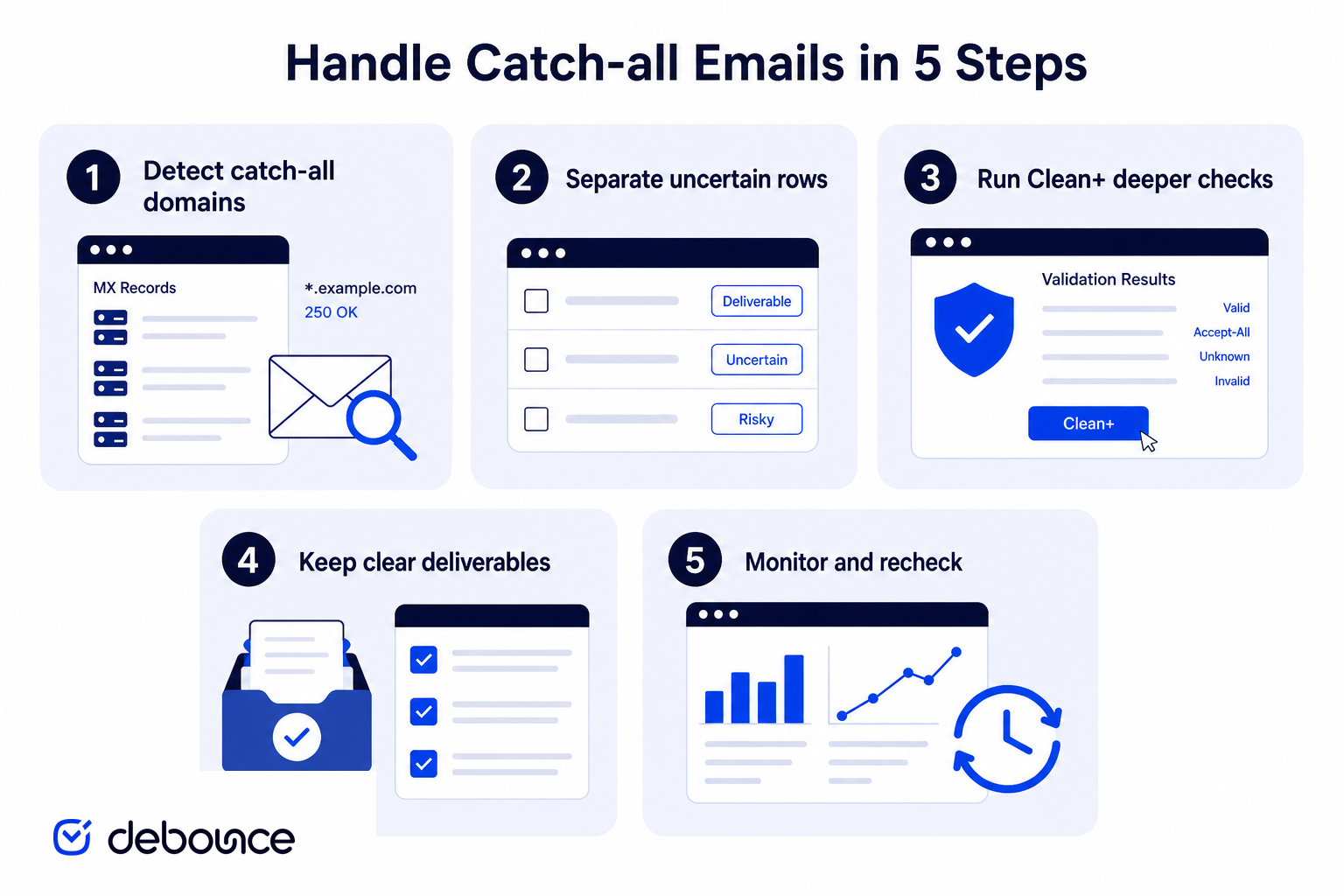
DeBounce handles this in two layers. Standard validation identifies catch-all and hard-to-verify domains. Then catch-all email validation (Clean+) runs a deeper pass on those uncertain records to classify more of them as valid or invalid.
Catch-all validation reduces uncertainty. It does not invent a guarantee that every remaining address will inbox forever — list quality, consent, and sending behavior still matter.
A catch-all domain is configured so the receiving mail server accepts messages for addresses at that domain even when the specific mailbox may not exist. A probe to a real user and a probe to a nonsense local part can both return a positive SMTP response.
That is why honest verification tools report catch-all as its own status instead of flattening it into “valid” or “invalid.” Acceptance at the server level is not proof that a person reads that inbox. Messages sent to a catch-all address may later be delivered to a real mailbox, routed to a shared admin inbox, silently discarded, or rejected with a delayed (asynchronous) bounce.
Microsoft 365 / Exchange Online environments are a common example of “accept now, decide later” behavior: SMTP can look catch-all while undeliverable addresses still bounce minutes or hours afterward. If your ESP does not process those delayed DSNs, dead addresses get resent campaign after campaign.
Catch-all detection is domain-level, not mailbox-level. The classic method: generate an obviously fake local part with high entropy, run an SMTP probe to RCPT TO for that invented address, and check the response. If the server accepts the fake address, the domain is catch-all. If it rejects it, individual mailbox checks are more trustworthy on that domain. If the server returns temporary failures, retry after greylisting windows or treat the result as unknown.
Detection tells you the domain will not reveal mailbox existence over SMTP. It does not tell you which enriched or guessed addresses at that domain are real. That is a protocol limit — not a reason to treat every catch-all row as safe.
These labels get mixed together, but they are not the same problem:
| Status | What it usually means | Practical response |
|---|---|---|
| Catch-all / accept-all | Domain accepts arbitrary local parts at SMTP time. | Run deeper catch-all validation; do not treat as confirmed deliverable. |
| Unknown | The check could not return a definite answer (timeouts, greylisting, blocks). | Retry / deeper pass; suppress for cold sends if still unclear. |
| Hard-to-validate provider | Provider rate-limits or greylists probes so aggressively that generic tools fail. | Use specialized handling; expect slower throughput and careful post-send monitoring. |
Hard-to-validate is an operational constraint (anti-probe defenses), while catch-all is a server configuration that hides mailbox existence. Many real lists contain both.
Catch-all domains can hide damage. If the server accepts a typo and never bounces, your bounce rate may look healthy while opens, replies, and conversions quietly fall. You paid to reach a mailbox that may not exist, and mailbox providers still see weak engagement patterns over time.
Delayed bounces create a second trap. Some environments accept at SMTP and reject later. If your ESP does not suppress those addresses quickly, the same bad rows return in the next campaign. Pair validation with bounce processing and a short sunset window for uncertain segments. Use catch-all status as information — keep real contacts when deeper checks or engagement support them, suppress role-heavy noise and rows that stay uncertain after a second-layer pass, especially before cold volume.
This matters most for outbound, enrichment-driven lists, and international consumer domains where catch-all and greylisting are common. Clean+ is most useful when a large share of your file lands in catch-all or unknown, when you are preparing outbound or paid-acquisition lists where bounce risk is expensive, or when the list mixes easy consumer domains with hard providers. If the acquisition source is purchased or scraped, deeper validation still cannot make that list permissioned — pair Clean+ with honest collection practices. Also remember that catch-all status can change: a domain that looks catch-all today may be reconfigured next quarter, so re-check aging segments rather than trusting a single run forever.
If you generated candidates from names, keep pattern columns separate so you can see which format produces more deliverable hits after cleaning — see convert names to email addresses.
Some providers are catch-all by design. Others rate-limit or greylist validation traffic so aggressively that ordinary tools return unknown or fail after a few checks. Below are examples where DeBounce applies specialized handling. Coverage evolves as providers change behavior — if you need a domain investigated, contact us.

QQ.com (and foxmail.com) plus Mail.ru properties (including list.ru, bk.ru, and inbox.ru) are commonly accept-all, which is why many validators cannot resolve individual mailboxes. DeBounce can run deeper checks on these domains so their addresses are not stuck as permanent catch-all noise.

t-online.de is frequently constrained on other tools. DeBounce supports validation for this provider without the same practical ceilings many generic checkers hit.

Some Google Workspace domains are configured as catch-all and look unverifiable on a first pass. DeBounce uses additional methods to reduce uncertainty on those Workspace catch-all setups.

Comcast (including comcast.net) addresses can be difficult for generic validators. DeBounce includes handling aimed at validating Comcast mailboxes more reliably.

These French providers often block validation IPs after only one or two probes. DeBounce’s approach is built to validate free.fr and aliceadsl.fr addresses despite that sensitivity.

Naver is typically accept-all, so standard SMTP checks do not resolve individual mailboxes. DeBounce can validate Naver addresses with its catch-all / hard-provider methods.

GMX is sensitive to bulk probing. DeBounce can validate GMX addresses with specialized handling, but throughput may be slower than average consumer domains. Residual bounce risk can be higher than on easy providers — treat GMX segments carefully after cleaning.

WEB.DE behaves similarly to GMX: rate limits and sensitivity make bulk validation harder. DeBounce can process WEB.DE lists with dedicated methods; expect slower runs and monitor post-send bounce rates closely.

bbox.fr often blocks validation IPs quickly. DeBounce supports bbox.fr validation despite those anti-probe controls.

abv.bg is another provider where generic tools hit limits. DeBounce validates abv.bg addresses as part of its hard-provider coverage.

Rogers is a major Canadian provider and is commonly accept-all. Standard validators often cannot resolve Rogers addresses; DeBounce applies catch-all methods here as well.
Yahoo and AOL are also among the accept-all-style providers DeBounce can process with deeper validation.
Even after a deeper pass, some rows may remain uncertain. Treat them as a risk segment, not confirmed leads:
Document the policy: how contacts were collected, which statuses were suppressed, and when the list was last re-checked. That paper trail matters when an ESP asks why a segment bounced or when your team needs to justify holding uncertain catch-all rows back from a big send. For campaign bounce context, see ideal email bounce rate.
Catch-all and hard-to-validate providers are why “valid vs invalid” is not enough for modern list hygiene. Detect uncertain domains honestly, run a second-layer catch-all pass where it matters, and keep a clear send policy for anything that remains ambiguous: validate, decide, monitor, repeat. That loop is how catch-all stops being a mystery status and becomes an operable segment.
Ready to reduce uncertainty on catch-all and unknown rows? Start with DeBounce and run a deeper pass before your next import or send.
A catch-all domain is configured to accept mail for addresses at that domain even when a specific mailbox may not exist. A simple SMTP check can confirm domain acceptance, but it often cannot prove whether a given address is a real inbox.
First-tier validation finds catch-all and unknown results. Catch-all validation (Clean+) is a second-layer process that re-checks those uncertain addresses to classify more of them as valid or invalid. It reduces uncertainty — it does not guarantee zero bounces.
Usually no for cold or high-volume campaigns. Unknown means the check could not confirm the mailbox. Prefer deliverable results, suppress invalids, and only use remaining uncertain addresses with a clear risk policy.
These providers are sensitive to probing and often rate-limit validation traffic. Specialized handling can process them, but runs may be slower and residual bounce risk can be higher than on easy consumer domains.
No. It reduces uncertainty on catch-all and unknown results. Mailboxes still change, and sending practices still affect deliverability. Use validation as risk reduction alongside consent, authentication, and ongoing list hygiene.
Detection probes an obviously fake address at the domain. If the server accepts it, the domain is catch-all. That tells you SMTP will not reveal mailbox existence. It does not confirm which individual addresses at that domain are real.
Find quick answers to your questions about our pricing and plans.

The email sending limit varies across various hosts, ranging from per minute to hourly and even daily. Knowing the exact limits in the case of...

The return on investment from email is huge. But for that, you need the data around the best time to send the email, benchmark yourself...

Free SMTP servers are best suited for low-volume sending, testing, and small applications, rather than large-scale campaigns. Free SMTP providers typically impose strict...

A poor-quality email list damages sender reputation, increases bounce rates, and wastes email marketing budget. Email verification tools help remove invalid, disposable, duplicate,...

Email marketing can be a blessing and a curse - especially when not done correctly. The days of email blasts are gone but not forgotten....


When cleaning up your email, remove promotional emails, old newsletters, and spam in bulk rather than one by one. Clean your primary work...
