
Unlike phishing, pharming works by corrupting DNS systems or device hosts files so that typing a correct address automatically routes users to fraudulent...

Key Takeaways
You write an email, hit Send, and seconds later it appears in someone’s inbox halfway across the world. That process depends on SMTP, the standard protocol responsible for sending email across the internet. Think of it as the mail carrier that moves your letter between post offices: it doesn’t help the recipient read the letter, it just gets it there.
SMTP, or Simple Mail Transfer Protocol, is the standard protocol used to send and relay email across the Internet. When you send a message, SMTP moves it from your email client to your outgoing mail server, and from there to the recipient’s mail server. It handles outgoing mail only (retrieving and reading mail from a mailbox is handled by IMAP or POP3).
SMTP is an application-layer protocol that runs over TCP/IP, defined by RFC 5321. It’s a push protocol: it pushes messages from one server to another. Once the message lands in the recipient’s mailbox, SMTP’s job is done. Whatever happens next, such as downloading to a device, reading in a browser, or syncing across apps, is outside SMTP’s scope.
SMTP and IMAP are often confused because they’re both involved in email, but they serve opposite purposes: SMTP sends messages, while IMAP retrieves and synchronizes them.
SMTP moves a message through a series of steps using short plain-text commands. The process involves your email client, your outgoing mail server, and the recipient’s mail server (in that order).
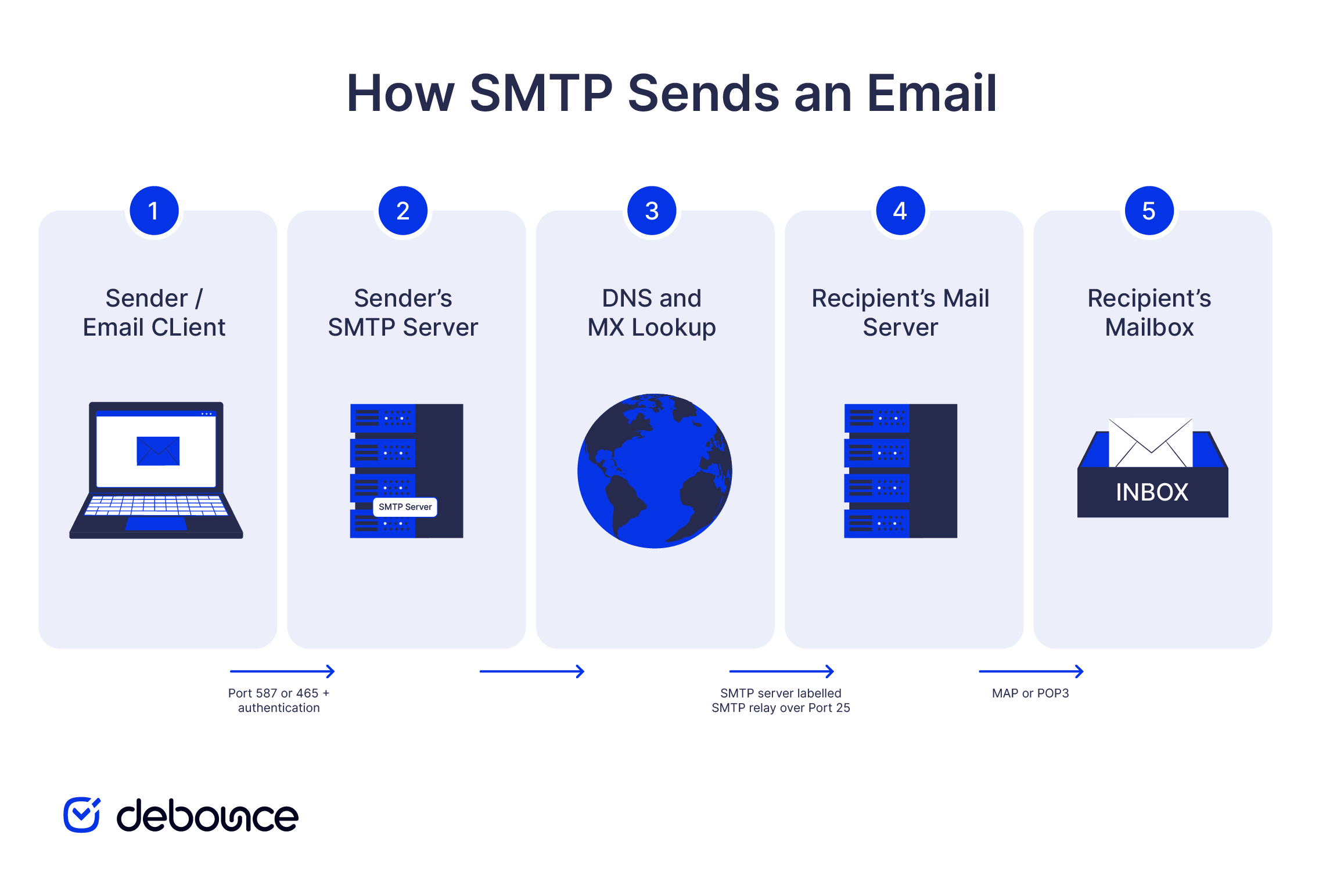
When you hit send, here’s what happens:
If the message passes through intermediate servers along the way (which happens in some configurations), each one adds a Received: header to the message, creating a traceable record of where the message has been. This is called store-and-forward: each server temporarily holds the message before passing it to the next one. That trace is what email headers show when you look at the full source of a delivered message.
SMTP is a request-and-response conversation in plain text. The client issues a command, and the server replies with a numeric code. Here’s what a basic SMTP exchange looks like:
EHLO client.example.com
250 Hello client.example.com

MAIL FROM:<[email protected]>
250 OK

RCPT TO:<[email protected]>
250 OK

DATA
354 Start input, end with <CRLF>.<CRLF>

Subject: Hello
This is the message body.
250 Message queued

QUIT
221 Bye
Each command has a specific role: EHLO opens the session and identifies the sending server; MAIL FROM declares the sender address; RCPT TO declares the recipient; DATA carries the message content; and QUIT closes the connection. The server responds with three-digit codes: 250 means success, 354 means “go ahead and send the message body,” and codes in the 4xx and 5xx ranges signal temporary and permanent failures, respectively.
Three ports handle most SMTP traffic, and choosing the right one matters for deliverability and security:
Port 2525 is an unofficial fallback port offered by many email service providers. It is often used when port 587 is unavailable or blocked, although it is not formally assigned for SMTP in an RFC.
SMTP was originally designed without built-in security, so modern email relies on additional authentication and encryption to protect message submission.
SMTP AUTH is the authentication layer on submission ports 587 and 465. When you configure an email client or application to send mail, you provide a username and password that your SMTP server verifies before accepting the message. This prevents unauthorized users from sending email through your server and helps reduce spam abuse.
Server-to-server delivery over port 25 works differently. SMTP AUTH is not used because mail servers identify and evaluate one another through DNS records, IP reputation, and other trust signals rather than user credentials.
Encryption protects messages while they travel between the client and the SMTP server. On port 587, STARTTLS begins with an unencrypted connection and upgrades it to TLS before credentials or message content are transmitted. On port 465, implicit TLS encrypts the connection from the moment it is established.
SMTP AUTH and TLS verify that you’re authorized to use the sending server and protect the connection in transit, but they do not prevent someone from spoofing your domain in the From: header. Domain spoofing is addressed by SPF, DKIM, and DMARC, which are DNS-based email authentication standards that receiving servers evaluate alongside the SMTP transaction.
The most common confusion about SMTP is the idea that it handles both sending and receiving email. It does not.
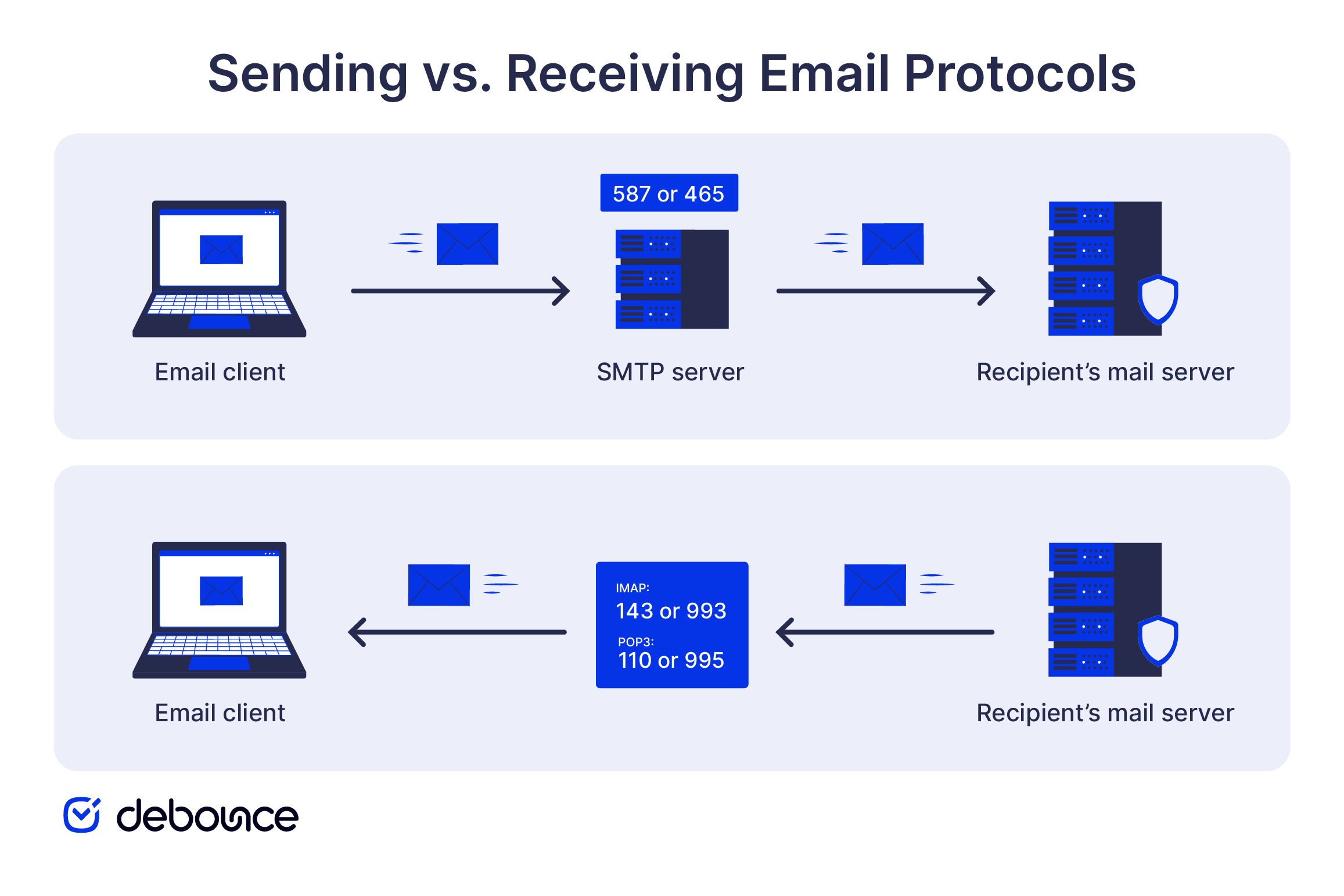
SMTP is a push protocol that sends and relays messages from one server to another. IMAP and POP3 are pull protocols that let an email client retrieve messages stored in a mailbox. When you open your inbox and see new email, IMAP or POP3 is doing the work, not SMTP.
SMTP, IMAP, and POP3 are complementary rather than competing protocols. Most email clients use SMTP to send messages and IMAP, or sometimes POP3, to receive them, connecting through different servers or ports for each function.
SMTP delivers your message to the recipient’s mail server. Whether that message reaches the inbox rather than the spam folder depends on factors beyond the SMTP transaction itself.
Three factors determine inbox placement beyond what SMTP controls:
There’s also a direct connection between SMTP and email verification. When DeBounce verifies an email address, it opens an SMTP conversation with the recipient’s mail server and issues a RCPT TO command to test whether the mailbox is accepted. If the server responds positively, the address is deliverable. If it returns a rejection, the address gets flagged.
The verification stops before the DATA stage, so no message is ever sent, and the check leaves no trace in the recipient’s inbox. DeBounce combines this SMTP response with other validation signals to assess the address without completing an actual delivery.
SMTP handles the sending and relaying of email between servers, while IMAP or POP3 handles retrieval. It also works alongside SPF, DKIM, and DMARC, which help receiving servers verify the sender and decide how to treat the message.
Reliable delivery also depends on sending to valid addresses. DeBounce checks email addresses at the SMTP level without sending a message, helping you remove invalid contacts before they generate bounces. Verify your email list before your next campaign and start with 100 free verifications.
SMTP is used to send and relay outgoing email. Retrieving messages from a mailbox is handled by IMAP or POP3 after the email has been delivered.
Port 587 with STARTTLS is the standard choice for authenticated email submission. Port 465 with implicit TLS is also widely supported, while port 25 is mainly used for server-to-server relay and is often blocked for client sending.
SMTP is the protocol that defines how email is sent and relayed. An SMTP server is the system that follows those rules to accept messages and pass them toward the recipient’s mail server.
Basic SMTP does not provide encryption on its own, but modern connections are commonly protected with TLS. Port 587 usually uses STARTTLS, while port 465 encrypts the connection from the start. SPF, DKIM, and DMARC provide separate protection against domain spoofing.
Yes. An email verifier opens an SMTP conversation with the recipient’s mail server and issues a RCPT TO command to test whether the mailbox is accepted, stopping before DATA, so no message is actually sent. This is how DeBounce confirms whether an address is deliverable without sending anything to the inbox.
Find quick answers to your questions about our pricing and plans.
Unlike phishing, pharming works by corrupting DNS systems or device hosts files so that typing a correct address automatically routes users to fraudulent...

You can not please everyone. Some people will opt-out of your email list no matter what. It’s not you. It’s them. This is a struggle...

Want to write cold emails that get read? Here are some of the best-known strategies for writing a perfect cold email that always gets a...
SIP supports real-time communication such as voice and video calls, while SMTP sends and relays email messages. They serve different purposes and often...

Struggling to make sales through email marketing? Learn the tricks to getting your emails opened, read, and clicked on so you can make money with...

Many e-commerce marketers are very keen on investing in email marketing. They are growing their lists, sending engrossing email campaigns to engage visitors or, better...
