Open rate is still useful as a directional signal, but Apple Mail Privacy Protection and similar privacy features mean it is no longer...

Key Takeaways
Disposable email use is now common. Apple’s Hide My Email, Firefox Relay, and Yahoo’s native disposable address generator have put throwaway-style addresses in the hands of billions of users. Alongside older services like Mailinator, 10MinuteMail, and Temp Mail, the volume of disposable signups hitting business forms has never been higher, and current email spam statistics reflect the scale of the problem.
Every unblocked disposable signup hits your program in three places at once: bounce rates climb when the address expires, email sender reputation suffers when mailbox providers see repeated delivery failures, and analytics become less reliable because fake or low-quality signups can look like real conversions. Knowing how to block disposable email addresses is now essential for any business that collects emails through forms.
These methods are ordered from most effective to most basic. The best approach is to use more than one, since disposable email services create new domains all the time, and one tool may not catch them all.
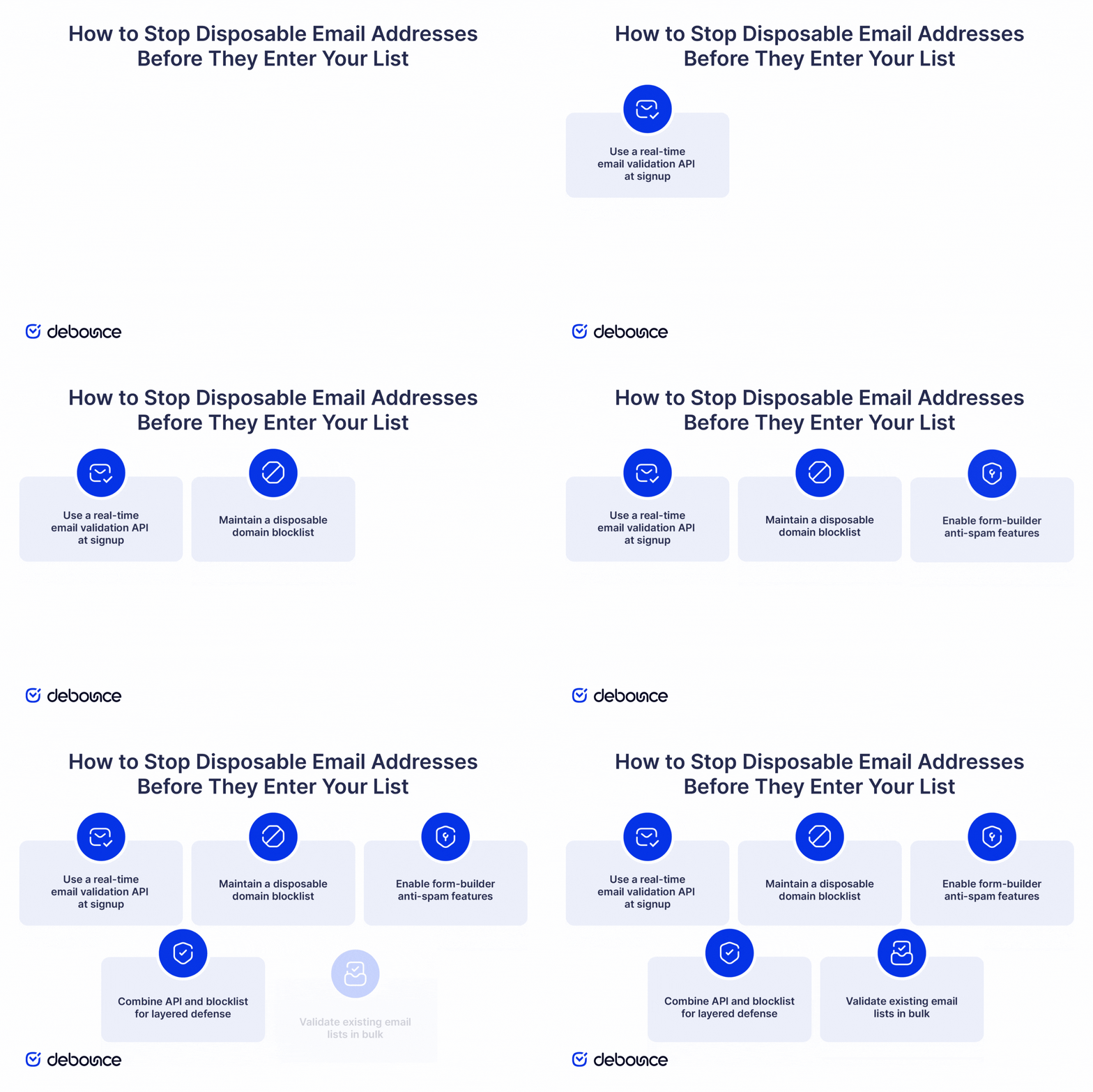
When a user submits a signup form, a real-time API check can review the address before it enters your database. This allows you to block poor-quality signups at the point of capture instead of cleaning them up later.
DeBounce’s free disposable email check API is CORS-enabled and requires no authentication, which means it’s callable directly from your signup form’s frontend JavaScript. A single fetch call returns the disposable verdict in under 200ms.
Implement the API call on form submit, before the account creation request fires. If the response flags the address as disposable, return a clear error and prevent submission.
For higher-volume flows or broader checks, such as catch-all detection, role accounts, syntax errors, and MX validation, use the full DeBounce REST API. The free disposable check covers the most common issue with one lightweight call, while the full API gives you deeper validation in a single request.
Keep a list of known disposable email provider domains, like mailinator.com, 10minutemail.com, tempmail.com, and thousands of others, and reject any signup whose email domain appears on it. Open-source starting points exist, such as the disposable-email-domains repository on GitHub, which maintains thousands of entries.
The approach is fast and free: checking a local list adds no API delay and has no per-call cost. It catches the most widely used disposable services immediately.
The limitation is that blocklists age quickly. Disposable services launch new domains daily, sometimes dozens per week. Without an automated update job, a blocklist becomes meaningfully incomplete within weeks of deployment.
Automate updates from the GitHub source on a weekly schedule using a simple cron job that pulls the latest version and reloads it into your application. That keeps coverage current for the most common services, while your API check catches newer or less familiar domains the list may not include yet.
Most modern form builders, like WordPress plugins, Webflow, HubSpot forms, and Typeform, include a built-in disposable email blocking option in their anti-spam settings. Turn it on before building custom logic. If the platform already catches common disposable addresses, use that first and add stronger validation only where needed.
Built-in protection is not the same on every platform. Some form builders use old static lists; others integrate with active third-party APIs that maintain fresh coverage. Check the platform’s documentation to confirm the disposable list is actively maintained before relying on it as your only defense.
If the built-in protection relies on an outdated static list, add an API check through the form’s webhook or submit handler. The platform can block the obvious disposable addresses, while the API catches the ones it misses. If you cannot change the backend, DeBounce’s real-time email validation widget can validate addresses directly in the form as the user types.
A strong production setup checks the local blocklist first, then uses the validation API for anything the list does not catch. The local check is fast, free, and adds no delay. The API adds broader coverage for newer or less common disposable domains.
This keeps the system efficient without weakening protection. The blocklist handles many common disposable signups instantly, which reduces unnecessary API calls. The API then covers the gaps, giving you stronger protection than either method can provide on its own.
Cache API responses by domain for 24 hours. A domain’s disposable status usually does not change within a day, so repeated checks for the same domain only use one API call per day. This is especially useful during automated signup attempts, where the same disposable domain may be tested many times.
Real-time blocking stops new disposable signups, but it does not fix the disposable addresses already in your database. Those may come from before blocking was added or from times when blocking failed. Bulk validation checks the full list and flags disposable addresses so you can remove them.
Use Email List Validation to run a full pass on your existing database. The process classifies each address as valid, invalid, disposable, catch-all, role-based, or unknown, so you know exactly what you’re working with before your next campaign.
Run bulk validation quarterly at minimum, monthly for high-acquisition lists. Disposable addresses that worked at signup may expire later, turning into hard bounces that hurt your sender reputation each time you email them.
Pair scheduled bulk validation with engagement-based suppression. Contacts with no opens or clicks in six months are likely unengaged, and disposable addresses often fall into that group. Cleaning your email list of invalid addresses and long-term inactive contacts in the same pass keeps the list healthier and your deliverability metrics more accurate.
Understanding the damage disposable emails cause helps you decide which blocking method to use first. They do more than waste space in your database. They can hurt five parts of your email program at the same time.


For real-time validation inside the form UI, use the real-time email validation widget. It works with form JavaScript and checks the address as the user types, so you can validate signups without changing the backend.
Blocking disposable emails is rarely a binary on/off decision. If the rules are too strict, you may reject legitimate users who use masked addresses for privacy. The goal is to stop abuse while still allowing privacy-conscious users to sign up when their intent is genuine.

A hard block rejects the signup outright with an error message. A soft flag accepts the signup but tags it as risky for downstream filtering, excluding it from marketing automation, for example, while still allowing transactional email.
Hard-blocking works best for high-stakes signups: paid trials, paid plans, identity-verified flows where a real, permanent contact is needed. Soft-flagging works better for lower-stakes interactions, including newsletter signups, gated content downloads, and free tool access.
In B2C consumer products, building trust often matters more than blocking every fake signup, so soft-flagging is usually the more conversion-friendly choice. In B2B SaaS, fake trials, referral abuse, and usage-limit workarounds can carry a higher cost, so hard-blocking is often the better option.
When a disposable address is rejected, show a specific error message. “Please use a permanent email address to create your account” is clear about the requirement. “Invalid email” gives the user no actionable information and typically causes them to abandon the form rather than try again with a real address.
Users with legitimate privacy concerns often switch to a permanent address when the reason
for the rejection is clearly explained. Offering alternatives helps further: social login through Google or Apple, phone verification, or a link to your privacy policy that addresses the concern directly.
Classic disposable services generate addresses that expire in minutes or hours and almost never produce any engagement. That’s the profile to hard-block without hesitation.
Privacy aliases from Apple’s Hide My Email, Firefox Relay, and SimpleLogin work differently. They forward to a real inbox and can produce genuine, sustained engagement over months or years. Hard-blocking them excludes a growing and privacy-conscious segment of the audience, particularly Apple ecosystem users, for very little gain.
The better approach is to allow privacy aliases by default and monitor engagement separately. If a privacy-alias signup produces no opens or clicks for 90 days, suppress it like any other unengaged contact. That’s an engagement decision (not a disposable-email decision), and it’s a more accurate signal of actual intent.
Blocking disposable email is no longer optional. Real-time API validation at signup, paired with a maintained domain blocklist and regular bulk validation, helps keep bounce rates low, analytics clean, and sender reputation protected across every campaign.
The nuance is in the approach: filter abuse without alienating privacy-conscious users. Someone using Apple’s Hide My Email or Firefox Relay is different from someone using a 10-minute throwaway address. Engagement (not address type) is the right long-term signal for suppression decisions.
The fastest way to add real-time blocking to any existing signup form is DeBounce’s free disposable email check API. No authentication, no account setup required for basic use; a single fetch call from your form’s submit handler returns the disposable verdict before the record is created. For existing lists that need a full pass, upload them through Email List Validation and get every address classified before the next campaign goes out.
It’s a temporary email address that expires after a short period (often minutes to hours) and is used to receive a verification email without exposing a real inbox.
Yes, but combining an API with an actively maintained blocklist makes bypassing impractical for the vast majority of users. Determined attackers can always find new domains, but the friction is enough to deflect low-effort fake signups, which represent the overwhelming majority of the problem.
New disposable domains appear daily. Static blocklists become meaningfully incomplete within weeks if not actively maintained, which is why a validation API, with its own continuously updated database, is the more reliable primary defense.
Yes, especially for any signup that triggers marketing emails. Free signups generate the same bounce-rate and sender-reputation damage as paid ones, and they’re statistically more likely to use disposable addresses in the first place.
Find quick answers to your questions about our pricing and plans.

Open rate is still useful as a directional signal, but Apple Mail Privacy Protection and similar privacy features mean it is no longer...

A business email uses your own domain name and immediately signals professionalism to customers, partners, and inbox providers. Setting up a business email...

Believe it or not, the majority of our business transaction happens via email. So much so that in 2023, there were an estimated 4.2 billion...

Email retargeting focuses on users who have already interacted with your brand, which leads to higher conversion rates than standard email campaigns. Email...


Email size limits apply to the complete message, including body text, inline images, and all attachments combined. Email encoding (Base64) increases file sizes...

MX records tell sending servers which mail servers accept email for your domain and the order in which they should be tried. There...