
As an email marketer, you may often encounter a formidable obstacle in your campaigns — ambiguous email bounce codes. These codes can be perplexing and...

Key Takeaways
Email lists decay at roughly 22% per year. Addresses change when people leave jobs, get deleted when accounts close, become disposable when users want to avoid marketing, or simply stop being checked after someone abandons an inbox. Without a verification process in place, those bad addresses don’t sit silently; they generate bounces that damage email sender reputation across the entire sending domain.
Email verification helps prevent that. It checks each address through several steps, with each catching a different type of problem. Understanding how every step works and what it catches explains why basic format checks miss most of the problem.
A verification service runs all six steps on every address, in order, in roughly 100–500 milliseconds per address. The pipeline below is the same whether verification runs in real time on a signup form or in bulk across a list of millions.
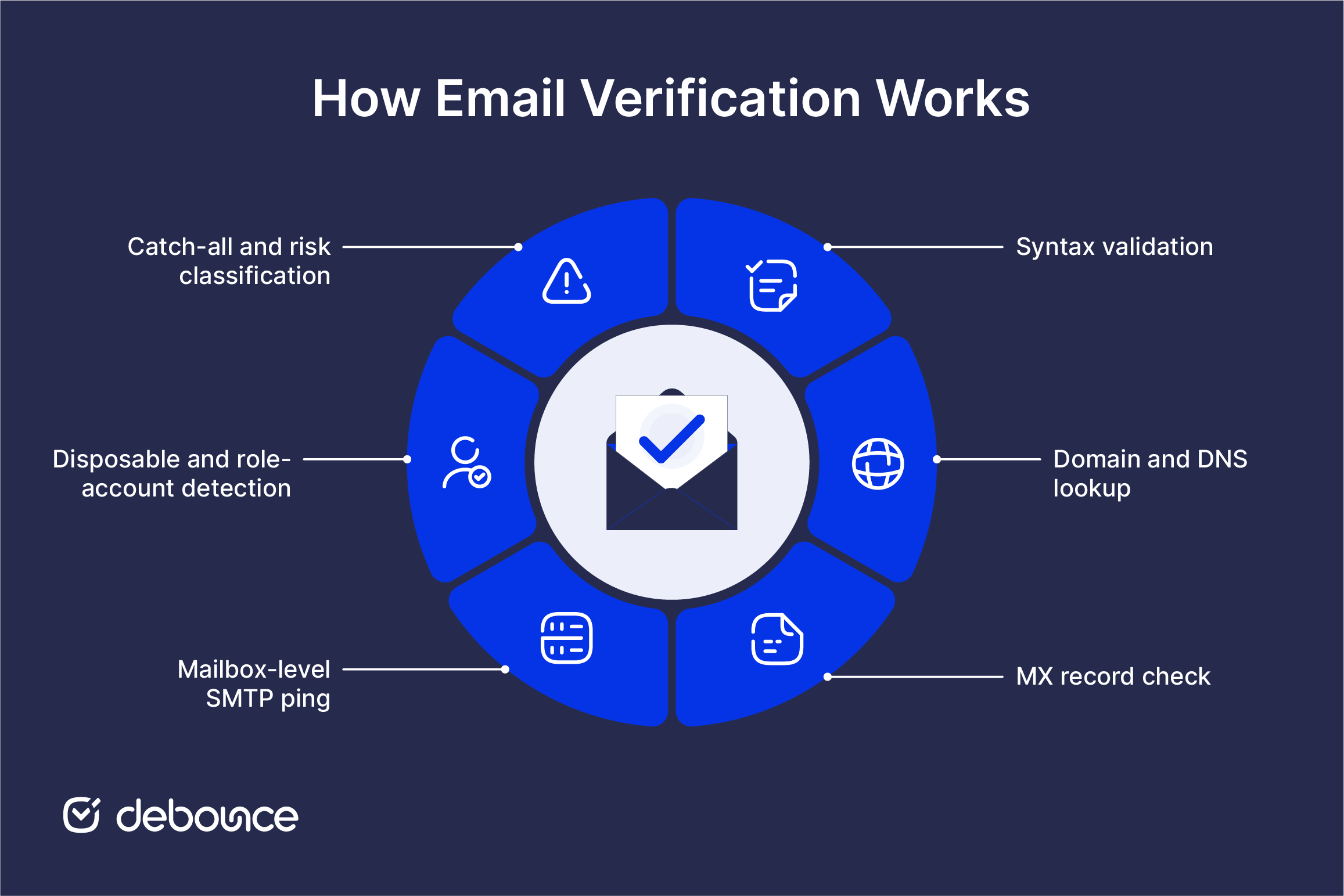
The first step confirms that the address matches standard email formatting rules (based on RFC 5322 and related specifications) as implemented by major mail systems. The verifier checks for a correctly placed @ separator, a valid local part before the @, a valid domain part after it, and the absence of illegal characters or structural errors like consecutive dots or leading/trailing hyphens.
Syntax checks catch obvious typos, like a missing @, an address submitted as a name only, or impossible character combinations, but they can’t confirm the address is real. A perfectly formatted address like [email protected] passes syntax validation cleanly. Everything that passes this step moves to Step 2.
The verifier runs a DNS query against the domain part of the address to confirm the domain itself exists and resolves to a real authoritative server. If the domain doesn’t exist in DNS (because it’s expired or a typo), the address can’t receive email regardless of how valid it looks.
This step catches a common typo pattern: [email protected] instead of [email protected]. The local part looks plausible, but gmial.com either doesn’t exist or isn’t an email provider, which is why DNS lookup returns no result and the address is rejected. Everything that passes moves to Step 3.
The verifier queries the domain’s DNS for MX (Mail Exchange) records. MX records identify which servers handle incoming email for the domain. A domain without MX records has no email infrastructure (it may have a website, but it cannot receive mail).
This step is faster and more reliable than contacting the mail server directly because it confirms infrastructure readiness without initiating an SMTP session. An address on a domain with no MX records (even a real, functioning website domain) is undeliverable by definition. Everything that passes moves to Step 4.
The verifier opens a connection to the recipient’s mail server using the SMTP protocol. It initiates the HELO/EHLO handshake, then issues an RCPT TO command for the specific address being checked. The server’s response reveals whether that mailbox accepts mail.
Usually, a 250 response means the mailbox exists and can receive mail, while a 550 response means it does not. The check stops before any email is sent, so verification only tests whether delivery would work. This step is where most non-obvious bad addresses are caught: correctly spelled addresses on real domains with MX records, where the specific mailbox simply doesn’t exist. Everything that passes moves to Step 5.
The verifier compares the address against an actively maintained list of disposable email providers, like Mailinator, 10MinuteMail, Temp Mail, and hundreds of others. DeBounce maintains this database through its free disposable email check API, which is updated continuously as new disposable services launch.
The verifier also identifies role-based addresses: info@, support@, admin@, sales@, noreply@. These belong to shared inboxes with multiple owners rather than individual people, making them unreliable for marketing email and frequent sources of spam complaints.
At this step, the address is flagged, not always rejected. Some businesses block disposable or role-based addresses, while others keep them and filter them later. The right choice depends on the use case. A paid trial signup usually needs stricter rules than a newsletter signup. Any address flagged here moves to the final classification.
The final step handles a specific infrastructure pattern: catch-all domains. These are servers configured to accept mail for every possible address at the domain, regardless of whether any specific mailbox exists. Because they return 250 to every RCPT TO in Step 4, mailbox-level verification produces unreliable results for them, as the server says “yes” to everything.
The verifier identifies catch-all behavior and classifies affected addresses accordingly. At this step, every address that has passed the previous five checks receives its final risk verdict:
The output goes back to the calling application with both the verdict and, in most services, a confidence score for borderline cases.
The six-step pipeline matters because skipped checks create bigger problems over time. Bad addresses affect every campaign, and the damage builds across three connected areas: list quality, sender reputation, and analytics integrity.
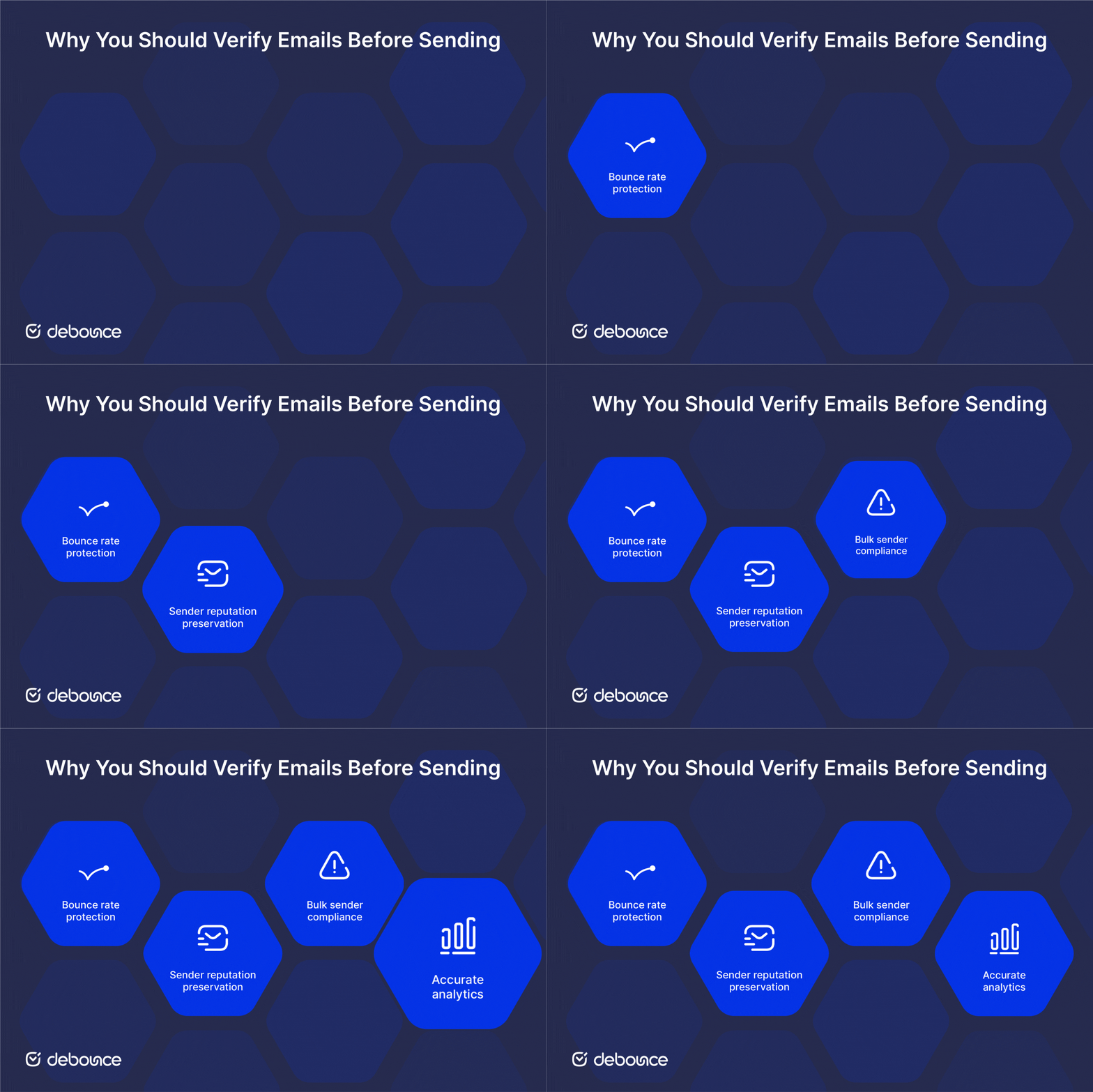
Sending to invalid addresses produces hard bounces. Mailbox providers track bounce rates at the sending domain level and begin throttling or filtering senders whose rates consistently exceed roughly 2%. A single unverified list send can establish that pattern before the problem is detected in aggregate metrics.
Repeated hard bounces tell mailbox providers that your list is not well maintained. That can damage your sending reputation within days. Once reputation drops, every campaign can suffer, including marketing emails and transactional messages.
Gmail and Yahoo now expect bulk senders to keep spam complaint rates below 0.3%. Bad addresses make that harder, especially role-based and disposable emails. These addresses often belong to people who did not clearly opt in, which makes complaints more likely.
Invalid addresses make your list look bigger than it really is. They lower engagement rates and make campaign data less reliable. When bad data guides marketing decisions, teams can spend money in the wrong places without realizing where the problem started.
The six-step process stays the same no matter how verification starts. What changes is when the address gets checked. Most email programs need more than one verification method.
Call the DeBounce REST API as the user submits the form. The response determines whether the address is accepted before the record is created. This is the only method that catches bad addresses before they enter the database. Recommended for any user-facing input form that collects email addresses.
Upload the full list to Email List Validation, run the pipeline across every address in parallel, and download the results classified by verdict. Processing time ranges from minutes to a few hours depending on volume. Run quarterly at minimum; monthly for high-acquisition lists. This method handles addresses already in the database, including those collected before real-time verification was in place, and those that were valid at capture but have since decayed.
Single-address checks are useful when you need to investigate one email. For example, you might check a specific bounce or confirm a contact before direct outreach. Most services show the full result, including what failed and why. This helps with troubleshooting, but it should not replace regular verification for full email lists.
For frontend integration without backend changes, the real-time email validation widget validates addresses as the user types and integrates with the form’s JavaScript directly (no server-side modification required).
Most reputable services follow the same basic verification process. The main differences are accuracy, especially with catch-all domains and servers that block verification checks. After that, comparison usually comes down to free limits, API setup, and pricing.
| Service | Best for | Free tier | Specific strength |
| DeBounce | Teams wanting comprehensive validation with a free disposable API | 100 free credits + unlimited disposable checks | Free CORS-enabled disposable check API plus full bulk and real-time validation in one platform |
| ZeroBounce | Enterprise teams needing the deepest data set | 100 free credits/month | AI-scoring on catch-all addresses and detailed deliverability reports |
| NeverBounce | Marketing operations teams with HubSpot/Mailchimp integrations | Trial only | Native ESP integrations and bulk processing speed |
| Kickbox | Developers prioritizing API quality and documentation | 100 free credits at signup | Clean REST API and quality scoring beyond simple valid/invalid |
| MailerCheck | MailerLite users and small marketing teams | 10 free credits | Tight MailerLite integration and clear bulk-list UI |
| Clearout | Lead generation teams running outbound | 100 free credits | Real-time API focus and additional finder/enrichment features |
DeBounce’s combination of a fully free disposable check API with no authentication required, plus comprehensive bulk and real-time validation on the same platform, makes it the practical starting point for most teams. The free disposable check handles the most common failure mode (throwaway signups), with zero setup, and the full platform handles everything else as the program scales.
The email verification process is the operational foundation that protects bounce rates, sender reputation, and analytics integrity across every campaign. Each of the six steps catches a distinct category of bad address that the steps before it don’t cover. Syntax catches formatting errors. Domain and MX checks catch infrastructure failures. SMTP ping catches non-existent mailboxes. Disposable and catch-all detection handles the edge cases that pass every other check but still don’t deliver.
The strongest setups combine real-time API verification at signup (so bad addresses never enter the database) with periodic bulk verification of existing lists to catch addresses that have decayed since capture. Cleaning an email list on a regular schedule turns verification from a one-time event into an ongoing program that compounds in value over time.
Start with DeBounce’s free disposable email check API for the simplest real-time integration: one fetch call from any signup form, no authentication required, results in under 200ms. When you’re ready for full pipeline verification across bulk lists and signup flows, Email List Validation handles both in the same platform.
A backend pipeline that confirms an email address is real, correctly formatted, and capable of receiving mail. The pipeline runs syntax, domain, MX, SMTP, disposable, and catch-all checks before returning a verdict, without sending any email.
Most services use the terms interchangeably. When distinguished, verification refers to the technical deliverability checks covered by the 6-step pipeline, while validation sometimes includes broader risk scoring such as spam likelihood, engagement risk, and role-based flags.
Real-time API verification typically returns in 100–500 milliseconds per address. Bulk verification of large lists runs checks in parallel and completes in minutes to a few hours, depending on list size.
No. This article describes the backend technical process that runs without the user’s knowledge. The user-facing confirmation code is a separate concept; see our dedicated post on user-facing email verification codes for how that flow works.
No. This article describes the backend technical process that runs without the user’s knowledge. The user-facing confirmation code is a separate concept; see our dedicated post on user-facing email verification codes for how that flow works.
Find quick answers to your questions about our pricing and plans.

As an email marketer, you may often encounter a formidable obstacle in your campaigns — ambiguous email bounce codes. These codes can be perplexing and...

Catch-all email addresses accept messages sent to any address within a domain, even if the specific mailbox does not exist, preventing bounces due...

An email syntax error prevents an email from being sent or accepted because the address or message format doesn't follow the required rules....


Microsoft 365 DKIM uses two CNAME records (selector1 and selector2) that point to Microsoft-generated keys. This dual-selector setup enables automatic key rotation for...
You probably are familiar with the concept of List Hygiene? Well, this simply means the process of getting rid of inactive users from your mailing...

Client-side JavaScript, whether HTML5 attributes, regex, or libraries, can only confirm email format. It cannot verify that a mailbox exists or that an...
